Answered
My iphone
I cant not Fill out the applicationg my Iphone It keep give m aeros 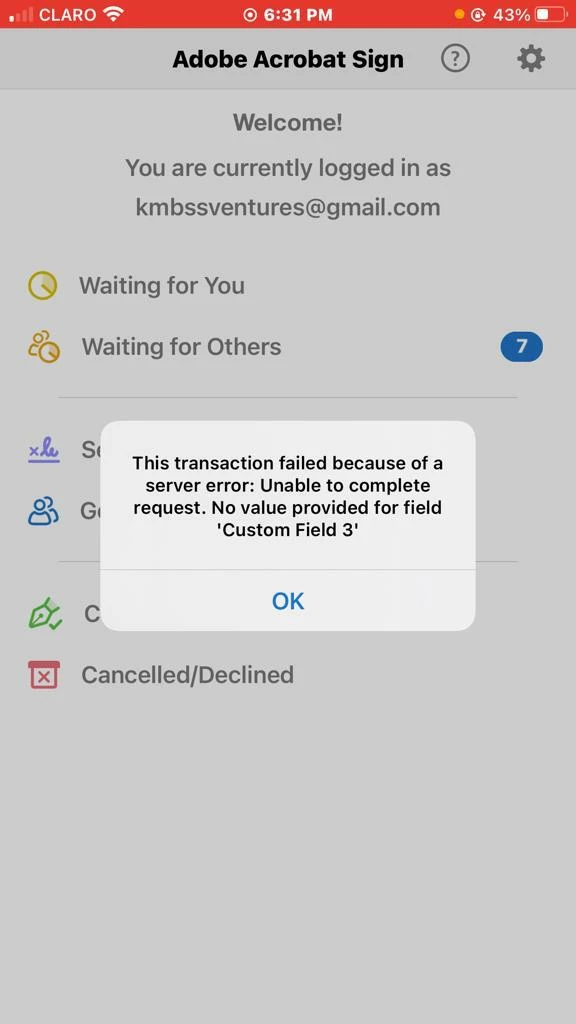

I cant not Fill out the applicationg my Iphone It keep give m aeros
Hi,
Just a few quick questions:
Is this happening with every PDF document that you try to send via Acrobat Sign?
or,
Is this halpening with just one particular PDF document?
Just for troobleshooting purposes, do you have available a macOS or a Microsoft Windows computer with Adobe Acrobat Pro that you can test this form with?
Otherwise, it would helpful if you can provide more details about the type of document that you are sending and the steps that you followed.
Also, from looking at the screenshot, the alert is triggered because "Custom Field 3" doesn't have a value.
Make sure that Field 3 is not a required field.
If you don't need this field to be filled out before sending, don't make it a required field or it will continue to trigger this alert until the field is populated with some value.
Already have an account? Login
Enter your E-mail address. We'll send you an e-mail with instructions to reset your password.


 AdChoices