Participant
September 10, 2018
Answered

My “tools” tab isn’t visible, only “home”, using my iPad

  • September 10, 2018
  • 1 reply
  • 524 views

Where is my “tools” button.  Only my Home button shows.  I’m us an iPad.

This topic has been closed for replies.
Correct answer Meenakshi_Negi

Hi Milou,

Sorry for the delay in response.

In Adobe Acrobat Reader for mobile application, there is no separate tools button.

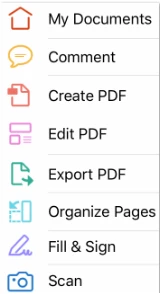
When you click on "Home" icon at the top left of the screen, you will get the list of the tools available in the mobile application.

Check the screenshot below:

Hope that answers your question.

Let us know if you have any questions.

Regards,

Meenakshi

1 reply

Meenakshi_Negi
Meenakshi_NegiCorrect answer
Legend
September 13, 2018

Hi Milou,

Sorry for the delay in response.

In Adobe Acrobat Reader for mobile application, there is no separate tools button.

When you click on "Home" icon at the top left of the screen, you will get the list of the tools available in the mobile application.

Check the screenshot below:

Hope that answers your question.

Let us know if you have any questions.

Regards,

Meenakshi