


Participant
April 5, 2019
Answered

Night mode setting is reversed

  • April 5, 2019
  • 5 replies
  • 7646 views

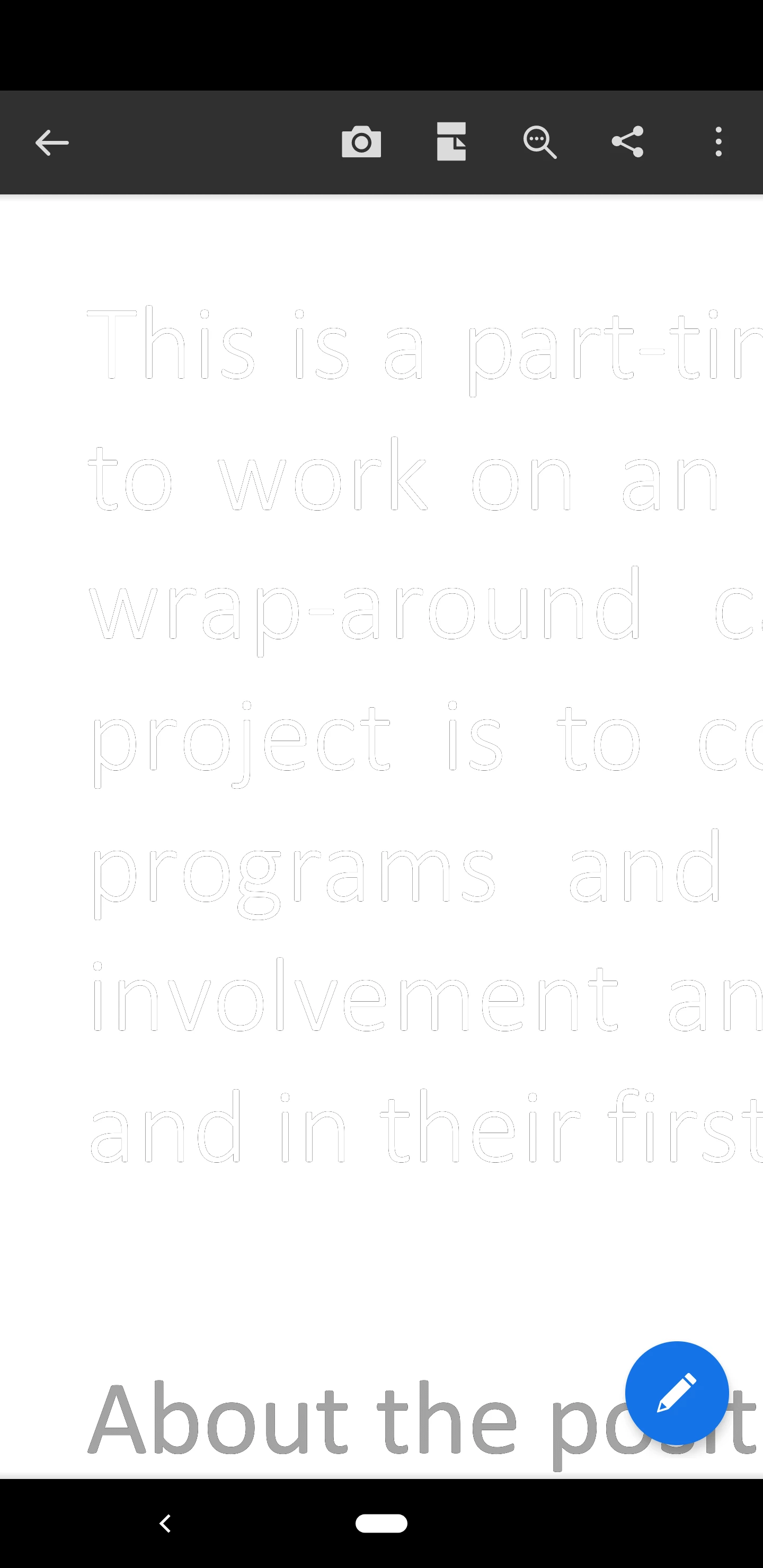
I think my app has night mode reversed. When I open a PDF it shows a black background when I have night mode turned off. When I turn it on the background goes white, but the text becomes unclear, more like an outline of the text (on closer inspection, this same outlined text is what shows in the. I have attached a picture to show what I'm talking about. I am using Version 19.0.0.8512

Thanks
This topic has been closed for replies.
Correct answer christianw78841227

New update seems to have fixed this issue.

5 replies

Participant
May 14, 2019

Yes! Fixed!

christianw78841227AuthorCorrect answer
Participant
May 14, 2019

New update seems to have fixed this issue.

Participant
April 27, 2019

I am having the same issue. This is any document I open up. This started when I upgraded my OS to Android Q. I also have a pixel 3 like everyone else who seems to have the problem.

This happens with any document I open. The only exception is when there is a picture within the document. In that case, I can see a normal background within the picture but the rest of the document still has a black background.

Tried clearing all app data on the phone uninstalling acrobat and reinstalling it without any improvement.

I also discussed this with the Android Q development team. They were able to reproduce it and stated that it is an issue within the app.

Please help.

Thank you

Participant
April 25, 2019

Same EXACT issue!

Lately, the PDFs I've been opening have been black background with white text. Not sure how that happened. I've uninstalled and reinstalled. Are there any options or settings I'm not aware of that I can change?

My installed Adobe Android app version is 19.2.1.9183

Meenakshi_Negi
Legend
April 8, 2019

Hi Christianw,

If the issue occurs with a particular document, then it seems that PDF was created in that way.

It looks like the PDF was created with the black background.

Would you mind once to open the PDF on the desktop application and check the background color of the PDF?

Let us know how it opens on the desktop application.

If the issue occurs with all the PDFs, please try once to re-install the application.

Make sure that you sign out of the application before uninstalling the application.

Let us know how it goes.

If the issue persists, please let us know the make and model of the device.

Also, share the OS version.

We will be waiting for your response.

Regards,

Meenakshi

Participant
April 9, 2019

The issue persists.

Pixel 3 XL

Android version Q

Build: QPP2.190228.021

Meenakshi_Negi
Legend
April 26, 2019

Hi All,

Sorry for the delay in response.

We have tried replicating the issue on our end, however, the PDF opens fine.

Would it be possible to share any sample PDF with us on which the issue occurs?

You may share the PDF using the steps provided in the following help document How to share a file using Adobe Document Cloud

We will be waiting for your response.

Regards,

Meenakshi