Participant
September 29, 2017
Answered

No longer have option to copy document to adobe

  • September 29, 2017
  • 2 replies
  • 997 views

My knowhow cloud no longer gives me the option to copy document to adobe so I can read and edit it, how do I fix this?

This topic has been closed for replies.
Correct answer derek lau @ adobe.com

hi jordanaw96,

I'm sorry for your inconvenience.

The issue seems to be in "knowhow" cloud. If it didn't provide an "Export" option for you, you should be looking for "Share" or "Open In" that kind of similar options in "knowhow" cloud. When you choose this kind of options, the popover menu should appear like below,
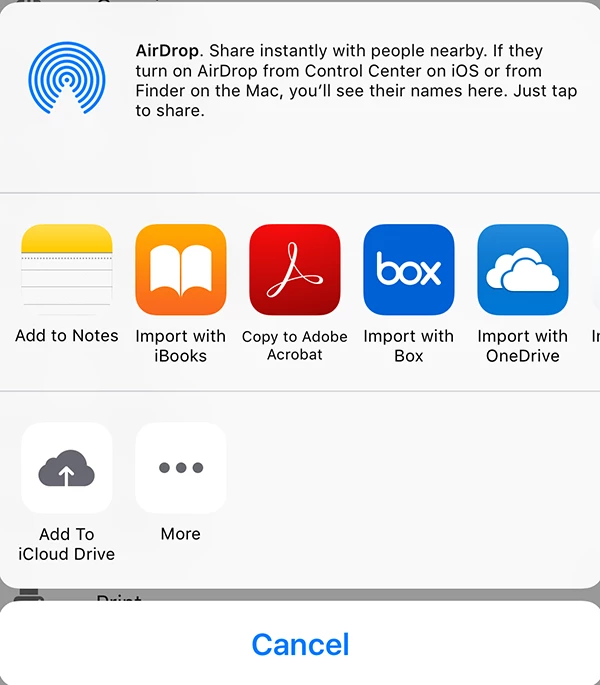
Then choose "Copy to Adobe Acrobat" to copy a PDF into Acrobat's "Local"

Hope this help

2 replies

derek lau @ adobe.comCorrect answer
Adobe Employee
October 19, 2017

hi jordanaw96,

I'm sorry for your inconvenience.

The issue seems to be in "knowhow" cloud. If it didn't provide an "Export" option for you, you should be looking for "Share" or "Open In" that kind of similar options in "knowhow" cloud. When you choose this kind of options, the popover menu should appear like below,

Then choose "Copy to Adobe Acrobat" to copy a PDF into Acrobat's "Local"

Hope this help

AkanchhaS8194121
Legend
October 2, 2017

Hi Jordanaw,

What type of document you are referring to and where exactly it is saved? Is it on iCloud or Document Cloud?

You may check whether your mobile app Adobe Acrobat Reader is up to date or not?

Go to App Store> Search Adobe Acrobat Reader> Update(if available)

I assume you have an iOS device, so also check Settings>Adobe Acrobat> "Allow Access To" (should be allowed)

(You may also reboot your device completely. Sometimes a simple reboot resolves such complicated things)

Regards,

Akanchha