

limakid2015
Inspiring
May 21, 2023
Answered

PDF and responsive or not reponsive design in mobile phones.

  • May 21, 2023
  • 2 replies
  • 3028 views

I export my MS Word or Apple Pages projects in PDF. ALl is desing for printing in mind, so the design of thew documents belong to the old school, with pictures everywhere and text sorrunding them. Not only “normal” text, but also objects like tables and text boxes. My documents easily can have 3 or 4 images inline.


The issue is that a friend who receives these documents in his cellphone, they look like RESPONSIVE! and the files are not HTML of course, they are just PDF as we know. I didn‘t know about this kind of resposive pdf files. My receipient uses a Samsung Galaxy phone. That is good, right?


The problem: he doesn‘t like it and want to se the files like desktop view. Maybe just caprice or personal taste, but that is what he wants.


I don‘t know which app is using to view those files. Maybe the one which comes for default in the cellphone. Is there a way that he can switch any button somewhere saying something like «SWITCH TO DESKTOP VIEW or to GO BACK TO RESPONSIVE VIEW? 

H


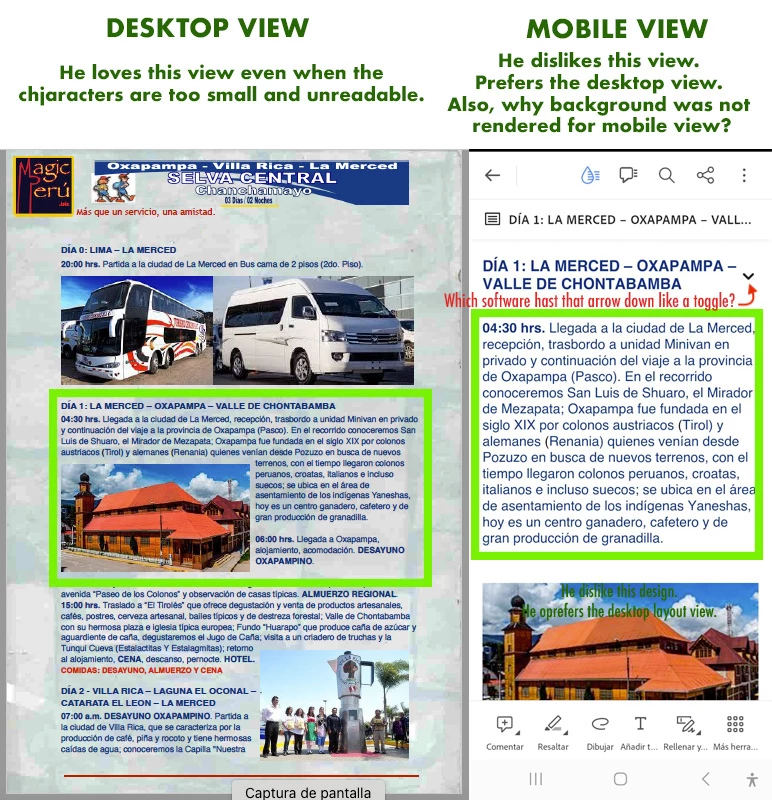
He states that with other PDF files «noi problem» because he can see the desktop view. I wonder if is ther a way that we could control this FROM the Acrobat app at least? The left hand side of the image is the screen of My cellphone, Samsung J1 Minioprime, old one, shows the desktop laytout.
 

This topic has been closed for replies.
Correct answer S_S

Hi @limakid2015,


Thank you for writing in. 


As Bevi mentioned, Liquid mode changes the file layout for better ease of reading.


I tried opening a similar file with a background image and a similar layout, and it opened fine. Also, switching to liquid mode removed the background and brought the text first, with the image following the paragraphs.


Hope you were able to test the behaviour on your friend's device.


-Souvik 


Marking a reply or response “Correct” will help future users with the same issue quickly identify the correct answer.

2 replies

Bevi Chagnon - PubCom.com
Legend
May 21, 2023

And Acrobat/Mobile's Liquid Mode is part of Adobe's work on improving readability for all.

See https://www.adobe.com/acrobat/mobile/acrobat-reader.html


|    Bevi Chagnon   |  Designer, Trainer, & Technologist for Accessible Documents ||    PubCom |    Classes & Books for Accessible InDesign, PDFs & MS Office |
S_S
Community Manager
S_SCommunity ManagerCorrect answer
Community Manager
May 25, 2023

Hi @limakid2015,


Thank you for writing in. 


As Bevi mentioned, Liquid mode changes the file layout for better ease of reading.


I tried opening a similar file with a background image and a similar layout, and it opened fine. Also, switching to liquid mode removed the background and brought the text first, with the image following the paragraphs.


Hope you were able to test the behaviour on your friend's device.


-Souvik 


Marking a reply or response “Correct” will help future users with the same issue quickly identify the correct answer.

limakid2015
Inspiring
June 4, 2023

Yes, I checked the phone of my friend days ago, and I saw that he has the Acrobat installed to read PDF files, he was viewing a PDF heavy file (for printing purposes), 20 MB and when I clicked on the DROP icon (it was grayed out), a meesage says that liquid mode is not available with big files! Wow! What a learning for me. 

And he complained why the PDF in low quality (when I sent him roughs) looked wihout background and so on... all the mystery was about that DROP icon and he was blaming me.  


JR Boulay
Community Expert
Community Expert
May 21, 2023

[MOVED TO THE ACROBAT READER MOBILE DISCUSSIONS]

Acrobate du PDF, InDesigner et Photoshopographe
Bevi Chagnon - PubCom.com
Legend
May 21, 2023

Your friend might have their Acrobat/Mobile set to Liquid Mode, which rearranges the PDF's layout to make it vertical and thumb-scrollable.

Turn it on/off by clicking the tear-drop icon at the top of the mobile screen:


|    Bevi Chagnon   |  Designer, Trainer, & Technologist for Accessible Documents ||    PubCom |    Classes & Books for Accessible InDesign, PDFs & MS Office |