Participating Frequently
January 29, 2024
Question

PDF files from new Acrobat Pro which contain eps files do NOT display correctly on iphone, ipad

  • January 29, 2024
  • 1 reply
  • 3790 views

Hi All

Since ii have upgraded to Acrobat Pro 2023.008.20470 on desktop mac pro new exported pdf files which contain eps files do not display correctly when viewed in mail on iphone or ipad.


The same files display correctly in desktop mail and in Acrobat reader on iPad.


NEVER had this issue before installing new Acrobat Pro. All files containing eps or ai files always displayed correctly!

In my tests I have saved the same file in ai format still faulty.

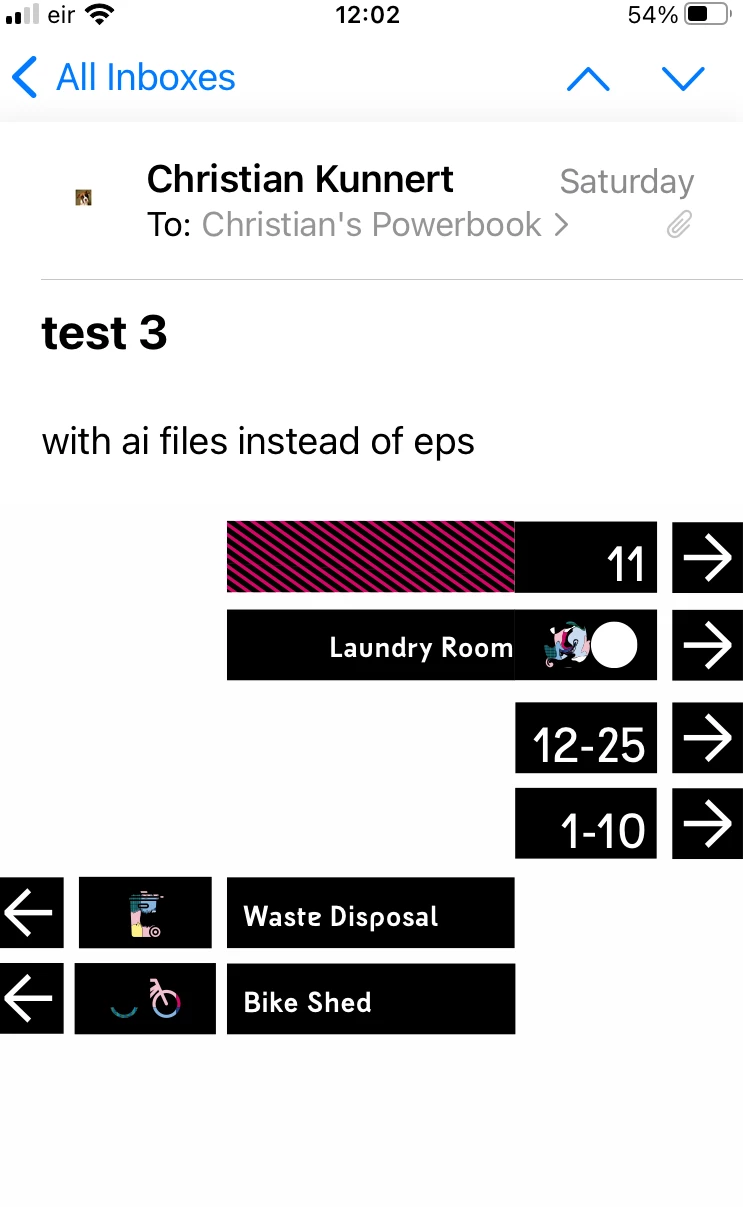
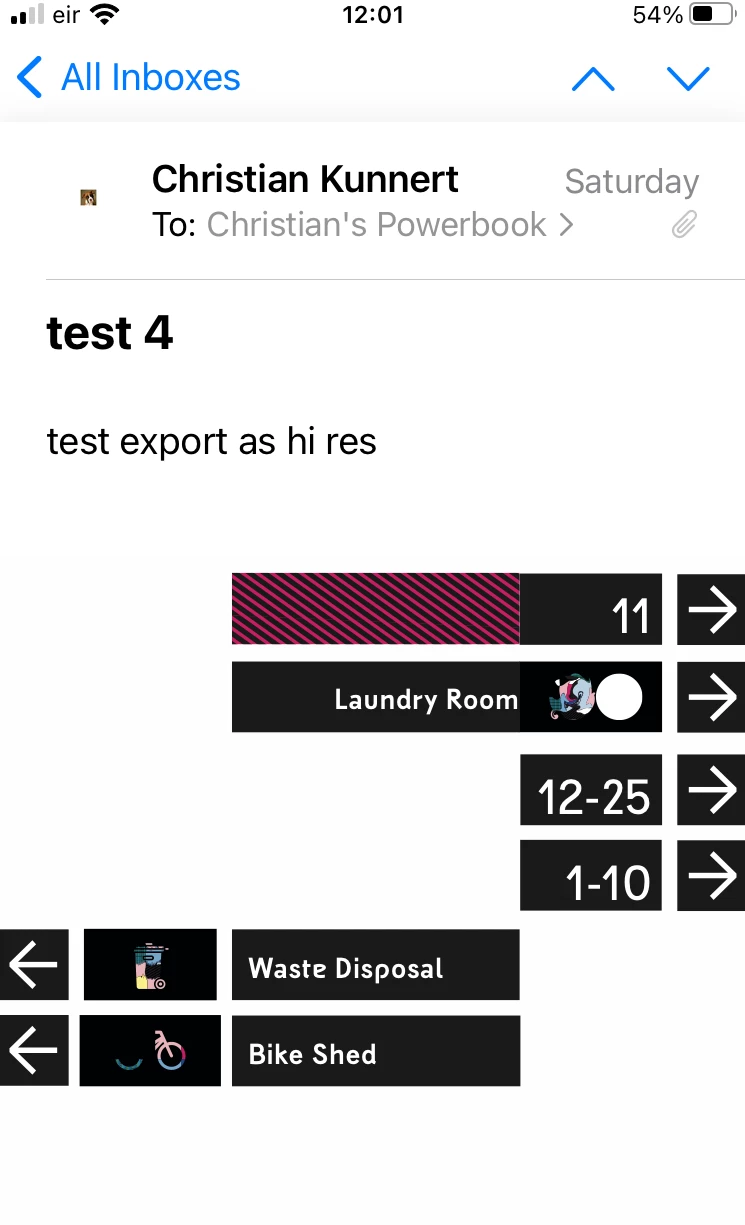
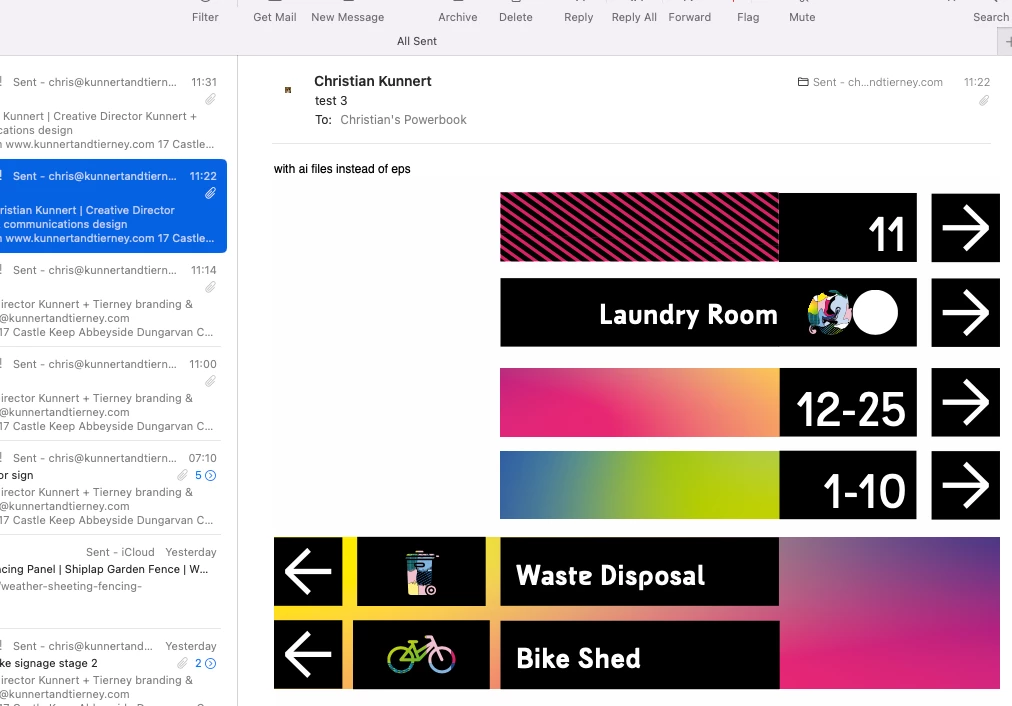
The sample files attached show the correct set and the faulty set. 

Please note: in the CORRECT set the first bar next to figure "11" also contains an eps file - red with black diagonal stripes which displays ok in both scenarios. This doesn't make sense when the gradients below (for "12-25" and "1-10 " do not display correctly even though they are ALL eps files.


Also, the icons for "Waste Disposal" and "Bike Shed" also contain eps files which do NOT display correctly.


Here details

Mac OS 12.7.2 Monterey

Apple Mail 16.0 (3696.120.41.4)

iPhone iOS 16.7.5


please advise how to fix this problem

thanks in advance


This topic has been closed for replies.

1 reply

S_S
Community Manager
Community Manager
February 1, 2024

Hi @Chris Kunnert,


Hope you are doing well. Thank you for writing in!


From the screenshots, it looks like a PDF that has multiple layers on it. 

Acrobat Reader Mobile does not support layer displays. I suggest filling out the feedback form: https://acrobat.uservoice.com/, which ensures your feedback reaches the dev team for review and future implementations.


You can share the file with your recipient, and if they open the file on their desktop, they will see the same representation you see.


-Souvik

Participating Frequently
February 2, 2024

Hi Souvik


Thanks for your response.

The pdf doe NOT use multiple layers. I have described that the red/black image next to the figure "11" in the files uploaded is the same type eps as the ones that are NOT appearing below. That doesn't make any sense.

The same pdf displays CORRECT on Mac desktop and in reader but NOT CORRECT on iphone.

Hope this helps


Regards

Chris

S_S
Community Manager
Community Manager
February 3, 2024

@Chris Kunnert Thanks for the response. 


EPS files are Encapsulated PostScript files that use multi-layer imaging to create vectors for high-quality results.


These files contain a lot of metadata that the mobile device architectures can't process now (current versions). More info about EPS files here: What are EPS files, and how do you open them? | Adobe.


Desktops have a more robust system and the processing power to open files with such details added, resulting in you seeing the difference in results on both platforms.


Hope this clarifies your question.


-Souvik