


Laetitia+Crochemore
Participant
June 11, 2026
Question

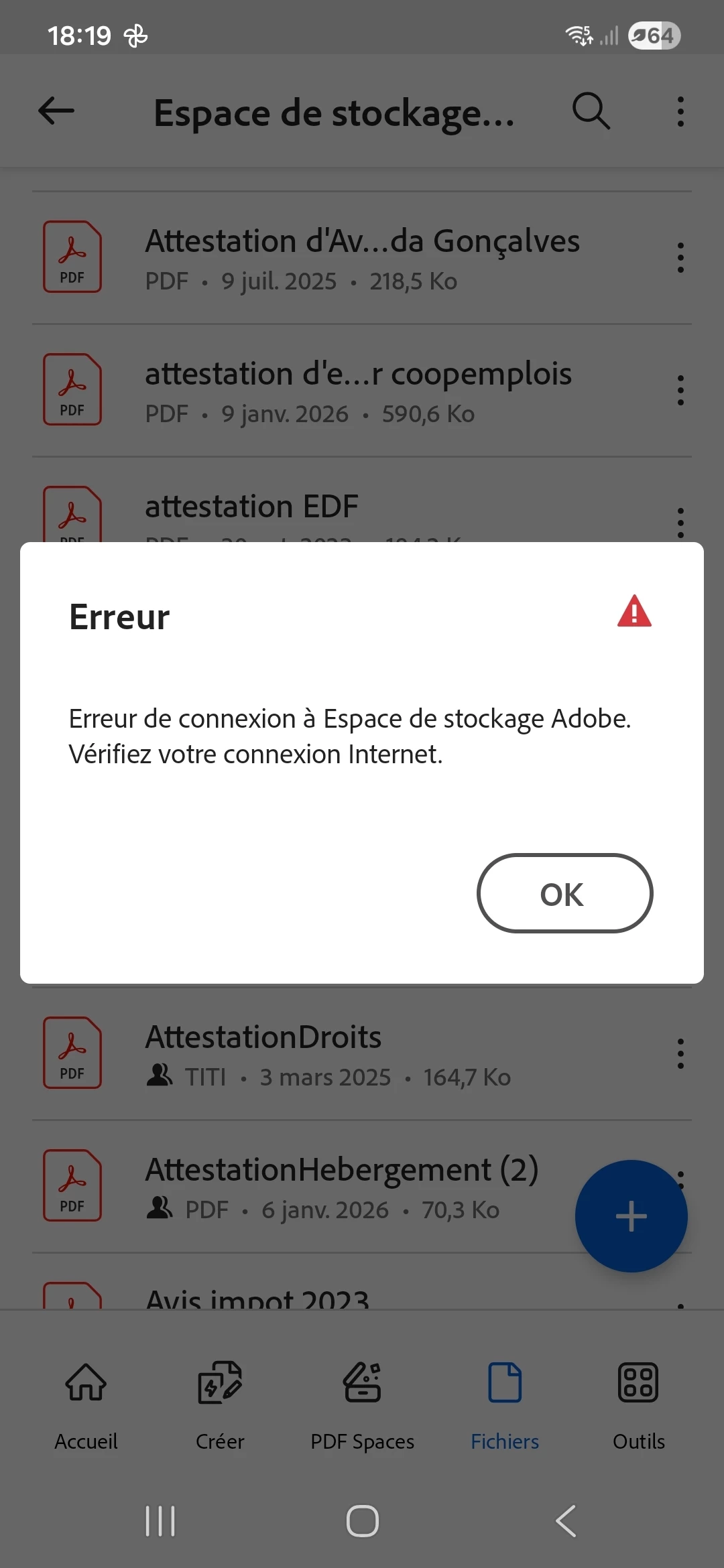
Pourquoi lorsque je veux ouvrir un fichier pdf ça me marque : "Erreur de connexion à Espace de stockage Adobe Vérifiez votre connexion Internet " pdf ça me marque

  • June 11, 2026
  • 6 replies
  • 108 views


    6 replies

    Participant
    June 27, 2026


    Bonjour, il m'arrive exactement la même chose, plus d'accès aux fichiers et même message d'erreur. J'ai fait toutes les manipulations proposées dans cette conversation. 

     Une solution a-t-elle été trouvée ? 


    Ça c'est sur le téléphone, un message du même ordre apparaît dans l'app du pc et sur Adobe en ligne. Je m'inquiète vraiment pour mes fichiers ! 

    Amal Jaiswal
    Community Manager
    Community Manager
    June 29, 2026

    Hi ​@Hélène 


    Hope youa re doing well and thanks for reaching out. If you are experiencing the issue as shown in the screenshot, our development team is still reviewing this issue and it is not reproducible in-house. Would you mind sharing the details as below, so we can isolate the issue for the fix.

    • Device details
      • What device model are you using?
      • What is the OS version (Android/iOS)?
      • What is the Acrobat Reader app version?
    • Document details
      • Does this happen with all documents or only specific ones?
      • Are the documents stored in Adobe Cloud Storage, or another service (Google Drive, OneDrive, Dropbox, local storage)?
      • Can you open the same document from another device or from Acrobat on the web/desktop?
    • Account details
      • Are you signed in to your Adobe account?
      • Does signing out and signing back in change the behavior?


    ~Amal

    Amal Jaiswal
    Community Manager
    Community Manager
    June 19, 2026

    Hi ​@Yann84700 

    We have reported this issue to our engineering team and they have acknowledged the bug and logged the ticket for it. We will keep you posted of the updates as soon as we get more information.

    Thanks 
    Amal

    Yann84700
    Participating Frequently
    June 20, 2026

    Toujours pareil ce matin. J ai des dossiers pro à traiter depuis 3 jours et mon abonnement ne fonctionne plus. Celà me pénalise grandement 


    Yann84700
    Participating Frequently
    June 19, 2026

    Celà fait déjà 3 jours que j'attends...

    Amal Jaiswal
    Community Manager
    Community Manager
    June 19, 2026

    Hi there, 
    Could you please confirm the Acrobat reader Mobile app and the device OS version numbers, it will be helpful to isolate the issue for the fix.

    ~Amal

    Yann84700
    Participating Frequently
    June 19, 2026

    Appli  officielle via Google play store

    Dernière mise à jour 18 juin "26.5.1
    NOUVEAUTÉ : MODIFIEZ DES IMAGES
    Des petites retouches aux réglages essentiels, vous pouvez modifier vos images directement dans votre environnement de travail, à l’aide d’outils essentiels comme Recadrer, Faire pivoter et Supprimer l’arrière-plan."

    Amal Jaiswal
    Community Manager
    Community Manager
    June 19, 2026

    Hi there 


    I have checked your Adobe account linked with the Adobe ID you are using on this community and found an active plan for Acrobat Premium. Please sign out of the application, reboot the device and re-login with the corect Adobe ID and see if that helps. 

    You may also try to restore the purchase. Tap on the profile icon > Subscriptions > Restore purchase and reboot the device and check.


    Let us know how it goes.


    ~Amal

    Yann84700
    Participating Frequently
    June 19, 2026

    Tout cela a déjà été fait et Richard ne change 

    Amal Jaiswal
    Community Manager
    Community Manager
    June 19, 2026

    Hi there 


    Please try to sign out of the application and clear the App cache from the device settings. Go to Settings > Apps > Adobe Acrobat > Storage > Clear Cache > reboot the device and try to re-login to the app using your Adobe credentials and let us know how it goes. 


    ~Amal

    Yann84700
    Participating Frequently
    June 19, 2026

    Bonjour, j'ai exactement le même problème depuis plusieurs jours et toujours en attente de dépannage de par le support adobe. Votre problème est il réglé depuis. Si oui, par quel moyen ? Merci d'avance 

    Amal Jaiswal
    Community Manager
    Community Manager
    June 19, 2026

    Hi there 


    Hope you are doing well and sorry for the trouble. 


    To fix the error connecting to Adobe storage space, try signing out of your account, checking your app updates, or whitelisting the app in your firewall. Please try the steps below and see if that works:

    1. Sign Out & Sign In: Go to your profile menu in the top right, select Sign Out, quit the application, relaunch, and sign back in to refresh your session.
    1. Check for any Pending Updates: Ensure your application is running the latest version. check for any missing/pending updates and make sure the app is updated to the latest version available on App/Play Store and reboot the device.
    1. Check Online Access: Verify if your storage is actually down or if it's an app-specific issue by logging into the web version via Adobe Document Cloud.
    1. Review Firewall & Security: Ensure your network or antivirus firewall is not blocking access. 


    Let us know how it goes. 


    ~Amal

    Amal Jaiswal
    Community Manager
    Community Manager
    June 11, 2026

    Hi there 


    Hope you are doing well and thanks for reaching out. We are sorry for the trouble. 


    Have you started experiencing this issue recently or was it occurring earlier as well? What is the version of the Acrobat Mobile app and the OS you are using? Tap on the profile icon > About Acrobat and try updating the app to the latest version available on the App/Play store and reboot the device once. 


    Is this an issue with a particular PDF file or with all the PDFs? Try with a different PDF file and check. 


    If it still doesn’t work, please share a small video recording of the steps you are taking and the issue as it occurs for more clarity.


    ~Amal

    Yann84700
    Participating Frequently
    June 19, 2026

    Malgré l'ensemble des manipulations de vérification à la connexion mon abonnement premium n'est pas reconnu même si il est vérifié et confirmer qu'un abonnement existe bien