


Participant
March 17, 2022
Answered

Signatures on Adobe sign are too small - bank sent document back

  • March 17, 2022
  • 3 replies
  • 3100 views

Hello Adobe community,


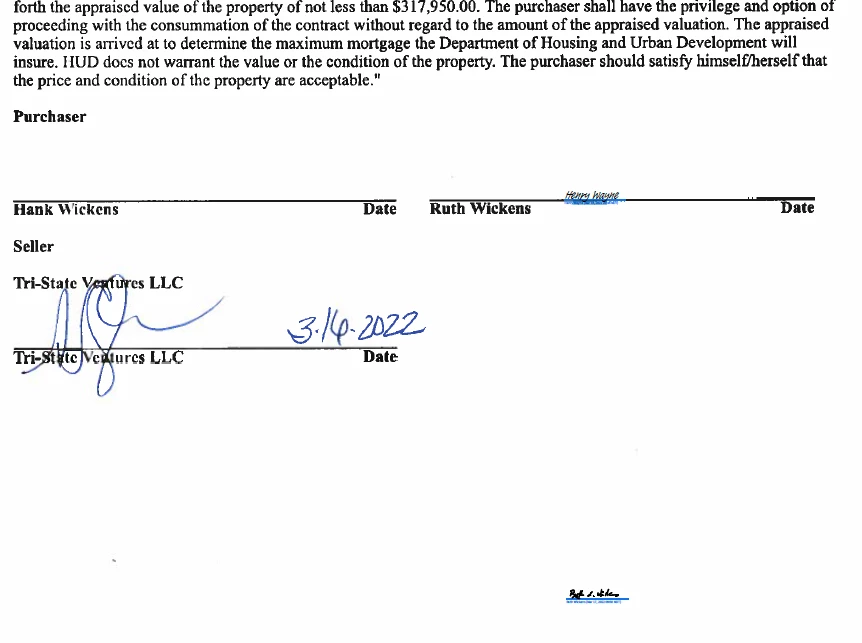
Does anyone know how to fix extremely small Adobe signatures? When I set up the document for signatures I made nice and big sign fields, but when the document came back I got extremely small signatures, and not in the correct space where I placed the sign fields. The lender that I am using to purchase a house just sent back the document asking me to resign.


I set up the signatures on my iPad pro.
 

Correct answer MrsBingleBop

For anyone searching in the future, I figured it out. When users are signing, they see the "draw your signature prompt" and are signing directly on top of the prompt, instead of above the line. If the signature is completely below the line, they'll get an error that says "please sign above the line," but if enough of the signature is touching the line, no error message pops up!

3 replies

Participant
March 28, 2025

Did someone find a solution for this? Typed signatures are fine, but signatures from mobile appear small and BELOW the blue signature line, exactly like @JLlorens screenshot. If this is the intended behavior, my office will have to stop using adobesign.

MrsBingleBopCorrect answer
Participant
March 28, 2025

For anyone searching in the future, I figured it out. When users are signing, they see the "draw your signature prompt" and are signing directly on top of the prompt, instead of above the line. If the signature is completely below the line, they'll get an error that says "please sign above the line," but if enough of the signature is touching the line, no error message pops up!

SDellise
Participant
June 13, 2022

We are experiencing the same problem when having customers sign using the Adobe Sign mobile app for iPad. The signature fields are large enough, but the signature itself it not legible because the font is too small. When the same documents are signed using a pc, the signature is fine.

Harsh Vardhan Pareek
Community Manager
Community Manager
March 17, 2022

Hi @JLlorens 


Could you confirm a few more details to understand the issue better?

1. Application version?

2. iOS version?

3. Try to do a signature on different PDF and check if the issue happens.

make sure that the app is up to date.


Thanks,

Harsh

JLlorensAuthor
Participant
March 19, 2022

Hello @Harsh Vardhan Pareek ,


Here is the information that you requested;


1. Acrobat version 22.02.00 (20220216.220949)

2. iPad OS 14.7.1, model name iPad Pro (12.9-inch) (3rd generation)

3. I get these errors in about 1 out of 4 signatures. For example, I just signed another document and it came out well.