
Participant
August 17, 2024
Answered

Sincronization trouble iPhone vs ipad

  • August 17, 2024
  • 2 replies
  • 446 views

Hi team,

Can you help me with my issue? 

I have only the free version of Adobe. When I save files on IPhone (15) I cannot find some of them on iPad (mini 6) and vice versa.

This is very frustrating and a real problem, especially when you need to show a document proof to someone and you realise that this one is on your iPad. I complained to Apple and they said this is not up to them but this is an Adobe issue. Apple decided issues related to Adobe.


Thanky you very much for your advices.

best, TzvetI 
    This topic has been closed for replies.
    Correct answer jane-e

    @TzvetI-Kar 


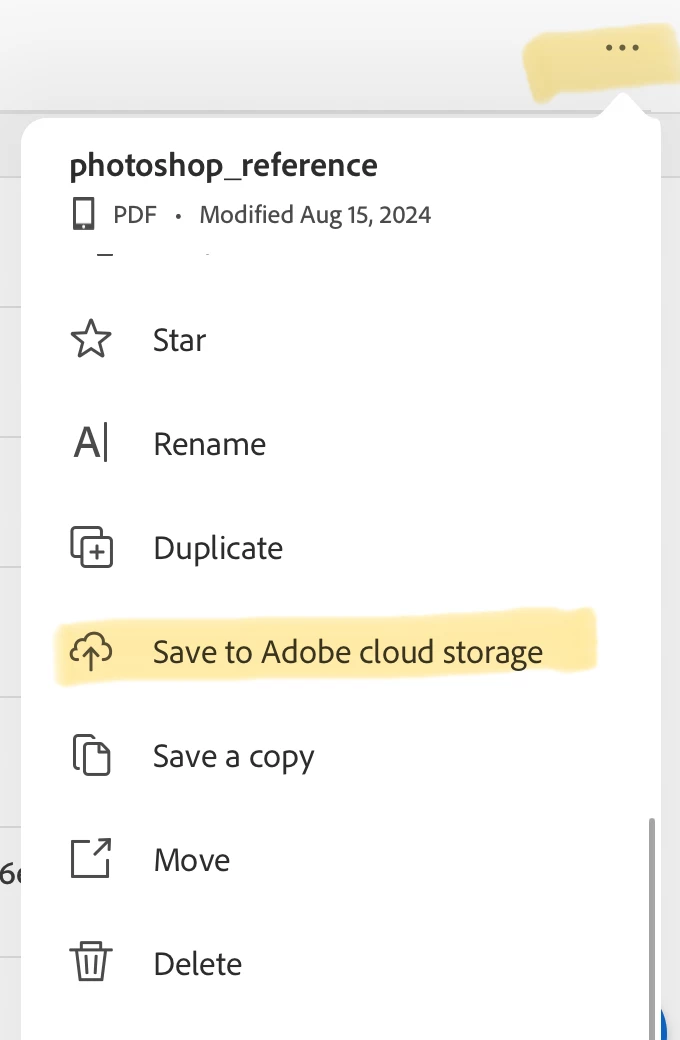
    In addition, you can move files from the device to Adobe Cloud Storage. In the list of files, click the three dots on the far right, then scroll way down to the bottom of the list and tap "Save to Adobe Cloud Storage". 


    Jane


    2 replies

    Participant
    August 24, 2024

    Hi Jane, tank you for your answer.

    Normally, all is done through the iCloud. That's why I have had all documents shared between my devices. But since Apple reinstalled fully iOS because of I don't know what bug was the problem, then all my background mismatched, even messages on the other apps.

    This is very frustrating, given the fact I asked in front to the Apple assistant what happened? And then I had the answer I mentioned above "This is not up to them". It's a shame-I really found the Apple service dropped down! 
    thank you again for your support!

    Cheers!


    jane-e
    Community Expert
    Community Expert
    August 24, 2024


    You're welcome @TzvetI-Kar 

    Jane


    jane-e
    Community Expert
    Community Expert
    August 17, 2024


    I have only the free version of Adobe.

    By @TzvetI-Kar


    Adobe is a company with many applications. I think you mean Acrobat Reader for Mobile?


    Where are you saving your files? If you save them "On this iPad/Phone", that's where they are and you will only see them on the current device. When you save them to "Adobe Cloud Storage", you will see them on all devices.


    I've moved your post from Using the Community to Acrobat Reader for Mobile, but we can move it again if I guessed incorrectly. Please confirm.


    Jane


    jane-e
    Community Expert
    jane-eCommunity ExpertCorrect answer
    Community Expert
    August 17, 2024

    @TzvetI-Kar 


    In addition, you can move files from the device to Adobe Cloud Storage. In the list of files, click the three dots on the far right, then scroll way down to the bottom of the list and tap "Save to Adobe Cloud Storage". 


    Jane