
Participant
August 13, 2025
Question

Subscription issue...help!!!

  • August 13, 2025
  • 1 reply
  • 588 views

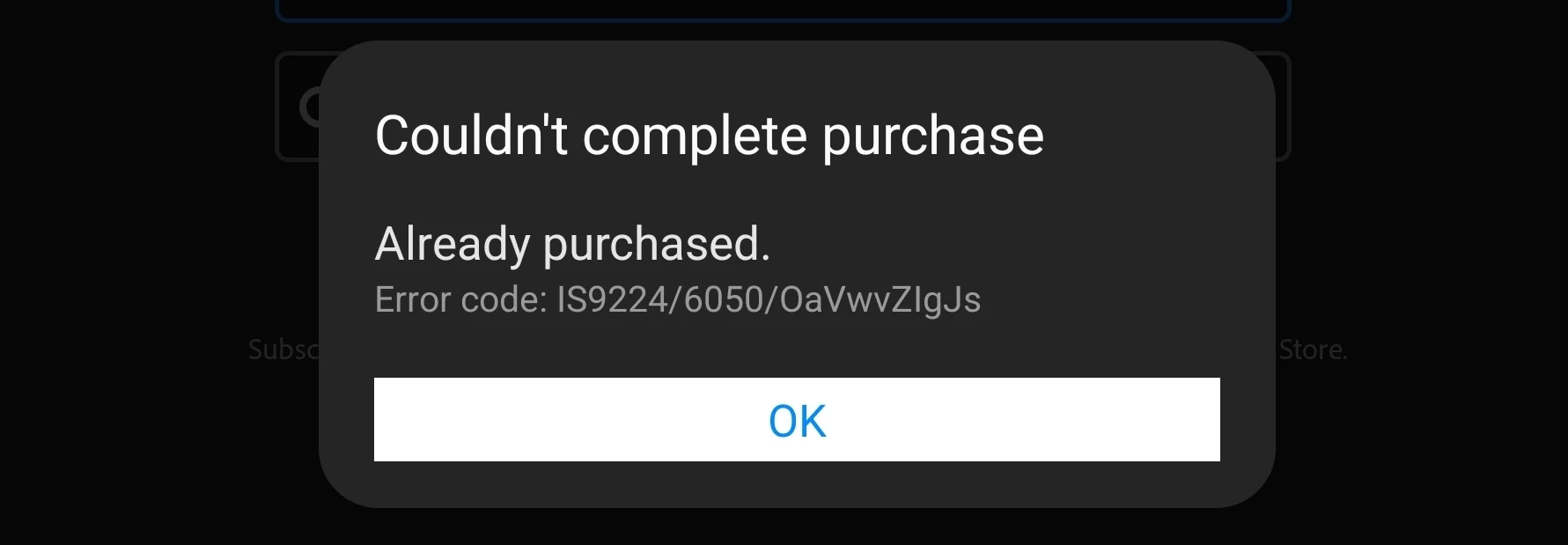
I renewed my subscription to mobile Adobe.  The purchase was made through the Samsung store.  I have spent hours on the phone with them and they are no help.  When I am signed in it does not.give me the full version, just the free version.  If I hit subscribe I get an error code telling me I already have a subscription.  If I hit restore it tells me I have nothing to restore.  I have cleared.the cashe, uninstalled and reinstalled, signed in and out - nothing seems to work.  PLEASE help.  I have paid for a years subscription and already have wasted almost a month without benefit of what I paid for!
1 reply

S_S
Community Manager
Community Manager
August 13, 2025

Hi @Carefree_multitalent0872,


Hope you are doing well. Sorry for the trouble with using Acrobat Reader Mobile.


I checked your account and couldn't find an active subscription with the email address you used to post your query here. 

I saw an old subscription purchased through Samsung, which now stands cancelled as of June this year.


Can you try logging in to https://adobe.ly/46Usd4p to see if you can use the tools there? If yes, I recommend checking the email address you are using on the app to sign in.


If not, please share a screenshot of your latest purchase. The screenshot should reflect the Purchase ID, which will help us discuss it further with the investigation team.


Also, please ensure you have the application installed from the Samsung Galaxy Store, not the Google Play Store.


Look forward to hearing from you.


Regards,
Souvik.

Participant
August 13, 2025

Thank you.  I have attached the requested photo.  I have app installed through Samsung store, not Google Play.  The requested info is in the attachments.

Amal.
Legend
August 13, 2025

Hi there,

Hope you’re doing well, and sorry for the trouble.

Please try restoring your purchase to see if that fixes the issue:
Open the Acrobat appTap the Profile iconSubscriptionsRestore Purchase.

If that doesn’t help, log out of the app and sign in again. Make sure the email you used to buy the app on the Samsung Store is the same one linked to your Adobe ID in the app.

Let us know if this works for you.


~Amal