
Participant
July 13, 2023
Question

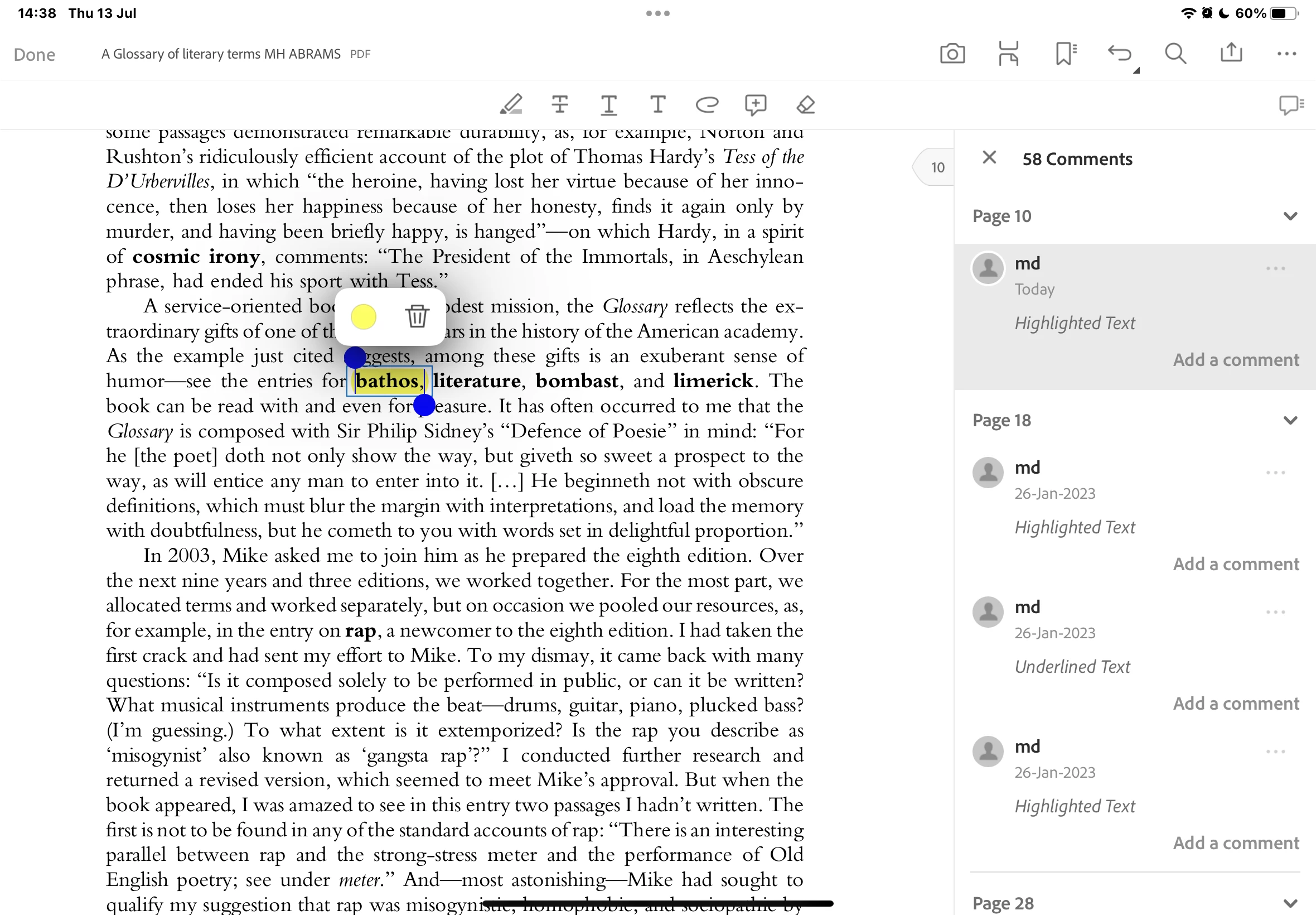
The recent update for Acrobat (for iPad) has spilt the user experience

  • July 13, 2023
  • 2 replies
  • 609 views

The recent update has messed up the user experience with highlighting especially. Whenever I highlight something and try to change its colour or underline it or make any other changes the entire edit history pops up in the app making it less easy and more clumsy to use on the iPad. Please try to restrict the edit history from popping up, if somebody wants the edit history they'll check it by themselves. 
This topic has been closed for replies.

2 replies

S_S
Community Manager
Community Manager
July 18, 2023

Hi @Md31054134do1s,


Hope you are doing well. Thank you for writing in!


We appreciate the feedback and would love to hear more about it. While I share this with the team, I highly suggest filling out the feedback form: https://acrobat.uservoice.com/


Filling out the form ensures that your feedback reaches directly to the product team to review and implement in future releases.


-Souvik

mariahweyne
Inspiring
July 13, 2023

You can revert 


Participant
July 14, 2023

I use it on iPad dear, is there any way through which I can revert???


mariahweyne
Inspiring
July 14, 2023