This topic has been closed for replies.
Correct answer MobileDeveloperCK

Hi deepakp46217258​,

The minimum iOS version requirement for Acrobat Reader for iPhone and iPad version 18.09.13 or later is iOS 11.2.

If you have an older iOS version on your iPad, you will not be able to install the latest version of Acrobat Reader (18.11.01 as of November 28, 2018).

(a) Update iOS (operating system)

Check iOS Settings > General > Software Update to see if you can update to iOS 11.2 or above.  If the Software Update screen shows "Your software is up to date", it means that the iOS on your iPad is not upgradable due to hardware limitations.

(b) Install the last compatible version of Acrobat Reader for the iOS on your iPad

Apple App Store for iOS will allow you to download the last compatible version of any iOS app (not just Acrobat Reader for iPhone and iPad), only if you sign into App Store with the Apple ID that was used to download and install the older version of the same app previously.

Do you see the Download button in the alert like this?
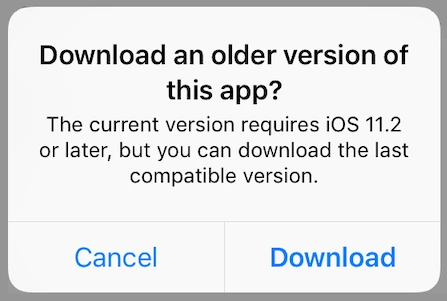
Please see the following forum thread for more details.

Re: Acrobat Reader app on older iPads with IOS 10.3.3

Hope this helps.

2 replies

MobileDeveloperCKCommunity ManagerCorrect answer
Community Manager
November 27, 2018

Hi deepakp46217258​,

The minimum iOS version requirement for Acrobat Reader for iPhone and iPad version 18.09.13 or later is iOS 11.2.

If you have an older iOS version on your iPad, you will not be able to install the latest version of Acrobat Reader (18.11.01 as of November 28, 2018).

(a) Update iOS (operating system)

Check iOS Settings > General > Software Update to see if you can update to iOS 11.2 or above.  If the Software Update screen shows "Your software is up to date", it means that the iOS on your iPad is not upgradable due to hardware limitations.

(b) Install the last compatible version of Acrobat Reader for the iOS on your iPad

Apple App Store for iOS will allow you to download the last compatible version of any iOS app (not just Acrobat Reader for iPhone and iPad), only if you sign into App Store with the Apple ID that was used to download and install the older version of the same app previously.

Do you see the Download button in the alert like this?

Please see the following forum thread for more details.

Re: Acrobat Reader app on older iPads with IOS 10.3.3

Hope this helps.

Participant
August 6, 2022

I have new iPad. Adobe defaults to web version will not complete download no message from adobe. Why no download to ipad

Bernd Alheit
Community Expert
Community Expert
November 27, 2018

iOS Version?