
Participant
October 23, 2017
Answered

Adding Dynamic Stamp to an Action

  • October 23, 2017
  • 2 replies
  • 1412 views

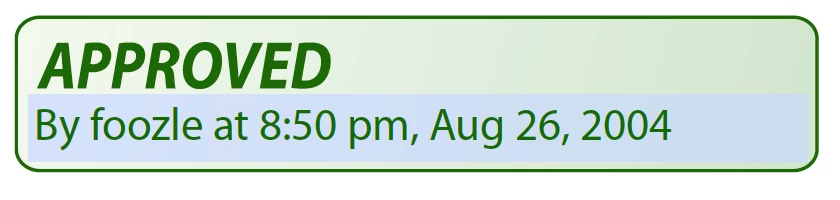
I am trying to create an action that will place the standard Acrobat “Approved” dynamic stamp in the same place and same size every time the action is run. I am having a hard time finding the stamp. I have tried using the code below but I'm just not getting a return that gives me the right information to add to the script.


app.getPath("user", "stamps");  // Show location of custom stamps

app.getPath("app", "stamps"); // Show location of built-in stamps

This will need to be shared among several users, so the script needs to pull the stamp from each user’s computer. Is this possible and how can I achieve it.

Below is exactly what I need, except I need to replace the arrow button with the Approved stamp. It needs to be the dynamic name/date/time Approved stamp.

Thanks in advance.

Tina

   var inch = 72;

   for (var p = 0; p < this.numPages; p++) {

      // Position a rectangle (.5 inch, .5 inch)

      var aRect = this.getPageBox( {nPage: p} );

      aRect[0] += 1.5*inch;           

      aRect[2] = aRect[0]+1*inch;   

      aRect[1] -= .78*inch;

      aRect[3] = aRect[1] - 18;      


      // Now construct a button field with a right arrow from ZapfDingbats

      var f = this.addField("NextPage", "button", p, aRect )

f.setAction("MouseUp", "this.pageNum++");

      f.delay = true;

      f.borderStyle = border.s;

      f.highlight = "push";

      f.textSize = 0;                 // Auto-sized

      f.textColor = color.blue;

      f.fillColor = color.ltGray;

      f.textFont = font.ZapfD

f.buttonSetCaption("\341") // A right arrow

      f.delay = false;

   }
This topic has been closed for replies.
Correct answer Karl Heinz Kremer

As far as the second part of your question goes, adding a stamp (or a different annotation) is very different from adding a form field. Take a look at the Doc.addAnnot() method: Acrobat DC SDK Documentation

This code will add the Approved annotation in a fixed location:

this.addAnnot({

    type: "Stamp",

    page: 0,

    rect: [36, 72, 288, 144],

    AP: "#DApproved"

});

2 replies

Karl Heinz  Kremer
Community Expert
Karl Heinz KremerCommunity ExpertCorrect answer
Community Expert
October 23, 2017

As far as the second part of your question goes, adding a stamp (or a different annotation) is very different from adding a form field. Take a look at the Doc.addAnnot() method: Acrobat DC SDK Documentation

This code will add the Approved annotation in a fixed location:

this.addAnnot({

    type: "Stamp",

    page: 0,

    rect: [36, 72, 288, 144],

    AP: "#DApproved"

});

teenerbAuthor
Participant
October 23, 2017

Thank you Karl, this is exactly what I needed! It looks like I was making it more difficult than it needed to be.

Karl Heinz  Kremer
Community Expert
Community Expert
October 23, 2017

You don't need to know where the stamp is located, all you need is the name of the stamp. You get that by placing the stamp in question on a page, then select that stamp and run a one-line JavaScript on the JavaScript console. See here for more information: https://acrobatusers.com/tutorials/dynamic_stamp_secrets​ - scroll down to the section titled "Stamp Name". 

Participant
June 16, 2019

i am trying to create a new dynmaic stamp

called Denied

I need the date and time and my user name to appear

i got the date working just not the name

i need step by step i am new to this
