Hi Parker,
thank you for your tips. You are completly right. I tried it out with the console window. Now I have the solution. Maybe somebody need this to:
My main problem were:
You have to use some stuipid:
Collection.Collection.addField
and that you have to deactivate first of all the sorting of all fields, because otherwise the new field gets automaticalle sort=2
Visual Basic 6 Code:
Set Collection = jso.App.newcollection()
' add new field from type numeric, at the end position 7
Set objCollectionField = Collection.Collection.addField("index", "Sortierung", "N", 7)
' you have to deactivate the sort for all fields, because otherwise VB6 can't access at it and to prevent acrobat to automatically switch the sort from 1 to 2
jso.DeactivateSort Collection
' sort for the new field index
jso.SortCollectionField Collection, "index"
' to add documents to your new portfolio, use the importdataobject method
If Collection.importdataobject(/c/Test/readme)= False Then
   MsgBox("Error")
End If
Set varAttachment = Collection.getDataObject("readme")
varAttachment.setFieldValue "index", lngSortCode
lngSortCode = lngSortCode + 1
' now add more documents to portfolio

Collection.SaveAs (v_strPortfolioName)
The folder level JavaScript functions:
/******************************************************************************
* Purpose:          Die Routine zeigt alle CollectionFields einer PDF collection
*                   (auch PDF package und PDF portfolio genannt) in der Console an.
*                   Dies funktioniert leider nicht über Visual Basic 6.
*                   Standardmäßig sind das folgende Felder:
*                     FileName/Name, sort: 1
*                     Description/Beschreibung, sort: null
*                     ModDate/Geändert am, sort: null
*                     Size/Größe, sort: null
*                     CreationDate/Erstellt am, sort: null
*                     adobe:Order/Reihenfolge, sort: null
*                     AFRelationship/Beziehung, sort: null
*                     CompressedSize/Komprimierte Größe, sort: null
*
* Inputs:           n.a.
*
* Assumes:          collection    aktuelles Portfolio
*
* Returns:          n.a.
*
* Effects:          Dient nur zu Testzwecken um alle verfügbaren Namen zu ermitteln.
*
* Date Created:     12.08.2020 12:27 Uhr
* Creator:          dacore Datenbanksysteme AG, A. Hofmann
* Notes:            Amenti V1.1.19 20200812
*                   18054-AU01+SW02 PDF Portfolio und digitale Unterschrift
******************************************************************************/
function ShowCollectionFields(Collection)
{
   try {
   //Konsole einblenden
   console.show();
   for (var i in Collection.collection.fields)
      console.println(Collection.collection.fields[i].name + '/' + Collection.collection.fields[i].text + ', sort: ' + Collection.collection.fields[i].sort + ', order: ' + Collection.collection.fields[i].order);

         }
   catch (e)
        {
        console.println("An error occurred while showing the collectionFields of the portfolio: " + e + '(Routine: ShowCollectionFields)');
        }
}


/******************************************************************************
* Purpose:          Die Routine deaktiviert die Sortierreihenfolge, damit später
*                   das Portfolio nach genau einem Feld sortiert werden kann.
*                   Dies funktioniert leider nicht über Visual Basic 6, weil
*                   wenn kein Wert in der Eigentschaft sort festgelegt wurde,
*                   für VisualBasic vermutlich kein Objekt vorhanden ist.
*
* Inputs:           n.a.
*
* Assumes:          collection    aktuelles Portfolio
*
* Returns:          n.a.
*
* Effects:          Portfolio ist unsortiert, damit später nach einem Feld sortiert werden kann
*
* Date Created:     12.08.2020 12:27 Uhr
* Creator:          dacore Datenbanksysteme AG, A. Hofmann
* Notes:            Amenti V1.1.19 20200812
*                   18054-AU01+SW02 PDF Portfolio und digitale Unterschrift
******************************************************************************/
function DeactivateSort(Collection)
{
   try {
   for (var i in Collection.collection.fields)
      Collection.collection.fields[i].sort=0;
        }
   catch (e)
        {
        console.println("An error occurred while deactivating the sort order of the portfolio: " + e + '(Routine: DeactivateSort)');
        }
}

function SortCollectionField(Collection, v_strFieldName)
{
   try {
   //Feld ermitteln
   var f = Collection.collection.getField(v_strFieldName);

   if (f == null)
      {
      app.alert('CollectionField "' + v_strFieldName + '" nicht gefunden. Sortierung kann nicht erfolgen!');
      }
   else
      {
      f.sort=1;
      }
}
   catch (e)
        {
        console.println("An error occurred while sorting the portfolio with field " + v_strFieldName + ": " + e + '(Routine: DeactivateSort)');
        }
}
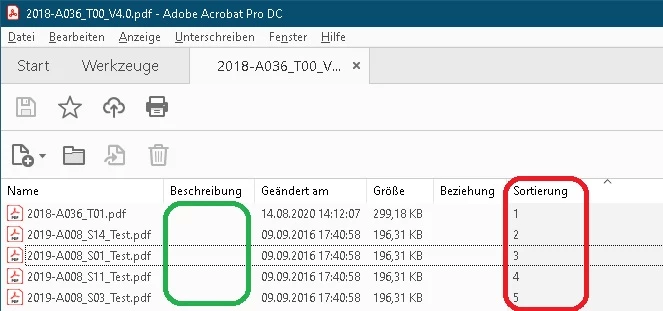
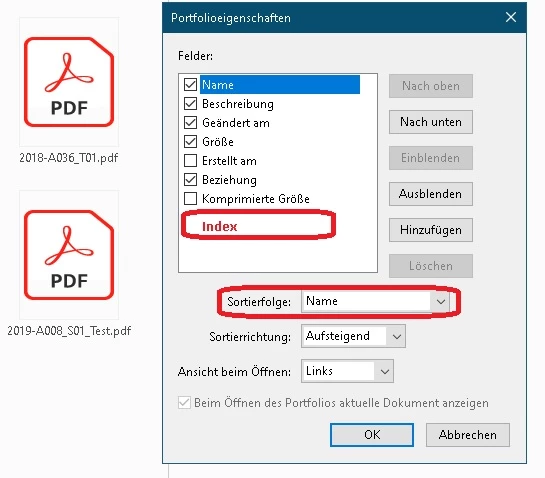
Here is the result:



 AdChoices