
Participant
March 8, 2023
Answered

Creating Custom JavaScript Calculation

  • March 8, 2023
  • 1 reply
  • 3015 views

Hello,


I am having a difficult time calculating the total of multiple fields and having that total display in the total field. The form I am working on has the ability to spawn a new page as well, the image below is a spawned page.  
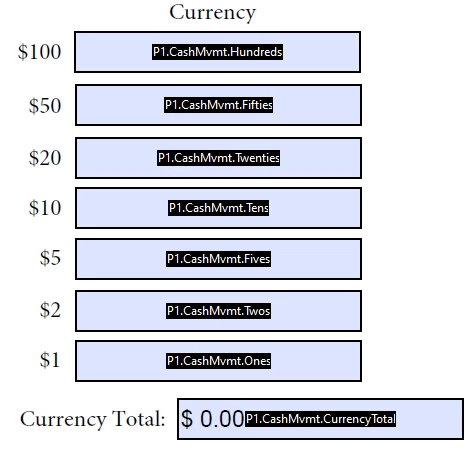


I've tried using the following code as a custom calculation but no matter what I do the CurrencyTotal field remains blank.

//define strPrefix
var strPrefix = "";
var aFieldName = event.targetName.split(".");
If(aFieldName.length > 2);  {
strPreFix = aFieldName[0] + "." + aFieldName[1] + ".";}

//give each field a temp name and bring in its value
var nA = this.getField(strPrefix + "Hundreds").value;
var nB = this.getField(strPrefix + "Fifties").value;
var nC = this.getField(strPrefix + "Twenties").value;
var nD = this.getField(strPrefix + "Tens").value;
var nE = this.getField(strPrefix + "Fives").value;
var nF = this.getField(strPrefix + "Twos").value;
var nG = this.getField(strPrefix + "Ones").value;

//perform calc
var nSum = nA + nB + nC + nD + nE + nF + nG;

//assign total to correct field
event.value = nSum;


Any help is greatly appreciated!!


Thanks in advance! 🙂 
This topic has been closed for replies.
Correct answer Thom Parker

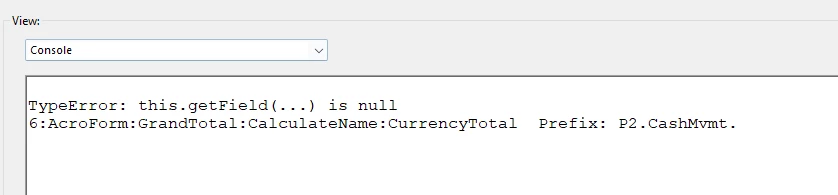
This is what is returning:


With the "this.getField(...) is null" error meaning a field doesn't exist, how do I determine which field it's referring to?


The null error is happening in a different script than the println. We know this because exceptions exit the script. 

The only way to know for sure which field name is returning null is to place "console.println" code before the line where the exception is thrown. 


It looks like it is the "GrandTotal" field contains the script that is causing the exception. 

The fact that this field is throwing the error before the "CurrencyTotal" field prints the report, means that your calculations are out of order.

But thats a different issue, and for debug purposes you should remove the GrandTotal script entirely. 


So it looks like the "P2.CashMvmt.CurrencyTotal"  calculation is working, or at least it's not thowing an error. 

However, the printout from the console.println is slightly disturbing. Because if  "event.targetName" was split to get the prefix shown, then it should have printed out like this:


Name:P2.CashMvmt.CurrencyTotal  Prefix: CashMvmt.CurrencyTotal


I would suggest simplifying the form until the scripting is worked out. To do this, make a copy of the PDF, and then delete everything except for one of the total fields, and all the inputs that are necessary for that total. 


1 reply

Thom Parker
Community Expert
Community Expert
March 8, 2023

There are a couple fatal errors in your script. The first thing to look at when you enter a script in a PDF is the Console Window. Which is were the first error would be reported. 

Here's an update to your script:

//define strPrefix
var strPrefix = "";
var aFieldName = event.targetName.split(".");
if(aFieldName.length > 2) 
    strPreFix = aFieldName[0] + "." + aFieldName[1] + ".";

//give each field a temp name and bring in its value
var nA = this.getField(strPrefix + "Hundreds").value;
var nB = this.getField(strPrefix + "Fifties").value;
var nC = this.getField(strPrefix + "Twenties").value;
var nD = this.getField(strPrefix + "Tens").value;
var nE = this.getField(strPrefix + "Fives").value;
var nF = this.getField(strPrefix + "Twos").value;
var nG = this.getField(strPrefix + "Ones").value;

//perform calc
event.value = nA + nB + nC + nD + nE + nF + nG;


Thom Parker - Software Developer at PDFScriptingUse the Acrobat JavaScript Reference early and often
Participant
March 8, 2023

Hi Thom,


That worked but it didn't add the values together properly. For example if I had $20 in one field and $10 in another, the Currency Total field was $2,010. It treated the values as characters rather than numbers. So I was able to modify the code to:

//define strPrefix
var strPrefix = "";
var aFieldName = event.targetName.split(".");
if(aFieldName.length > 2) 
    strPreFix = aFieldName[0] + "." + aFieldName[1] + ".";

//give each field a temp name and bring in its value
var nA = Number(this.getField(strPrefix + "Hundreds").valueAsString);
var nB = Number(this.getField(strPrefix + "Fifties").valueAsString);
var nC = Number(this.getField(strPrefix + "Twenties").valueAsString);
var nD = Number(this.getField(strPrefix + "Tens").valueAsString);
var nE = Number(this.getField(strPrefix + "Fives").valueAsString);
var nF = Number(this.getField(strPrefix + "Twos").valueAsString);
var nG = Number(this.getField(strPrefix + "Ones").valueAsString);

//perform calc
event.value = nA + nB + nC + nD + nE + nF + nG;


However, this code only works on my template - nothing happens when I spawn a page. 

Thom Parker
Community Expert
Community Expert
March 9, 2023

Excellent Catch!!  Now it's time for some debug.

Is anything reported in the console window?


Add a console.println() statement to your code to see what's going on inside the calculation:

Here's a video tutorial on the topic:

     https://www.pdfscripting.com/public/images/video/AcroJSIntro/AcroJSIntro_ConsoleWindow.cfm


Here's the modified script with debug code added:

var strPrefix = "";
var aFieldName = event.targetName.split(".");
if(aFieldName.length > 2) 
    strPreFix = aFieldName[0] + "." + aFieldName[1] + ".";

// Report prefix for debug purposes
console.println("Name:" + event.targetName + "  Prefix: " + strPrefix);

//give each field a temp name and bring in its value
var nA = Number(this.getField(strPrefix + "Hundreds").valueAsString);
var nB = Number(this.getField(strPrefix + "Fifties").valueAsString);
var nC = Number(this.getField(strPrefix + "Twenties").valueAsString);
var nD = Number(this.getField(strPrefix + "Tens").valueAsString);
var nE = Number(this.getField(strPrefix + "Fives").valueAsString);
var nF = Number(this.getField(strPrefix + "Twos").valueAsString);
var nG = Number(this.getField(strPrefix + "Ones").valueAsString);

//perform calc
event.value = nA + nB + nC + nD + nE + nF + nG;


Thom Parker - Software Developer at PDFScriptingUse the Acrobat JavaScript Reference early and often