
nondskrpt
Participant
January 30, 2019
Question

Custom Java Script Calculation for Radio Buttons

  • January 30, 2019
  • 4 replies
  • 3530 views

Hi all, I'm extremely new to this and it's generally outside of my wheelhouse so I'm looking for a bit of help. I'm hoping to create a budget form that allows people to select whether or not the item will be charged Harmonized Sales Tax (which is 13% where I'm from). Not all items are taxed so I'm allowing them to choose via a radio buttom whether tax is applicable. I'd like if they choose 'Y' the subtotal should calculate the 13% tax, and if they choose 'N' I'd want it to simply calculate based on the Cost Per and Quantity of the item.
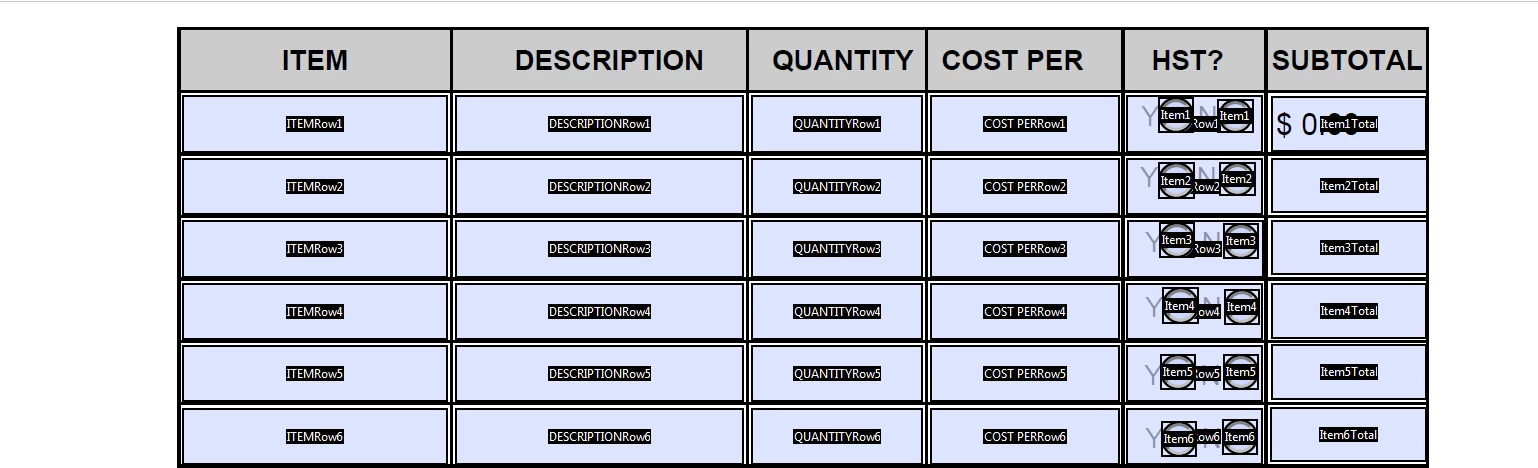
I'm able to calculate the Quantity and Cost per into a subtotal very easily obviously, but I'm somewhat lost as to how I can use the radio buttons to calculate the percentage tax. Any help is much appreciated.

This topic has been closed for replies.

4 replies

JR Boulay
Community Expert
Community Expert
May 1, 2020

Tip: a set of radiobuttons cannot return "Off" if you tick one as default.


Acrobate du PDF, InDesigner et Photoshopographe
ls_rbls
Community Expert
Community Expert
May 1, 2020

Awesome! thanks for that tip.

JR Boulay
Community Expert
Community Expert
May 1, 2020

"Zero", "Off" and "empty" values are automatically managed by Acrobat's buit in calculations

Acrobate du PDF, InDesigner et Photoshopographe
ls_rbls
Community Expert
Community Expert
May 1, 2020

Thank you!

JR Boulay
Community Expert
Community Expert
April 30, 2020

Use "1" as the export value for the "No" button, and use "1.13" as the export value for the "Yes" button.

So you just have to multiply the field "Quantity" by thefield "Cost per" by the button value.

This does not requires JavaScript.

Acrobate du PDF, InDesigner et Photoshopographe
ls_rbls
Community Expert
Community Expert
April 30, 2020

This is with JR's suggestion:


var a = this.getField("radioButton").value;
var c = this.getField("Cost per Item").value;
var d = this.getField("Cost per Quantity").value;

if ( (a == "1") && (c && d !="") )event.value = c+d;
else if( (a == ".13") && (c && d !="") ) event.value  = (Math.ceil(c+d)*(a))+(c+d);
else if ( ( a === ".13") || (a === "1") && (c || d =="") ) event.value ="";
else event.value =""; 


ls_rbls
Community Expert
Community Expert
April 30, 2020

Hi,


This is an old thread that seems like it fell through the cracks. I hope by now you were able to figure it out.


If not, here are a few ideas:


  • Make your radio buttons mututally exclusive: https://www.youtube.com/watch?v=nHT2H9_G3pg
  • You make radio buttons mutually exclusive by labeling them with the same field name (both YES & NO radio buttons will have the same name. I will use for the name "radioButton"). Then you add a customed export value. 
  • To add a custom export value right-click on the radio-button object and then select "Properties"from the context menu. Then go to the "Options" tab.  In the blank labeled "radioButton" type the  capital "Y" for example. Then repeat this step in the other radio button and type in "N". See the slide below:


  • After this is done, all you have to do now is use a custom calculation script for the SUBTOTAL field next to the radio buttons. Right-click on the subtotal  text field, select "Properties" from the context menu, and click on the "Calculate" tab. Down below in that dialogue box, tick the radio button "Custom calculation script:" and then on the "Edit..." button next to it.
  • This will open up the javascript editor for that field. You can copy the following script (or similar)  below and paste it in the JavaScript editing window:


var a = this.getField("radioButton").value;
var c = this.getField("Cost per Item").value;
var d = this.getField("Cost per Quantity").value;

if (a != "Y") event.value = c+d;
if (a != "N") event.value = (Math.ceil(c+d)*(13/100))+(c+d);
if ( (c =="") || (d =="") ) event.value ="";


try67
Community Expert
Community Expert
April 30, 2020

I would reconsider the way this code is built. For starters, why check a negative condition when you can use the positive? It's just more confusing. Also, I would use an if-else if-else construction, instead of separate if-commands. That way there would be a default value used for the field, in case none of the conditions is met.

ls_rbls
Community Expert
Community Expert
April 30, 2020

I tried the IF , ELSE conditions but with my current knowledge it was throwing back undesirable results. I 'm sure I wasn't following appropriate guidance. 


Would you mind sharing an example?