
Participant
November 24, 2020
Answered

Doing a running total calculation?

  • November 24, 2020
  • 1 reply
  • 1460 views

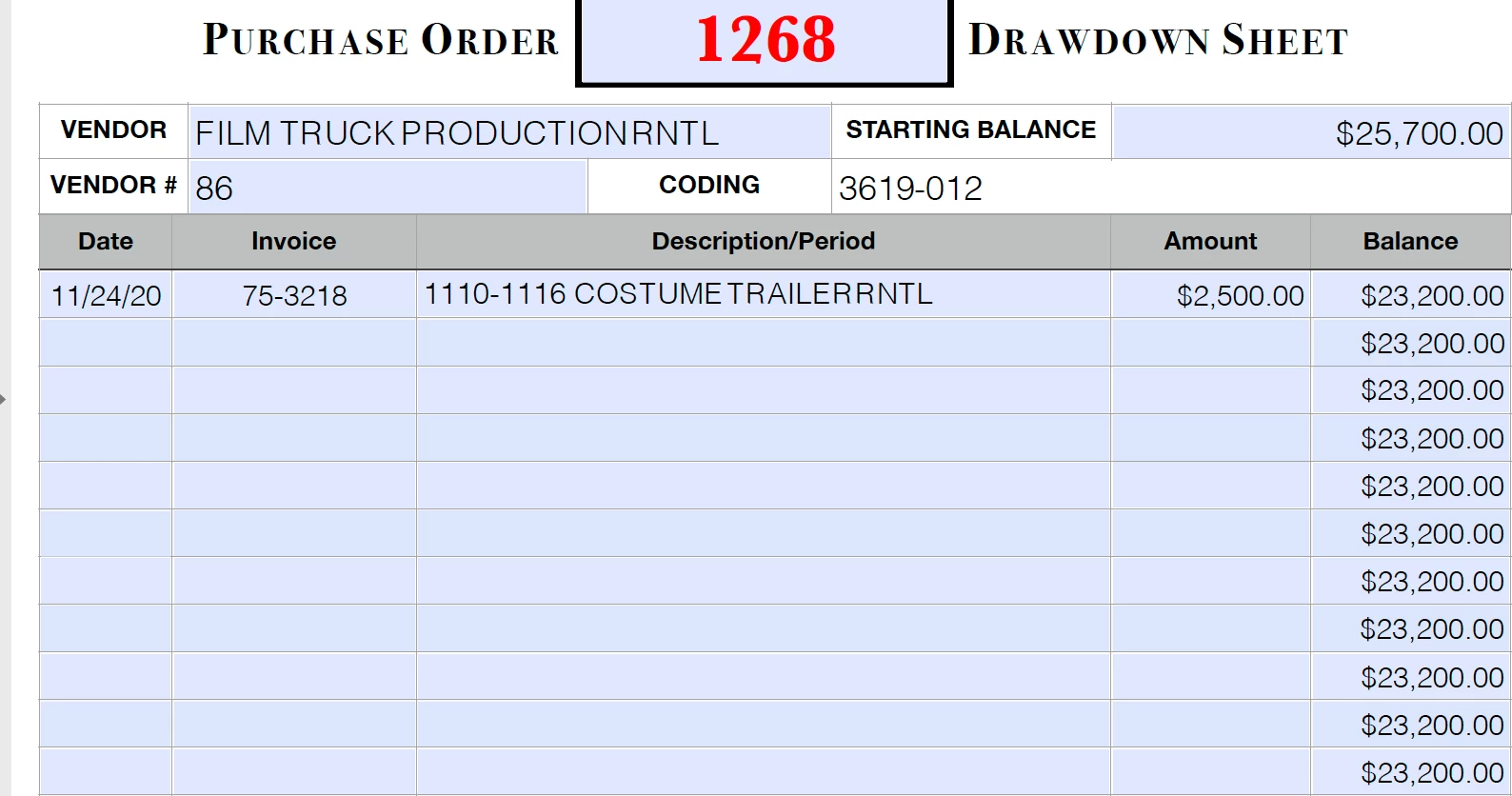
I've created a "drawdown sheet" that tracks reoccurring payments/invoicing on a PO.  I can't do it as a spreadsheet because it attaches to the pertinat PO which is a PDF.  A drawdown will have the starting balance (the amount for which the PO is written) and show the running balance as each weekly billing is paid.  I've attached a screen shot of the form and the issue.  The calculation is a simple subtraction from the previous balance but the issue is that the formula is performed down the sheet.  I tried to do an if,then statement:  If "2amount" is > 0 then "1balance" - "2amount", if else then leave "$0.00". Obviously that isn't Javascript but that is my problem - I don't spreak Javascript.  I scoured the web to find a solution and selfmedicate but it wasn't in the cards for me.  I even watched tutorials on basic javascript related to Acrobat but nothing stuck.  HELP!!
 

This topic has been closed for replies.
Correct answer ls_rbls

Seems like you have all the balance fields assigned with the same fieldname.


You'll need to rename them to fix that first. 


I am not sure if, from you've explained, that the next new balance should be shown in the field right below the prior one, and  when  a new amount is entered in the amount filed to its left. 


If that is the case then you need to use a custom calculation script.


In my examlple below I renamed the fields Amont1, Amount2, Amount3, etc for all the amount fields under that column.  Then I also renamed all the new balance fields like Balance1, Balance2, Balance3, etc under that column.


In my example script below I using for the first Balance field this line:


event.value = 0;

if (this.getField("Amount1").value >= 1)  event.value = this.getField("Starting Balance").value - this.getField("Amount1").value;


On the next Balance field this line:


event.value = 0;

if  (this.getField("Amount2").value >= 1)  event.value = this.getField("Amount2").value - this.getField("Balance1").value;


On the third balance field:


event.value = 0;

if  (this.getField("Amount3").value >= 1)  event.value = this.getField("Amount3").value - this.getField("Balance2").value;


And so on...


1 reply

ls_rbls
Community Expert
ls_rblsCommunity ExpertCorrect answer
Community Expert
November 24, 2020

Seems like you have all the balance fields assigned with the same fieldname.


You'll need to rename them to fix that first. 


I am not sure if, from you've explained, that the next new balance should be shown in the field right below the prior one, and  when  a new amount is entered in the amount filed to its left. 


If that is the case then you need to use a custom calculation script.


In my examlple below I renamed the fields Amont1, Amount2, Amount3, etc for all the amount fields under that column.  Then I also renamed all the new balance fields like Balance1, Balance2, Balance3, etc under that column.


In my example script below I using for the first Balance field this line:


event.value = 0;

if (this.getField("Amount1").value >= 1)  event.value = this.getField("Starting Balance").value - this.getField("Amount1").value;


On the next Balance field this line:


event.value = 0;

if  (this.getField("Amount2").value >= 1)  event.value = this.getField("Amount2").value - this.getField("Balance1").value;


On the third balance field:


event.value = 0;

if  (this.getField("Amount3").value >= 1)  event.value = this.getField("Amount3").value - this.getField("Balance2").value;


And so on...


Participant
November 24, 2020

IS_RBLS,


Gosh!  That was quick.  I've attached more screenshots to give more clarification.  Will I need to use quotes in referencing the field name?  Let me see:

event.value = 0;

if  (this.getField("AmountRow1").value >= 1)  event.value = this.getField("AmountRow1").value - this.getField("STARTINGBALANCE").value;


Then for the next set of fields:


event.value = 0;

if  (this.getField("AmountRow2").value >= 1)  event.value = this.getField("AmountRow2").value - this.getField("BalanceRow1").value;


Like that?


ls_rbls
Community Expert
Community Expert
November 24, 2020

No you don't use quotes with Simplified Field Notation(SFN) which is what you're currently using.


However, by using SFN  in your case above, it may limit the ability to use conditional statements in a formula or equation.


In my example, the value is the result of a Custom Calulation Script. In this case the syntax is expressed a little difefrent. That is why you've observed the use quotes and parenthesis for example.