

Saher Naji
Inspiring
May 21, 2024
Answered

Enhancing JavaScript code for Quick Navigation to Empty Fields

  • May 21, 2024
  • 1 reply
  • 2216 views

I've a code snippet to pinpoint empty fields within a lengthy form. Ideally, the script sholuld guides me directly to the first blank field. But, if this proves challenging, I'd like it to provide the page number and the information from the tooltip associated with the empty field. My intention is to populate the tooltip with brief descriptions, facilitating rapid identification for users. While the current script effectively notifies me of empty fields names, I seek improvements: displaying the tooltip text instead of the field name and accurately identifying the page numbers, instead of zeros.

Thank you


This is the code:

var emptyFields = [];

var currentPage = this.pageNum;

for (var i = 0; i < this.numFields; i++) {
var fname = this.getNthFieldName(i);
var f = this.getField(fname);

if (f.type !== "button" && f.required === true) {
if (f.value === "" || f.value === "Off") {
var pageNum = getPageNumForField(f); // Call the function to get page number
var tooltip = f.tooltip;
if (tooltip) {
var tooltipInfo = "Page " + pageNum + ": " + tooltip;
emptyFields.push(tooltipInfo);
} else {
emptyFields.push("Page " + pageNum + ": " + "Field " + f.name);
}
}
}
}

if (emptyFields.length > 0) {
var message = "Please fill in the following required field(s):\n\n" + emptyFields.join("\n");
// Use a timeout to delay the alert
app.setTimeOut(function() {
app.alert({
cMsg: message,
cTitle: "Required Fields Check",
nIcon: 3, // Optional: set icon type (3 for warning icon)
nType: 0 // Optional: set type to OK button only
});
// Restore the original page number after the alert
this.pageNum = currentPage;
}.bind(this), 10); // Bind 'this' to ensure the correct context
}

function getPageNumForField(field) {
var page = field.page;
return page + 1; // Add 1 to convert from 0-based indexing
}

/*
function getPageNumForField(field) {
var page = field.page;
if (typeof page === 'number' && !isNaN(page)) { // Check if page is a valid number
return page + 1; // Add 1 for 1-based indexing (if applicable)
} else {
return "N/A"; // Return a placeholder for invalid page numbers
}
}
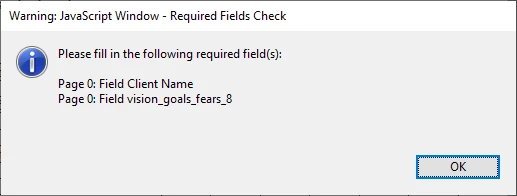


So instad of fields names I want to use the text in Tooltip, and we can ignore to use the real page number
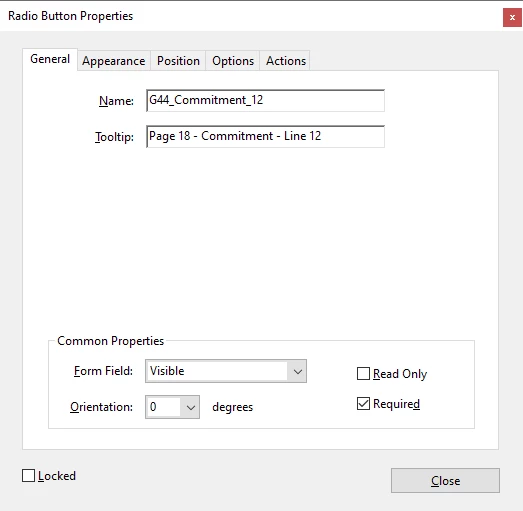


Thank you
This topic has been closed for replies.
Correct answer bebarth

Now I have this updated code:

function getPageNumForField(field) {
  // No longer used, can be removed
  // return field.page + 1; // Convert from 0-based to 1-based indexing
}

var emptyFields = [];
var maxAlerts = 10; // Max fields indicated in the alert box
var currentPage = this.pageNum; // Save the current page number (not used)
var firstField = null;

for (var i = 0; i < this.numFields; i++) {
  if (emptyFields.length < maxAlerts) {
    var fname = this.getNthFieldName(i);
    var f = this.getField(fname);
  
    if (f.type !== "button" && f.required === true) {
      if (f.value === "" || f.value === "Off") {
        if (!firstField) firstField = fname; // Save the first empty field name
      
        if (f.userName) {
          emptyFields.push(f.userName);
        } else {
          emptyFields.push("Field \"" + f.name + "\"");
        }
      }
    }
  } else {
    break;
  }
}

if (emptyFields.length > 0) {
  var message = "Please fill in the following required field(s):\n\n" + emptyFields.join("\n");
  
  // **Assuming app.alert supports tooltips (modify as needed):**
  app.alert({
    cMsg: message,
    cTitle: "Required Fields Check",
    nIcon: 3, // Optional: set icon type (3 for warning icon)
    nType: 0 // Optional: set type to OK button only
  });
  
  if (firstField) {
    this.getField(firstField).setFocus();
  }
}

// No longer needed as page number is not used
// this.pageNum = currentPage;


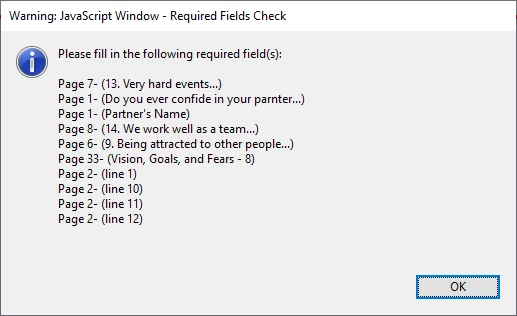
Is there a way to sort the tooltip texts which appear in the window below from A to Z?
Page 1...
Page 2...
Page 3...

and not like this:

Page 1
Page 2
Page 32
Page 33
Page 6
Page 7

and when I click the button, it should take me to the first field in this list.


Thank you


Hi,

I added a few lines between "BB Start" and "BB End".


function getPageNumForField(field) {
  // No longer used, can be removed
  // return field.page + 1; // Convert from 0-based to 1-based indexing
}

var emptyFields = [];
var maxAlerts = 10; // Max fields indicated in the alert box
var currentPage = this.pageNum; // Save the current page number (not used)
var firstField = null;

for (var i = 0; i < this.numFields; i++) {
  if (emptyFields.length < maxAlerts) {
    var fname = this.getNthFieldName(i);
    var f = this.getField(fname);
  
    if (f.type !== "button" && f.required === true) {
      if (f.value === "" || f.value === "Off") {
        if (!firstField) firstField = fname; // Save the first empty field name
      
        if (f.userName) {
          emptyFields.push(f.userName);
        } else {
          emptyFields.push("Field \"" + f.name + "\"");
        }
      }
    }
  } else {
    break;
  }
}

if (emptyFields.length > 0) {
	// BB Start
	for (var i=0; i<emptyFields.length; i++) emptyFields[i]=[emptyFields[i],Number(emptyFields[i].substring("Page ".length,emptyFields[i].indexOf("-")))];
	emptyFields.sort(function(a, b){return a[1]-b[1]});
	for (var i=0; i<emptyFields.length; i++) emptyFields[i].pop();
	// BB End
	
  var message = "Please fill in the following required field(s):\n\n" + emptyFields.join("\n");
  
  // **Assuming app.alert supports tooltips (modify as needed):**
  app.alert({
    cMsg: message,
    cTitle: "Required Fields Check",
    nIcon: 3, // Optional: set icon type (3 for warning icon)
    nType: 0 // Optional: set type to OK button only
  });
  
  if (firstField) {
    this.getField(firstField).setFocus();
  }
}

// No longer needed as page number is not used
// this.pageNum = currentPage;


 Please try and let me know...

@+

1 reply

bebarth
Community Expert
Community Expert
May 21, 2024

Hi,

Try that:


var emptyFields = [];
var currentPage = this.pageNum;
for (var i = 0; i < this.numFields; i++) {
	var fname = this.getNthFieldName(i);
	var f = this.getField(fname);
	if (f.type !== "button" && f.required === true) {
		if (f.value === "" || f.value === "Off") {
			var pageNum = getPageNumForField(f); // Call the function to get page number
			if (f.userName) emptyFields.push(f.userName);
			else emptyFields.push("Page " + pageNum + ": " + "Field " + f.name);
		}
	}
}
if (emptyFields.length > 0) {
	var message = "Please fill in the following required field(s):\n\n" + emptyFields.join("\n");
	// Use a timeout to delay the alert
	app.setTimeOut(function() {
		app.alert({
			cMsg: message,
			cTitle: "Required Fields Check",
			nIcon: 3, // Optional: set icon type (3 for warning icon)
			nType: 0 // Optional: set type to OK button only
		});
		// Restore the original page number after the alert
		this.pageNum = currentPage;
	}.bind(this), 10); // Bind 'this' to ensure the correct context
}

function getPageNumForField(field) {
	return this.getPageLabel(field.page);
}


@+

Saher Naji
Inspiring
May 21, 2024

Thanks @bebarth 
I updated it like this, and it's working very well now

function getPageNumForField(field) {
    var page = field.page;
    return page + 1; // Add 1 to convert from 0-based indexing
}

var emptyFields = [];

// Save the current page number
var currentPage = this.pageNum;

for (var i = 0; i < this.numFields; i++) {
    var fname = this.getNthFieldName(i);
    var f = this.getField(fname);
    
    if (f.type !== "button" && f.required === true) {
        if (f.value === "" || f.value === "Off") {
            var pageNum = getPageNumForField(f); // Call the function to get page number
            if (f.userName) {
                emptyFields.push("Page " + pageNum + ": " + f.userName);
            } else {
                emptyFields.push("Page " + pageNum + ": " + "Field " + f.name);
            }
        }
    }
}

if (emptyFields.length > 0) {
    var message = "Please fill in the following required field(s):\n\n" + emptyFields.join("\n");
    app.alert({
        cMsg: message,
        cTitle: "Required Fields Check",
        nIcon: 3, // Optional: set icon type (3 for warning icon)
        nType: 0 // Optional: set type to OK button only
    });
}

// Restore the original page number after the alert
this.pageNum = currentPage;
Saher Naji
Inspiring
May 21, 2024

But if we could update it to take us the the first empty field without any messages this will better