

Dmitriy K.
Known Participant
June 15, 2022
Question

extreme file enlargement due to comments

  • June 15, 2022
  • 2 replies
  • 458 views

Hello everyone, I noticed such a problem: after hiding comments in a document using code, the file size increases tenfold!

function Hide() {
	this.delay = true;
	this.syncAnnotScan();
	var annots = this.getAnnots();
	if (annots==null || annots.length==0) {
	app.alert("there are no comments in this document", 1);
	return;}
	for (var i=annots.length-1; i>=0; i--) {
	annots[i].setProps({readOnly: false, lock: false});
	annots[i].hidden = true;}
	this.delay = false;
	app.alert("all comments hide",3);
}
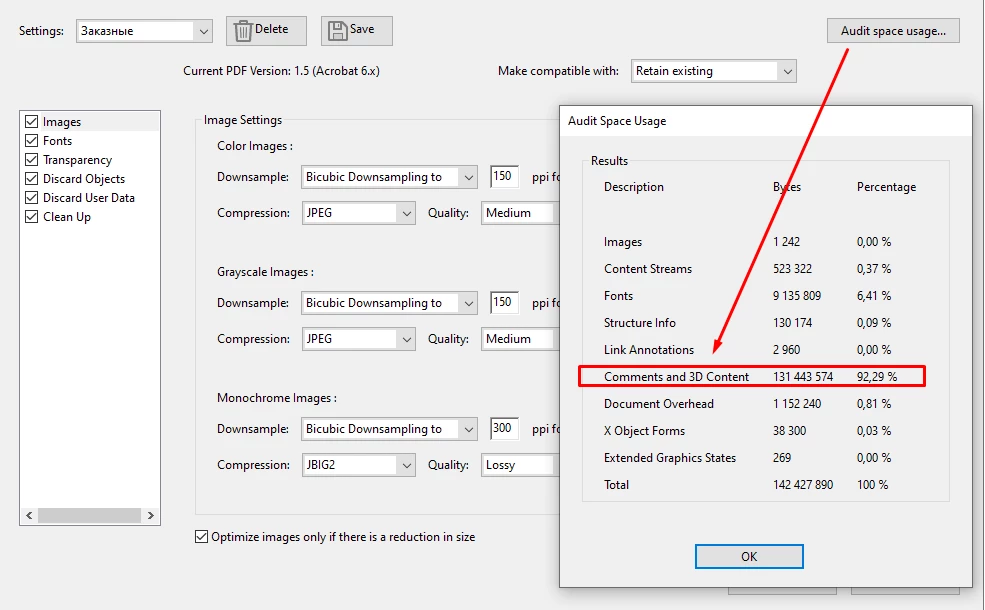
 

After optimizing(File - Save as Other - Optimizide PDF) the document, the file size returns to its original size, but after displaying comments and saving, it again grows in size by + 3 MB, and so on each time after the hide/show/save cycle.

How to solve this problem? add file optimization to the main code? Or is there an option in the program settings that will clear this automatically? 

This topic has been closed for replies.

2 replies

Legend
June 15, 2022

Are you doing the save from the menu, or in code? What you posted does not save.

It is the specific job of SAVE AS to both ask for a new name AND remove unused objects, rearrange the file, and reclaim space.

Dmitriy K.
Known Participant
June 16, 2022

after hiding the comments with the code, I save the file through the menu. Well, I most likely asked the question incorrectly, I will correct it: is there a function in the code similar to the Optimization button (I did not find it in the API)? I need that when my Hide button is pressed, the document is cleared at the same time, and the user does not need to do Save As.

try67
Community Expert
Community Expert
June 16, 2022

> is there a function in the code similar to the Optimization button (I did not find it in the API)?

- No.

Legend
June 15, 2022

Use Save As, rather than a simple Save. No need to optimise. Save alone always makes a document longer because changes are added to the end, leaving the original bytes untouched. 

Dmitriy K.
Known Participant
June 15, 2022

Thanks for the answer, but unfortunately it doesn't work for me. Maybe you know a function in the code that does this for the user?

try67
Community Expert
Community Expert
June 15, 2022

There's no direct command in JS to optimize a file. The closest you can get to it is to run a Preflight Profile that does it.