
Fill in another text field based on previously entered text
Hey there,
I am struggling a bit with my code, as I do not get it to work with my form. The current code I have is as follows:
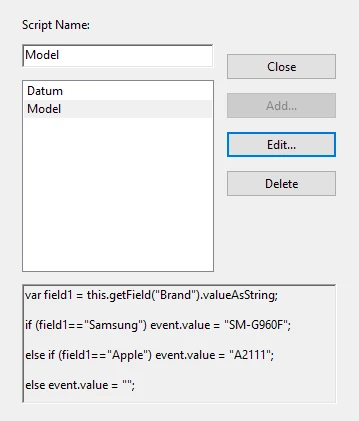
var field1 = this.getField("Brand").valueAsString;
if (field1=="Samsung") event.value = "SM-G960F";
else if (field1=="Apple") event.value = "A2111";
else event.value = "";
The steps I followed were:
1) I created a text field named "Model" and made it "Read Only"
2) Under "Javascript", I created a new document JavaScript called "Model"
3) I filled in the code above, where the goal is as follows:
- The code would start by retrieving the text field "Brand" to see what value has been filled in (i.e. "Samsung"
- If "Samsung" has been filled in, the "Model" field should display the string "SM-G960F"
- If "Apple" was entered in the "Brand" field, the "Model" field should display the string "A2111"
- If nothing has been filled in, then the field should stay empty.
The current error is as follows (I've cycled through quite a bit now):
TypeError: this.getField(...) is null
1:Document-Level:Model
But this seems strange to me, as the getField value is supposed to be null until it is filled in right? Or am I completely off with my thoughts?
I would be very grateful if one of you guys could help me out! Here are some screenshots as well:



 AdChoices