
Fillable Form - Average of multiple fields with options to skip
Hi Acrobat Community,
I'm trying to get an average of six fields, with the option of skipping blank fields or N/A, and have the value autofill a seventh field. It looks like this:
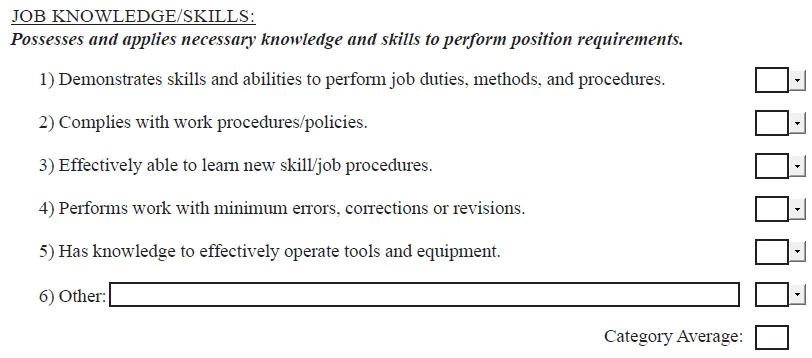
I've searched all over these forums and many others and I've found a few ways to do this. The one I've settled on was made by try67 on these forums. The problem I believe I'm running into now is that, no matter what I do, I can't get an array to call back to my function. The code I'm using looks like this:
function calcAverage(aFields, bIgnoreBlanks, bIgnoreZeros) {

    var total = 0;

    var n = 0;

    for (var i in aFields) {

        var f = this.getField(aFields);

        if (f==null) {

            console.println("Error! Can't locate a field called: " + aFields);

            continue;

        }

        if (f.valueAsString=="" && bIgnoreBlank) continue;

        var v = Number(f.valueAsString);

        if (isNaN(v)) continue;

        if (v==0 && bIgnoreZeros) continue;

        total+=v;

        n++;

    }

    if (n==0) event.value = "";

    else event.value = total/n;

}


calcAverage(["Knowledge1", "Knowledge2", "Knowledge3", "Knowledge4", "Knowledge5", "Knowledge6"], true, true);
The error I'm getting is this:

If I'm understanding correctly, it is ignoring the array and just creating one long string of the array elements. I've tested this and cut the array down to only include "Knowledge1" and the script works perfectly for that one field. I've read through all of the comments on every post I've found discussing this and similar scripts, but no one else seems to have run into this issue, so any help would be greatly appreciated!
The original post I got the script from is here.



 AdChoices