Participant
August 12, 2020
Answered

Help with Summing a rounded Calculation

  • August 12, 2020
  • 4 replies
  • 2827 views

Perhaps it is because I am overthinking this.  I am creating a form where someone is reimbursed for mileage at the government rate of $0.575 (mileage rate).  I created a cell where it would calculate the mileage in USD based on the number of miles someone drove (mileage=miles x rate).  But at the end of the row it is supposed to total the mileage of 7 days. 


So if someone drove 1 mile each day it is showing as each days as $0.58 miles.  Which is correct, but the total at the end of the row is $4.03 (which is $0.575*7=$4.025).  But I want the total to show as $4.06 ($0.58 rounded product x 7 days).  Can someone help me?

This topic has been closed for replies.
Correct answer ls_rbls

+++ UPDATE


Below these link from the IRS  are the scripts that you must use to calculate the appropriate gas mileage rates in accordance with the IRS standard mileage rates for fiscal year (FY) 2020:


Right off the bat... the link above states the following:


"IR-2019-215, December 31, 2019

WASHINGTON — The Internal Revenue Service today issued the 2020 optional standard mileage rates (PDF) used to calculate the deductible costs of operating an automobile for business, charitable, medical or moving purposes.

Beginning on January 1, 2020, the standard mileage rates for the use of a car (also vans, pickups or panel trucks) will be:

  • 57.5 cents per mile driven for business use, down one half of a cent from the rate for 2019,
  • 17 cents per mile driven for medical or moving purposes, down three cents from the rate for 2019, and
  • 14 cents per mile driven in service of charitable organizations.

The business mileage rate decreased one half of a cent for business travel driven and three cents for medical and certain moving expense from the rates for 2019. The charitable rate is set by statute and remains unchanged."


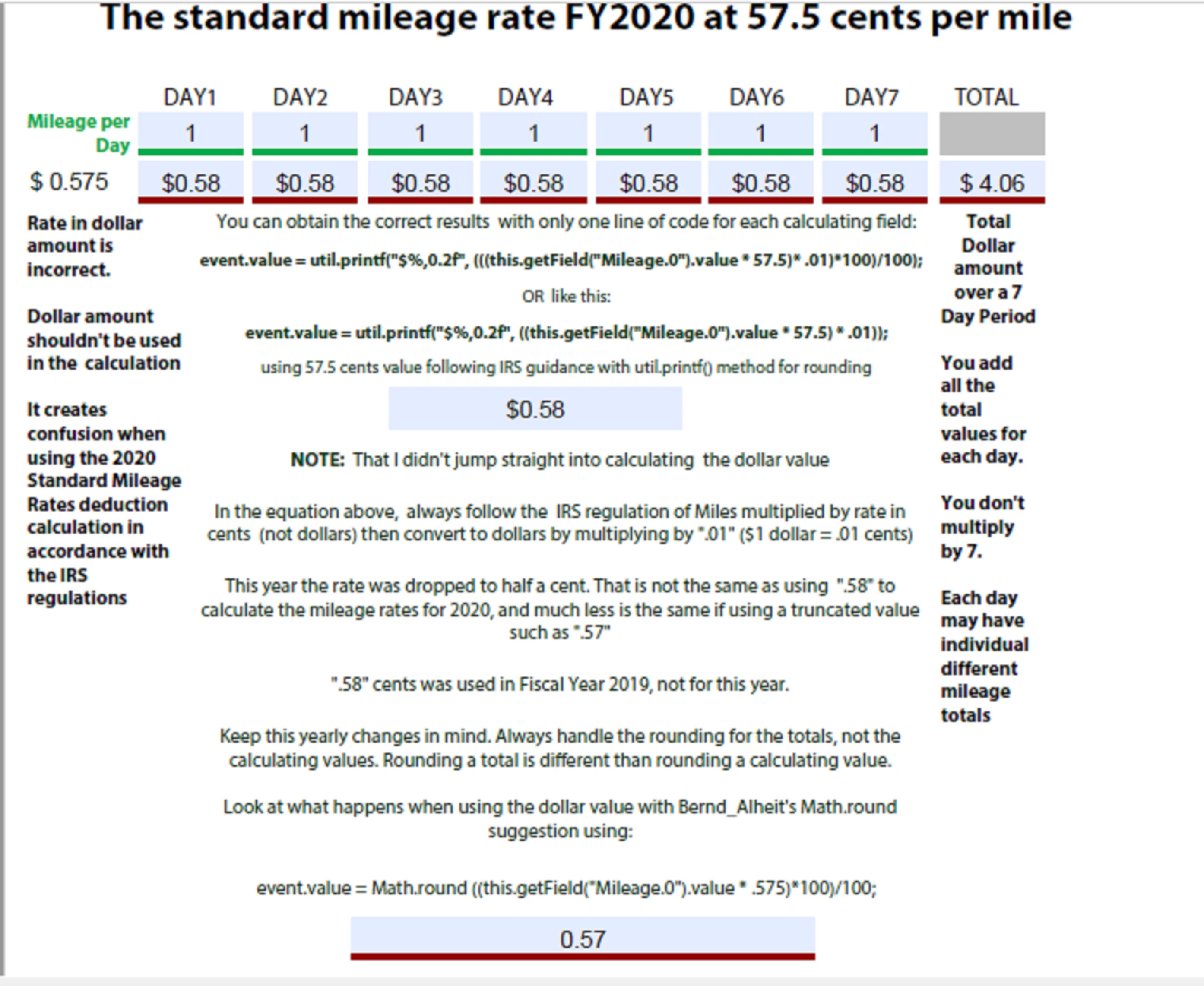
You've been using dollar value to work around the calculation when in fact, the mileage rate per miles driven in a day is calulated by multiplying total miles driven by 57.5 cents per mile driven


In FY2019 it used used to be 58 cents per mile driven.


So, your calculation should be performed with cents per mile ( 57.5) not cents converted to dollars (.575) to begin with.


Here's a couple of my scripts that works around this almost 98.9999 accurately:


//using 57.7 cents value following IRS guidance with util.printf() method for rounding

event.value = util.printf("$%,0.2f", ((this.getField("Mileage.0").value * 57.5) * .01));


//or you can also work it out like this with the multply by 100 divide by hundred to handle more complex rounding if the rate  changes to something like "68.9485" cents

event.value = util.printf("$%,0.2f", (((this.getField("Mileage.0").value * 57.5) * .01)*100)/100);


//using dollar value $ 0.575 -->> Bernd_Alheit method with Math.round() function for rounding is not wrong but causes incorrect rounding because is using dollar value

event.value = Math.round ((this.getField("Mileage.0").value * .575)*100)/100;


If at some point in the near future you take some time to understand what the toFixed function does in JavaScript, you won't use it to round numbers.


This is where the problem is and how JavaScript is taught to people in general. The term "rounding" a number is used interchangeably with this function when it shouldn't.


toFixed basically cuts a string chunk out of a number that have decimal points, it doesn't really round nothing unless you apply a bunch of "Band-Aid" javascripting remedies in an attempt to force the output of a desired number value, not to mention other issues that we frequently run into in regards of floating points.


As a fixed point notation function, toFixed is rather a truncating formatting function (in my humble opinion). And wether it allows to manipulate the output string value of a number or not, you still have to decide how many digits need to be cut off to the right of the decimal point. 


This is oviously something you don't want to do ina PDF government form to repair  money reimbursement calculated values.


The truth is that , in real math the term "rounding" doesn't carry the same definition as toFixed.


To really round a number you need to use other functions or a combination of them, like for example, the  Math.round() function (as illustrated by Bernd_Alheit).


In addition, See the quote below, teaken from this brief tutorial: https://medium.com/swlh/how-to-round-to-a-certain-number-of-decimal-places-in-javascript-ed74c471c1b8


  • "if you want to round 0.2345 to two decimal places, you need to round 23.45 (0.2345*100), then divide the result (23) by 100 to get 0.23."


And like Test_Screen_Name indicated : "Working with money needs a lot of care, it has more complications than people expect."


In any case, today's your lucky day!!   And please excuse my very long reply. I just want to make sure that you get this done correctly.


So, I prepared a PDF just for you with the scripts in it so you can use them and apply them:  GAS MILEAGE RATE CALCULATION 


Last, I will not spam any more this discussion but I would like to close my argument with the following slide:



4 replies

ls_rbls
Community Expert
ls_rblsCommunity ExpertCorrect answer
Community Expert
August 23, 2020

+++ UPDATE


Below these link from the IRS  are the scripts that you must use to calculate the appropriate gas mileage rates in accordance with the IRS standard mileage rates for fiscal year (FY) 2020:


Right off the bat... the link above states the following:


"IR-2019-215, December 31, 2019

WASHINGTON — The Internal Revenue Service today issued the 2020 optional standard mileage rates (PDF) used to calculate the deductible costs of operating an automobile for business, charitable, medical or moving purposes.

Beginning on January 1, 2020, the standard mileage rates for the use of a car (also vans, pickups or panel trucks) will be:

  • 57.5 cents per mile driven for business use, down one half of a cent from the rate for 2019,
  • 17 cents per mile driven for medical or moving purposes, down three cents from the rate for 2019, and
  • 14 cents per mile driven in service of charitable organizations.

The business mileage rate decreased one half of a cent for business travel driven and three cents for medical and certain moving expense from the rates for 2019. The charitable rate is set by statute and remains unchanged."


You've been using dollar value to work around the calculation when in fact, the mileage rate per miles driven in a day is calulated by multiplying total miles driven by 57.5 cents per mile driven


In FY2019 it used used to be 58 cents per mile driven.


So, your calculation should be performed with cents per mile ( 57.5) not cents converted to dollars (.575) to begin with.


Here's a couple of my scripts that works around this almost 98.9999 accurately:


//using 57.7 cents value following IRS guidance with util.printf() method for rounding

event.value = util.printf("$%,0.2f", ((this.getField("Mileage.0").value * 57.5) * .01));


//or you can also work it out like this with the multply by 100 divide by hundred to handle more complex rounding if the rate  changes to something like "68.9485" cents

event.value = util.printf("$%,0.2f", (((this.getField("Mileage.0").value * 57.5) * .01)*100)/100);


//using dollar value $ 0.575 -->> Bernd_Alheit method with Math.round() function for rounding is not wrong but causes incorrect rounding because is using dollar value

event.value = Math.round ((this.getField("Mileage.0").value * .575)*100)/100;


If at some point in the near future you take some time to understand what the toFixed function does in JavaScript, you won't use it to round numbers.


This is where the problem is and how JavaScript is taught to people in general. The term "rounding" a number is used interchangeably with this function when it shouldn't.


toFixed basically cuts a string chunk out of a number that have decimal points, it doesn't really round nothing unless you apply a bunch of "Band-Aid" javascripting remedies in an attempt to force the output of a desired number value, not to mention other issues that we frequently run into in regards of floating points.


As a fixed point notation function, toFixed is rather a truncating formatting function (in my humble opinion). And wether it allows to manipulate the output string value of a number or not, you still have to decide how many digits need to be cut off to the right of the decimal point. 


This is oviously something you don't want to do ina PDF government form to repair  money reimbursement calculated values.


The truth is that , in real math the term "rounding" doesn't carry the same definition as toFixed.


To really round a number you need to use other functions or a combination of them, like for example, the  Math.round() function (as illustrated by Bernd_Alheit).


In addition, See the quote below, teaken from this brief tutorial: https://medium.com/swlh/how-to-round-to-a-certain-number-of-decimal-places-in-javascript-ed74c471c1b8


  • "if you want to round 0.2345 to two decimal places, you need to round 23.45 (0.2345*100), then divide the result (23) by 100 to get 0.23."


And like Test_Screen_Name indicated : "Working with money needs a lot of care, it has more complications than people expect."


In any case, today's your lucky day!!   And please excuse my very long reply. I just want to make sure that you get this done correctly.


So, I prepared a PDF just for you with the scripts in it so you can use them and apply them:  GAS MILEAGE RATE CALCULATION 


Last, I will not spam any more this discussion but I would like to close my argument with the following slide:



Legend
August 20, 2020

Working with money needs a lot of care, it has more complications than people expect. In particular you need to round EACH line item that is added up, so that the displayed sum matches what a human checker would get. You can't just round the total, which is the obvious thing to do.

Lily5EDCAuthor
Participant
August 21, 2020

Thank you, Test Screen Name.  When I used the toFixed Code, the mileage rate of $0.575 won't round up the numbers before cutting it to the tenth place.  


For example 3 miles at $0.575, instead of being $1.73 ($1.725 rounded up) comes out as $1.72.  


And I have no idea what is going on with the sum. 0.57+1.72 is $2.30 not $2.29.

ls_rbls
Community Expert
Community Expert
August 21, 2020

+++EDITED REPLY , fixed errors in my suggested guidance


++Adding to the discussion,


You're missing a few details.


If you've used the toFixed method for every numeric field in your PDF, don't do that. Only use this method in the grand total field(s).


  • First off, you're not adding .57   the real value that you should be using is .575.


  • The rounding up will be handled automatically because of the built-in basic arithmetic rules . To fix this, you must follow the steps below.


  • Second, you need to format the the total field with Acrobat's built-in formats.  See slide below and set  up tthe grand total field exactly as shown. Note how I 've selected  2 decimal places.  When you set this up to two decimal places to calculate a number with 3 decimal places to the right of  the decimal period (".") it will round up automatically.


  • Last, your script should be phrased like this:


event.value = ( (0.575)+1.7).toFixed(1);


Why? 


  • Because you have to follow the basic "6th grader" math rules for rounding up or down.


  • And because sometimes, JavaScript handles arithmetic with numbers totally different. 


  • Anything greater than 5 to the right of the decimal (or to the tenth place) rounds up the nearest integer number to its left by adding a "1".  If it is less than 5 it rounds down the nearest integer number to the right. 


  • So if you apply a toFixed(2) method you would get an incorrect total because you may end up running into a double rounding issue which is not what you want.


To explain this better in a more visual way see the next slide below:


Bernd Alheit
Community Expert
Community Expert
August 12, 2020

For the calculation use the method toFixed.

Lily5EDCAuthor
Participant
August 14, 2020

How would I code this?


var a=this.getField("MileageRate"); 
var b=this.getField("Miles.0");
var c=this.getField("Mileage.0");
c.value=(a.value*b.value);    

(c.value.toFixed(2));


Or is there a better code than this?  If so could you help?  I need this for a form and I don't know anything about this.

Inspiring
August 14, 2020

Code is working from what I  can see. what is the problem?

Inspiring
August 12, 2020

Hi, can you explain what calculation you use to get 4.025?

can you share your file perhaps or tell us how many fields you have and how are they formatted?