
How to debug plugin in Visual Studio 2013?
I followed all the necessary steps as descripted in the Plugin Apps Developer Guide document to debug a plugin into Visual C++:
● Specify the Acrobat plug-ins directory under the link | output tab in the Project settings dialog box.
● Specify the Acrobat or Adobe Reader executable under the executable for debug session in the Project settings dialog box.
● The first time you build a plug-in, do a Rebuild All.
● Set breakpoints in your source code by selecting the line and clicking the hand icon or pressing the F9 key.
● After setting breakpoints, press the F5 key to have Microsoft Visual Studio launch Acrobat or Adobe Reader.
However I received the following message when a press F5 key:
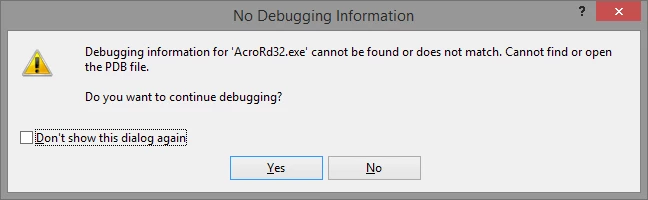
Of course I don't have PDB file of Acrobat's executable. So what do I have to do? Other question, the plugin have a lot of callbacks, can VS handle that?
Thanks,
Rodrigo Gonçalves.


 AdChoices