Participant
May 6, 2020
Answered

Javascipt to abort code and return to dialog box

  • May 6, 2020
  • 2 replies
  • 3453 views

Hello,


I am working on automating and preparing a form for digital signature. For prior military, I am referring to an nonjudicial punishment form. The form will be passed back and forth between a commander and a service member and they will add their intitials next options and then digitally sign. I have added a javascript code to execute onblur when the digital signature field is pressed. A dialog box appears and has the commander type his/her initials into one of two options. (I realize that I could use a radio button and it would slove my problems, but its the military and we require physically typing initials into the box). After the commander presses OK, a second window for the digital signature appears. A second javascript is then executed upon signature (from the signed tab) that places the date and time into particular readonly fields in certain blocks on the form (again I realize the digital signature has this information but this is the military and if the block isn't completed the form isn't legally sufficient).


What I am trying to do is create an alternative to a radio button with the text fields in the dialog box. I have written code in the onblur to ensure that only one of the fields has text in it (typing text in 1 field clears the other). Where I am running into trouble is ensuring that at least one of the blocks contains initials. I can't have the commander digitally sign if he/she doesn't add intitials to one of the blocks. I have an if statement after OK is pressed that will check to make sure that both variables are not empty. What I want to do is stop the script prevent it from running the digital signature window and either "cancel out" forcing the commander to click the digital signature field again (or better) go back to the dialog box for the commander to enter his/her initials. 


I have seen a prior post where this problem was circumented by adding a button and hiding the digital signature until the "validation" is performed, but the form doesn't provide the space for a button nor can I add buttons to the form.


Most appreciated if someone knows of a viable option. 


PS I am an JAG and not a programmer by trade so forgive me if my question is impossible based upon how the code is executing or if it is something a child should know.


Thanks,


Mike


My code is:


var Offer =
{

result:"cancel",
DoDialog: function(){return app.execDialog(this);},
strOpt1:"",
strOpt2:"",
initialize: function(dialog)
{
var dlgInit =
{
"Opt1": this.strOpt1,
"Opt2": this.strOpt2,
};
dialog.load(dlgInit);
},
commit: function(dialog)
{
var oRslt = dialog.store();
this.strOpt1 = oRslt["Opt1"];
this.strOpt2 = oRslt["Opt2"];
},

"Opt1": function(dialog)
{
dialog.load({
"Opt2": this.strOpt2,
});
},
"Opt2": function(dialog)
{
dialog.load({
"Opt1": this.strOpt1
});
},

description:
{
name: "Offer of NJP",
elements:
[
{
type: "view",
elements:
[
{
type: "view",
char_height: 10,
elements:
[
{
type: "static_text",
item_id: "sta1",
height: 48,
name: "Type your initials next to the appropriate action. Then press OK and you will be \nprompted to digitally sign the AF Form 3070. Note, Fields in sections 1c and 1e will \nlock upon digitally signing in Block 2.",
char_width: 15,
alignment: "align_fill",
font: "dialog",
},

{
type: "view",
height: 28,
char_width: 8,
char_height: 8,
align_children: "align_row",
elements:
[
{
type: "edit_text",
item_id: "Opt1",
width: 50,
char_width: 8,
},
{
type: "static_text",
item_id: "txt1",
name: "I am considering punishing you under Art 15, UCMJ.",
},
]
},
{
type: "view",
height: 28,
char_width: 8,
char_height: 8,
align_children: "align_row",
elements:
[
{
type: "edit_text",
item_id: "Opt2",
width: 50,
char_width: 8,
},
{
type: "static_text",
item_id: "txt2",
name: "I am considering having the following person punish you under Art 15, UCMJ.",
},
]
},
]
},
{
type: "ok_cancel",
},
{
type: "static_text",
item_id: "stat",
name: "Designed and Coded by Lt Col Michael Hopkins",
char_width: 15,
alignment: "align_fill",
font: "dialog",
},
]
},
]
}
};

// Example Code
Offer.strOpt1 = "";
Offer.strOpt2 = "";
if("ok" == Offer.DoDialog())
{

if(Offer.strOpt1 == "" && Offer.strOpt2 == ''" {

app.alert("You must type initials in one of the fields.");

//Need code to cancel out of script, stop the execution of the digital signature, and return to dialog box for user input.

}

else

{

this.getField("01_1a1").value=Offer.strOpt1;
this.getField("01_1a2").value=Offer.strOpt2;

if (Offer.strOpt1 != "") this.getField("01_1a2_Commander").value = "";

var fieldsToLock = ["01_1a2_Commander"];
for (var i in fieldsToLock) this.getField(fieldsToLock[i]).readonly = true;

}

};

 

This topic has been closed for replies.
Correct answer ls_rbls

+++ EDITED REPLY, FIXED SOME TYPOS


Hi,


It looks like in the governement the common name of the user, as it appears in the digital signature after it is applied, is taken from the Distinguished Name of the certificate.


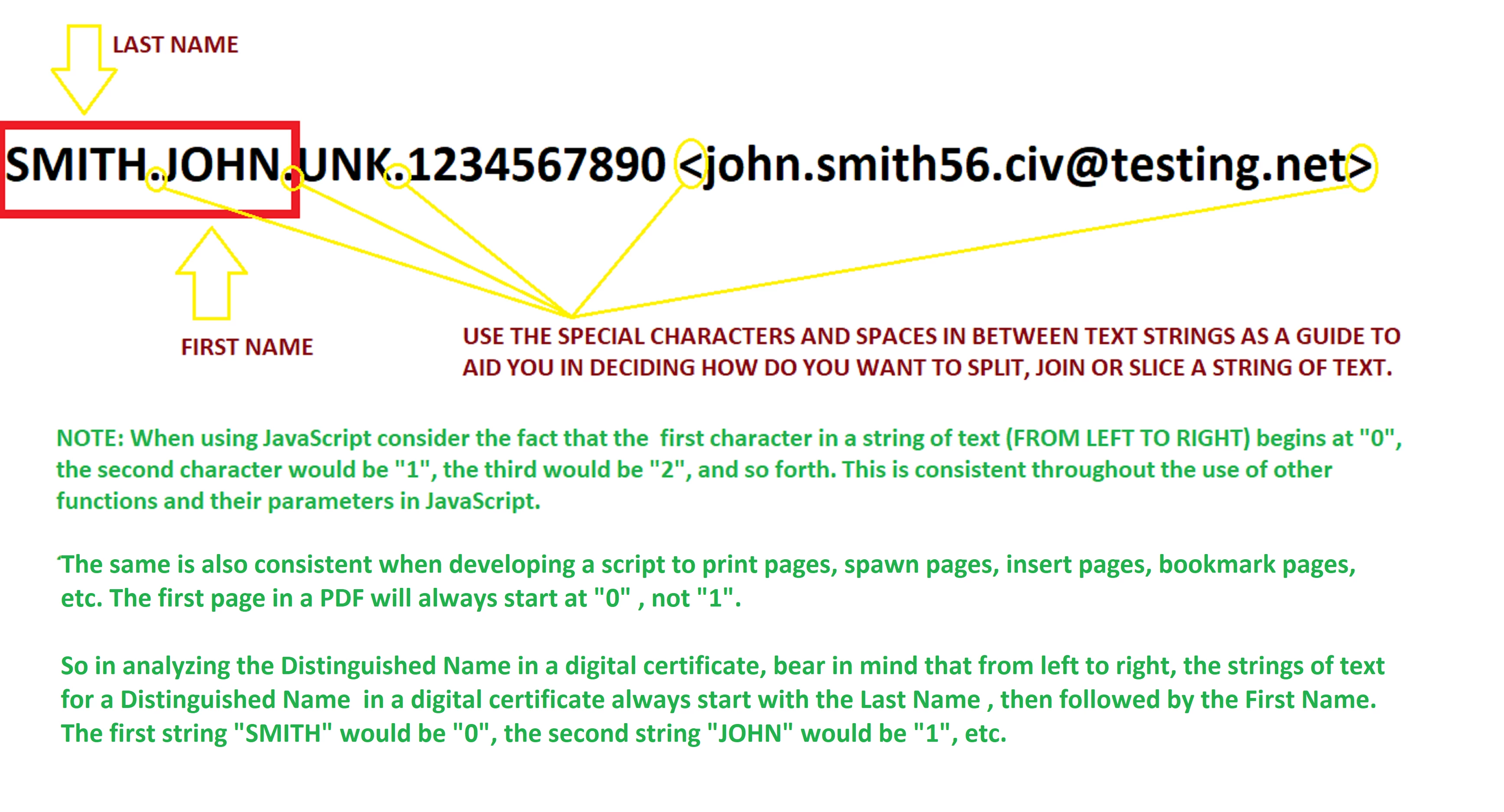
This makes things easier for us to figure out because when you get the value from cert.subjectDN.cn that is contained in sigInfo.certificates OR Info.name that is contained in signatureInfo you will get the same result : SMITH.JOHN.UNK .


If this wasn't the case, then when you extract this information to another text field it should read: John Unk Smith


The long answer to your issue is that you don't need to use an array to get this to work. Using the array method doesn't necessarily apply in your case because what you're dealing with is more related to international standards that are enforced with the use of digital signatures.


Some cultures use more than one first name, in other cultures the last name is also the surname, and in other cultures they have no last name at all.


The digital certificate standards that define the 'common name' schemas are not for the user(s) to choose a preferred method of signing, but an international standard as defined in RFC 1485 and the X.509 specifications for public key infrastructure certificates, cryptographic keypair association, and the Internet Engineering Task Force ( IETF ) Request For Comments (RFC) specifications.


These standards also encourage users to keep it as close as possible within the defined schemas of the international standards to aviod these problems when customizing a common name that will be used in a self-signed certificate.


For example, in order to get a specific string of text that is contained in a digital signing certificate, those special characters is what we use as guides to perform ".split" or ".join" methods from the Distinguished Name public component or from the user's identity key attributes.


Therefore, the employment of special characters, such as spaces (" "), dashes ("-"), periods(".") or less than / greater than ("<", ">") symbols, just make make our life easier.


See slide below:


See key attributes here: https://datatracker.ietf.org/doc/rfc1485/?include_text=1


Basics of Digital Certificates:
https://www.sites.google.com/site/ddmwsst/digital-certificates#TOC-CA-Hierarchy


Examples of key attributes:
http://certificate.fyicenter.com/717_Distinguished_Names_on_Certificates.html


Short Anwser:


You'll be fine just taking the first character strings from the First and Last name in order to compose the initials.


However, I did spotted some errors in my initial reply. Use the following instead:


var f = event.target;
var sigInfo = f.signatureInfo();
var cert = sigInfo.certificates[0];
var firstName = cert.subjectDN.cn.split(".")[1];
var lastName = cert.subjectDN.cn.split(".")[0];
   

//THIS LINE OF CODE WILL TRANSPOSE LAST AND FIRST NAME STRINGS

    this.getField("FULL NAME").value = cert.subjectDN.cn.split(".")[1]+" "+ cert.subjectDN.cn.split(".")[0];


//THIS LINE OF CODE WILL PULL THE INITIALS AS DECLARED IN THE firstName AND lastName VARIABLES ABOVE

    this.getField("INITIALS").value = (firstName.charAt(0)) + (lastName.charAt(0));


//THIS LINE WILL GET THE SAME DATE AS THE SIGNING TIME. IT WILL AVOID PROBLEMS WITH INCORRECT SYNCHRONIZATION BETWEEN THE SYSTEM CLOCK AND BROWSER TIME ZONES WHEN USING Info.date, USE new Date() INSTEAD

    this.getField("Date").value = util.printd ("yyyymmdd", new Date());


// AND THIS LINE WILL GET THE CORRECT TIME AS DISPLAYED IN THE SIGNED CERTIFICATE. AS MENTIONED THIS WILL AVOID TIME ZONE SYNCHRONIZATION PROBLEMS IF YOU USE Info.date. USE new Date() INSTEAD 

    this.getField("TIME").value = util.printd("hh:MM:ss", new Date());


//AND SOMETHING LIKE THIS SHOULD GET THE EMAIL BUT I MAY BE WRONG

      this.getField("EMAIL").value = Info.name.split(" <").join("<");


NOTE: These scripts should be executed as an action during signing time and only from the signature field. If you run these scripts independently on spearate text fields, keep in mind that  you'll need to include a signature status validation to meet a condition. The signature security properties of a blank signature field are different before a signature is applied on it,  it will change its status and also the properties of the signature field once the digital signature is applied and the document is saved.


Last, to resolve your other issue, about how the user will interact with the initial boxes, if you prefer to autopopulate the Initials text fields programatically, then you may want to consider an listening event with an on-click getAction method.


This would allow the user to click on the text fields to enter the initials but it will trigger the signature field. Signing the signature field will  populate the initials text field.


The trick is how to make this work when the user have to initial more that one text field before signing; but this is just another idea that then you should consider implementing with the array methods as explained in Thom Parker's excellent tutorials.


2 replies

ls_rbls
Community Expert
Community Expert
May 7, 2020

I forgot to add, that you need to set the properties of the date and the initials fields to readonly and lock those fields. This can also be done with a script.


These fields  will be autopopulated by the sign script and there is no need to have user intervention to fill them in.


To reset  these fields when the signature field is cleared, add a custom calculation script to each like so:


var s = this.getField("SignField").value;
if (s =="")  event.value="";


Just remember, this script can also be executed directly from the Signature field.

MikeGhotiAuthor
Participant
May 8, 2020

1s_rb1s,


Thanks for the reply. It was brilliant. I found Thom Parker's post (https://acrobatusers.com/tutorials/print/splitting-and-rebuilding-strings/) and using what you provided I was able to build the initials from the name. I was able to load them in an array and extract just the initials.Then I hit a snag that I don't think I can get around. I can't code it to account for hypenated last names and people with no middle initials. There is no consistency--some hyphenated last names use spaces, others are merged together, others have hyphens. For people with no middle name some list the middle as "UNK" (for unknown) such as SMITH.JOHN.UNK. There are just too many variables to account for by extracting from the signature name.


I greatly appreciate your thoughts and direction on this. 


Mike 

ls_rbls
Community Expert
ls_rblsCommunity ExpertCorrect answer
Community Expert
May 10, 2020

+++ EDITED REPLY, FIXED SOME TYPOS


Hi,


It looks like in the governement the common name of the user, as it appears in the digital signature after it is applied, is taken from the Distinguished Name of the certificate.


This makes things easier for us to figure out because when you get the value from cert.subjectDN.cn that is contained in sigInfo.certificates OR Info.name that is contained in signatureInfo you will get the same result : SMITH.JOHN.UNK .


If this wasn't the case, then when you extract this information to another text field it should read: John Unk Smith


The long answer to your issue is that you don't need to use an array to get this to work. Using the array method doesn't necessarily apply in your case because what you're dealing with is more related to international standards that are enforced with the use of digital signatures.


Some cultures use more than one first name, in other cultures the last name is also the surname, and in other cultures they have no last name at all.


The digital certificate standards that define the 'common name' schemas are not for the user(s) to choose a preferred method of signing, but an international standard as defined in RFC 1485 and the X.509 specifications for public key infrastructure certificates, cryptographic keypair association, and the Internet Engineering Task Force ( IETF ) Request For Comments (RFC) specifications.


These standards also encourage users to keep it as close as possible within the defined schemas of the international standards to aviod these problems when customizing a common name that will be used in a self-signed certificate.


For example, in order to get a specific string of text that is contained in a digital signing certificate, those special characters is what we use as guides to perform ".split" or ".join" methods from the Distinguished Name public component or from the user's identity key attributes.


Therefore, the employment of special characters, such as spaces (" "), dashes ("-"), periods(".") or less than / greater than ("<", ">") symbols, just make make our life easier.


See slide below:


See key attributes here: https://datatracker.ietf.org/doc/rfc1485/?include_text=1


Basics of Digital Certificates:
https://www.sites.google.com/site/ddmwsst/digital-certificates#TOC-CA-Hierarchy


Examples of key attributes:
http://certificate.fyicenter.com/717_Distinguished_Names_on_Certificates.html


Short Anwser:


You'll be fine just taking the first character strings from the First and Last name in order to compose the initials.


However, I did spotted some errors in my initial reply. Use the following instead:


var f = event.target;
var sigInfo = f.signatureInfo();
var cert = sigInfo.certificates[0];
var firstName = cert.subjectDN.cn.split(".")[1];
var lastName = cert.subjectDN.cn.split(".")[0];
   

//THIS LINE OF CODE WILL TRANSPOSE LAST AND FIRST NAME STRINGS

    this.getField("FULL NAME").value = cert.subjectDN.cn.split(".")[1]+" "+ cert.subjectDN.cn.split(".")[0];


//THIS LINE OF CODE WILL PULL THE INITIALS AS DECLARED IN THE firstName AND lastName VARIABLES ABOVE

    this.getField("INITIALS").value = (firstName.charAt(0)) + (lastName.charAt(0));


//THIS LINE WILL GET THE SAME DATE AS THE SIGNING TIME. IT WILL AVOID PROBLEMS WITH INCORRECT SYNCHRONIZATION BETWEEN THE SYSTEM CLOCK AND BROWSER TIME ZONES WHEN USING Info.date, USE new Date() INSTEAD

    this.getField("Date").value = util.printd ("yyyymmdd", new Date());


// AND THIS LINE WILL GET THE CORRECT TIME AS DISPLAYED IN THE SIGNED CERTIFICATE. AS MENTIONED THIS WILL AVOID TIME ZONE SYNCHRONIZATION PROBLEMS IF YOU USE Info.date. USE new Date() INSTEAD 

    this.getField("TIME").value = util.printd("hh:MM:ss", new Date());


//AND SOMETHING LIKE THIS SHOULD GET THE EMAIL BUT I MAY BE WRONG

      this.getField("EMAIL").value = Info.name.split(" <").join("<");


NOTE: These scripts should be executed as an action during signing time and only from the signature field. If you run these scripts independently on spearate text fields, keep in mind that  you'll need to include a signature status validation to meet a condition. The signature security properties of a blank signature field are different before a signature is applied on it,  it will change its status and also the properties of the signature field once the digital signature is applied and the document is saved.


Last, to resolve your other issue, about how the user will interact with the initial boxes, if you prefer to autopopulate the Initials text fields programatically, then you may want to consider an listening event with an on-click getAction method.


This would allow the user to click on the text fields to enter the initials but it will trigger the signature field. Signing the signature field will  populate the initials text field.


The trick is how to make this work when the user have to initial more that one text field before signing; but this is just another idea that then you should consider implementing with the array methods as explained in Thom Parker's excellent tutorials.


ls_rbls
Community Expert
Community Expert
May 7, 2020

Hey Mike,


I think you're complicating yourself too much.


You can get both the date and the distinguished name out of a digital certificate at signing time with this code:


var f = event.target;
var sigInfo = f.signatureInfo();
var cert = sigInfo.certificates[0];

	this.getField("Initials").value = cert.subjectDN.cn;
	this.getField("Date").value = util.printd ("yyyymmdd", Info.date);


If you notice the fifth and last line of code above, I used the  util.printd  method to format the output date to military format string.


Otherwise you'll get the long format which includes full year, month , day, and the Time with hours, minutes, seconds, and the UTC time zone, which is taken from the system clock at signature time.


So this aleviates that issue.


To get the last name and first name initials from the certificate's Distinguished Name, you're gonna need to use a combination of transposing strings and also using a .split  and .join methods as shown in the link below.


See here:   https://stackoverflow.com/questions/43192973/transpose-2-strings-in-an-array


I am posting that link because I haven't how to figure that one out yet. 


NOTE: To add the script that I posted, right-click on the signature field, select Properties from the context menu , and click on the "Sign" tab. Then tick the radio button below that says "Then tick This script executes when field is signed" and click on the "Edit" button to paste the script.