
Known Participant
May 18, 2020
Question

Looking for a JS to do multiple things

  • May 18, 2020
  • 1 reply
  • 730 views

I have the below on a form and I need a JS to make the following possible please:

If a term of 2 years or over is entered, I need tick box A to be ticked and the adjacent monetary field to be open

If a term of under 2 years is entered, tick box B needs to be ticked and its two field to be live while A is 'shut'

but... regardless of the term entered, the customer could chose 'additional customisation' in which case both A, B and C need to be ticked and the fields open.
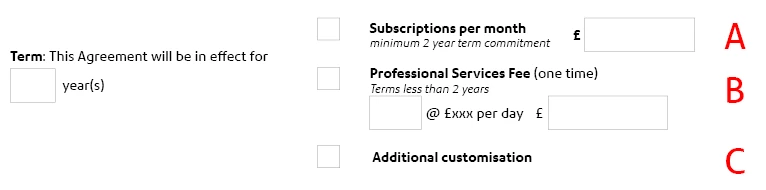


Thank you!

This topic has been closed for replies.

1 reply

BarlaeDC
Community Expert
Community Expert
May 18, 2020

Hi,


Assuming the fields are called as follows -


Checkboxes are nammed ( checkbox_a, checkbox_b, and checkbox_c)

The above two year text field is called AboveTwoYear

The less than two year text field is called LessThanTwoYear

And the Total one is called Total.


Then placing this script in the validate of the year(s) field should do what you want.


NOTE : I have note coded for non-numeric values being entered in the year(s) field, so anything that is entered would be treated as a number and this may lead to some unexpected responses, please let me know if you need that added.


if ( !this.getField("checkbox_c").isBoxChecked(0)) {
 if ( event.value < 2) {
    this.getField("checkbox_a").checkThisBox(0, false);
    this.getField("checkbox_b").checkThisBox(0, true);
    this.getField("checkbox_c").checkThisBox(0, false);
    this.getField("AboveTwoYear").readonly = true;
    this.getField("LessThanTwoYear").readonly = false;
    this.getField("Total").readonly = false;
 } else {
    this.getField("checkbox_a").checkThisBox(0, true);
    this.getField("checkbox_b").checkThisBox(0, false);
    this.getField("checkbox_c").checkThisBox(0, false);
    this.getField("AboveTwoYear").readonly = false;
    this.getField("LessThanTwoYear").readonly = true;
    this.getField("Total").readonly = true;
  } 
}


Then is you add this code to checkbox_c under the "Mouse Up" ->  "Run a JavaScript"


if ( this.getField("checkbox_c").isBoxChecked(0)) {
this.getField("checkbox_a").checkThisBox(0, true);
this.getField("checkbox_b").checkThisBox(0, true);
this.getField("AboveTwoYear").readonly = false;
this.getField("LessThanTwoYear").readonly = false;
this.getField("Total").readonly = false;
}

This code will check checkboxes A and B, and mark the other fields as not readonly.


Hope this helps, please feel free to post any follow up questions


Malcolm

jlehaneAuthor
Known Participant
May 18, 2020

Hi Malcolm

Thanks for your reply. It works great but I don't think I explained myself very well - sorry. If the fields aren't in use, then they need to be hidden, not readonly. As you can see below, if a figure is entered in A and then B is chosen, the figure stays in the box.

All boxes need to be editible if C is chosen. Hope that makes sense!


BarlaeDC
Community Expert
Community Expert
May 19, 2020

Hi,


No problem just change the readonly lines from


this.getField("Total").readonly = false;

TO

this.getField("Total").display = display.hidden;


And the readonly = true to display.visible.


Regards


Malcolm