
Participating Frequently
October 9, 2020
Answered

Needs average of four columns of fields but ignore zeros

  • October 9, 2020
  • 5 replies
  • 1622 views

I have a form with four individual columns that need an average calculated, but with the zeros ignored.  Below is what it looks like.  The fields in each column are either E.  R2.  R3.  R4., wish sequential numbers after each dot. The averages need to calculate in the DLA  row. (Keep in mind this page two, there are numbers on the other, bringing up the sum at the bottom). 
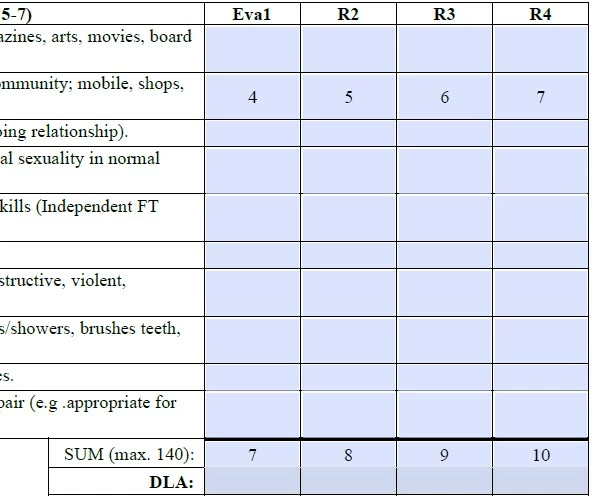


I've come across different codes but I am understanding they have to be a document level. How do I do that when I need four different averages? 


This is what I have found. Document-level script: 


function calcAverage(aFields, bIgnoreBlanks, bIgnoreZeros) {

    var total = 0;

    var n = 0;

    for (var i in aFields) {

        var f = this.getField(aFields);

        if (f==null) {

            console.println("Error! Can't locate a field called: " + aFields);

            continue;

        }

        if (f.valueAsString=="" && bIgnoreBlank) continue;

        var v = Number(f.valueAsString);

        if (isNaN(v)) continue;

        if (v==0 && bIgnoreZeros) continue;

        total+=v;

        n++;

    }

    if (n==0) event.value = "";

    else event.value = total/n;

}


Then for the DLA boxes, I am guessing I am supposed to run this script, but I am not sure how to write my form field names. For the first column, would it only "R1"?

calcAverage(["Knowledge1", "Knowledge2", "Knowledge3", "Knowledge4", "Knowledge5", "Knowledge6"], true, true);


So, questions - are these the correct scripts I need to be using and how do I make it work for my document? I have basic knowledge of JS. I really just need someone to tell me what to put and where to put it, and what I need to replace with my field names. Please and thank you so much! 

This topic has been closed for replies.
Correct answer ls_rbls

On second thought,


If you're still looking to use document-level script this is how I am using it in my PDFs


// USE THIS FUNCTION AS  DOCUMENT LEVEL SCRIPT TO GET THE AVERAGE USING THE  "getArray()"  METHOD

function calcAverage(aNumFields) {
sum = 0;
for (j =0; j < aNumFields.length; j++) sum += aNumFields[j].value;
event.value = util.printf("%0.2f",  sum/aNumFields.length);
}


// CALL THE FUNCTION FROM THE TOTAL AVERAGE DLA FIELDS THAT CORRESPOND TO EACH COLUMN

//This will get the average of all Eval1 children fileds
var f = this.getField("E");
calcAverage(aNumFields);

//This will get the average of all R2 children fileds 
var f = this.getField("R2");
calcAverage(aNumFields);

//This will get the average of all R3 children fileds
var f = this.getField("R3");
calcAverage(aNumFields);

//This will get the average of all R4 children fileds 
var f = this.getField("R4");
calcAverage(aNumFields);


//You can also rename the same  function and slighlty modify it to totalize the SUM of all the values in the "SUM (max. 140)" fields

function calcSUM(aNumFields) {
sum = 0;
for (j =0; j < aNumFields.length; j++) sum += aNumFields[j].value;
event.value = sum;
}

// THEN CALL THE FUNCTION FROM THE TOTAL  "SUM (max. 140)"  FIELDS THAT CORRESPOND TO EACH COLUMN

//This will get the SUM of all Eval1 children fileds
var f = this.getField("E");
calcSUM(aNumFields);

//This will get the SUM of all R2 children fileds
var f = this.getField("R2");
calcSUM(aNumFields);

//This will get the SUM of all R3 children fileds
var f = this.getField("R3");
calcSUM(aNumFields);

//This will get the SUM of all R4 children fileds
var f = this.getField("R4");
calcSUM(aNumFields);


Is very simple.


I am also learning Acrobat JavaScript so I always approach the problem as simple as possible. And like I mentioned before, since you already have the children  field names organized with an indexed hierarchy,  the getArray()  method works perfectly in this particular case. It also minimize the use of unnecessary conditional statements.


To recap, my example above assumes that  all "E" fields fall in the same column for "Eval1" , for example. And the same assumption for the R2, R3, R4 children fields under those columns.

5 replies

try67
Community Expert
Community Expert
December 3, 2021

To anyone who finds this code, there's a small mistake in it.

Change this line:

if (f.valueAsString=="" && bIgnoreBlank) continue;

To:

if (f.valueAsString=="" && bIgnoreBlanks) continue;

ls_rbls
Community Expert
ls_rblsCommunity ExpertCorrect answer
Community Expert
October 10, 2020

On second thought,


If you're still looking to use document-level script this is how I am using it in my PDFs


// USE THIS FUNCTION AS  DOCUMENT LEVEL SCRIPT TO GET THE AVERAGE USING THE  "getArray()"  METHOD

function calcAverage(aNumFields) {
sum = 0;
for (j =0; j < aNumFields.length; j++) sum += aNumFields[j].value;
event.value = util.printf("%0.2f",  sum/aNumFields.length);
}


// CALL THE FUNCTION FROM THE TOTAL AVERAGE DLA FIELDS THAT CORRESPOND TO EACH COLUMN

//This will get the average of all Eval1 children fileds
var f = this.getField("E");
calcAverage(aNumFields);

//This will get the average of all R2 children fileds 
var f = this.getField("R2");
calcAverage(aNumFields);

//This will get the average of all R3 children fileds
var f = this.getField("R3");
calcAverage(aNumFields);

//This will get the average of all R4 children fileds 
var f = this.getField("R4");
calcAverage(aNumFields);


//You can also rename the same  function and slighlty modify it to totalize the SUM of all the values in the "SUM (max. 140)" fields

function calcSUM(aNumFields) {
sum = 0;
for (j =0; j < aNumFields.length; j++) sum += aNumFields[j].value;
event.value = sum;
}

// THEN CALL THE FUNCTION FROM THE TOTAL  "SUM (max. 140)"  FIELDS THAT CORRESPOND TO EACH COLUMN

//This will get the SUM of all Eval1 children fileds
var f = this.getField("E");
calcSUM(aNumFields);

//This will get the SUM of all R2 children fileds
var f = this.getField("R2");
calcSUM(aNumFields);

//This will get the SUM of all R3 children fileds
var f = this.getField("R3");
calcSUM(aNumFields);

//This will get the SUM of all R4 children fileds
var f = this.getField("R4");
calcSUM(aNumFields);


Is very simple.


I am also learning Acrobat JavaScript so I always approach the problem as simple as possible. And like I mentioned before, since you already have the children  field names organized with an indexed hierarchy,  the getArray()  method works perfectly in this particular case. It also minimize the use of unnecessary conditional statements.


To recap, my example above assumes that  all "E" fields fall in the same column for "Eval1" , for example. And the same assumption for the R2, R3, R4 children fields under those columns.

ls_rbls
Community Expert
Community Expert
October 9, 2020

You don't necessarily need a document-level script for this to work since you can run a custom calculation script on each of the DLA averaging fields.


The script that you found since to be a modification of a script example that is provided  in the Adobe Acrobat DC SDK Using JavaScript in Forms,  Developing Acrobat® Applications Using JavaScript™ , "Task-based topics", on page 85


The most important detail is that you already created  parent field name and broke it down hierarchically with its children fields.


For example, "Eval1" is the parent name, and the children names are pre-fixed by the parent name and indexed in a hierarchy like "Eval1.0", "Eval1.1", "Eval1.2", etc. This makes it easier to run a script as defined in the link I provided above where you get an array of fields to perform a custom calculation based on the values of each field through an array.


This is explained the getArray() section with the first example on Page 146 of the Adobe Acrobat SDK JavaScript, API JavaScript™ for Acrobat® API Reference, "Field methods"


So for the DLA total of the Eval1 average field you can use something like this (which worked good on my end):


var f = this.getField("Eval1");
var aNumFields = f.getArray();

sum = 0.0;
for (j =0; j < aNumFields.length; j++) sum += aNumFields[j].value;
// sum contains the sum of all the children fields prefixed as "Eval1"

var n =  sum/aNumFields.length;
// var n calculates the average


event.value = util.printf("%0.2f", n);
//util.printf formats the total in this field to 2 decimals to the right of the period and rounds off the total number


ls_rbls
Community Expert
Community Expert
October 9, 2020

Sorry guys.


Seems like I was typing my long verbage answer at the same time as Try67 and Karl.


Please disregard. 

Karl Heinz  Kremer
Community Expert
Community Expert
October 9, 2020

You would call this script from the custom calculation script of your respective DLA field. Let's say you are working on E.DLA (we don't know what your naming convention for the DLA fields are, so I just assume that's the average field for the E column). 

You would call it with all field names that you want to average in a field array as you've shown in the example. I don't know how many rows you have, so let's assume it's 30, you would need to create an array with these 30 field names, and then call the script:

var fieldArray = [];
for (var i=0; i<30; i++) {
    fieldArray.push("E." + i);
}
calcAverage(fieldArray, true, true);


If you have a different number of rows, you need to edit the for expression. 


You would add something corresponding to all four DLA fields. 

Participating Frequently
October 9, 2020

There are 20 rows. So, in each of the DLA fields it would look something like this? This is for the first eval column: 


var fieldArray = [E];

for (var i=0; i<20; i++) {

         fieldArray.push(E + i);

}

calcAverage(E, true, true);


Karl Heinz  Kremer
Community Expert
Community Expert
October 9, 2020

Your script is different from what I posted. Use my script. You don't have to make any changes for the "E" column, just for the ohter three columns. Are your fields named E.0 ... E.19 or E.1 ... E.20? My script assumes the first case. If it's the second, the for loop need to be changed:


for (var i=1; i<=20; i++) {


try67
Community Expert
Community Expert
October 9, 2020

Yes, this is the correct script to use (which I wrote, by the way!)...


You need to place the function part in a doc-level script (Tools - JavaScript - Document Scripts), and the call to it as the custom Calculation script of your Average field. If your field names are R1, R2, etc. then change that call to:

calcAverage(["R1", "R2", "R3", "R4"], true, true);

That's all there is to it.

Participating Frequently
October 9, 2020

Thank you for responding so quickly! You are always so helpful!


So, I input the document script above as it is written at the document level. Then I only need the average of each column not a total of all of four columns, so I tried that calculation script in one of the DLA text fields, but only used "R1" and it didn't work. Then I created a separate field with a calculation script as you have it written above, and nothing happened. I must be doing something wrong but I can't figure it out. Do I need to change out any of the names in the document level script with my fields? aFields means all fields, yes?