
Notallowed signaturesign javascript DC Reader
Hi,
I have been using a custom javascript I wrote for years on Acrobat Pro 6. It also works on Acrobat Standard X but I have not been able to get it work on Acrobat Reader DC.
The javascript finds a location for a signature field, creates the field, then signs it with a Digital Certificate Signature.
everytime the code gets to
field.signatureSign
The console gives a Notallowed security error. I already have a trusted function etc (this all worked in Acrobat X) but cannot get it to work in DC Reader.
After it errors, I can click on the signature field with my mouse and Reader DC pops up up the sign dialog and I can then sign the file, so reader is working with the digital ID, is able to sign the documents etc, but not from javascript?
Can anyone tell me whats different, is this a function not available in Reader?
Can anyone confirm they can get Adobe Reader DC to field.signatureSign in javascript correctly
Code section below, it is "C:\Program Files (x86)\Adobe\Acrobat Reader DC\Reader\Javascripts\DigSigJC.js"
Note: Calling it config.js makes no difference.
// Adds signature to document and saves
function sign_document(operation)
{
	var field = this.addField({cName:'Signature', cFieldType:'signature', nPageNum:0, oCoords:[0,0,0,0]}); // Creates Signature Field
	field.rect=[320,75,375,60];
    trusted_signature(field); // Add signature to field
    app.execMenuItem('Save',this); // Save document
}
// Trusted operation to perform signing
var trusted_signature =app.trustedFunction(function(field)
{
	app.beginPriv();
		var sig = {appearance:'Approved',reason:'Approved for Manufacture',mdp:'allowNone'};
		var sec = security.getHandler('Adobe.PPKLite', false);
                // List all the available signature handlers
		//for (var i=0; i<security.handlers.length; i++)
		//	console.println(security.handlers[i]);
                //sec.login({bUI:true}); Makes no difference
		//console.println("isLoggedIn="+sec.isLoggedIn);
		field.signatureSign({oSig: sec, oInfo: sig, bUI: false});
	app.endPriv();
});
I also have the following javascript settings, but have tried them all to no avail.
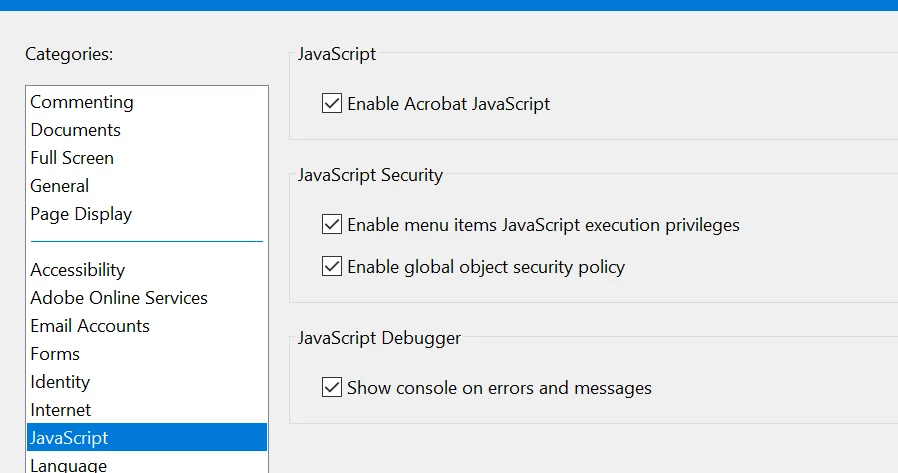
Any help greatly appreciated.
John.


 AdChoices