Participant
November 7, 2020
Answered

Pass a value depending on radio button selected to the subject line

  • November 7, 2020
  • 1 reply
  • 1240 views

I have 4 radio buttons with a button style as a check

Group name Shipping

radio button choices

Non-Emergency Parts Order1

Standard Overnight1

Priority Overnight1

2nd Day Air1


What I would like to do is this:

If the radio button selected is "Non-Emergency Parts Order1"

then a field value of "EmerText" will be null

if it is any of the other 3 then  "EmerText" will have a value of 'Rush"


I will then put the "Emertext" on the sujext line as follows

var subjectLine = EmerText + "D"+this.getField("District Office #").valueAsString + " " +this.getField("Customer name").valueAsString + " SR " + this.getField("Original SR #").valueAsString;


Following is the code I have. Issue is that it is not null when I chose "Non-Emergency Parts Order1"

Please help

var EmerText = this.getField("shipping");

if(event.target.value=="Non-Emergency Parts Order1") {
EmerText="";
} else {
EmerText="!!Rush ";
}


thanks


This topic has been closed for replies.
Correct answer ls_rbls

I appreicate the help. Below is a section of the form where I currently have check boxes.

I want to move to radio button so that only 1 can be selected. 

The javascript works with check boxes. 

I'm looking to see how I can capture the value of the selected radio button

radio group shipping

radio1 Choice Non-Emergency Parts Order
radio 2 Choice Standard Overnight
radio 3 Choice Priority Overnight
radio 4 Choice 2nd Day Air
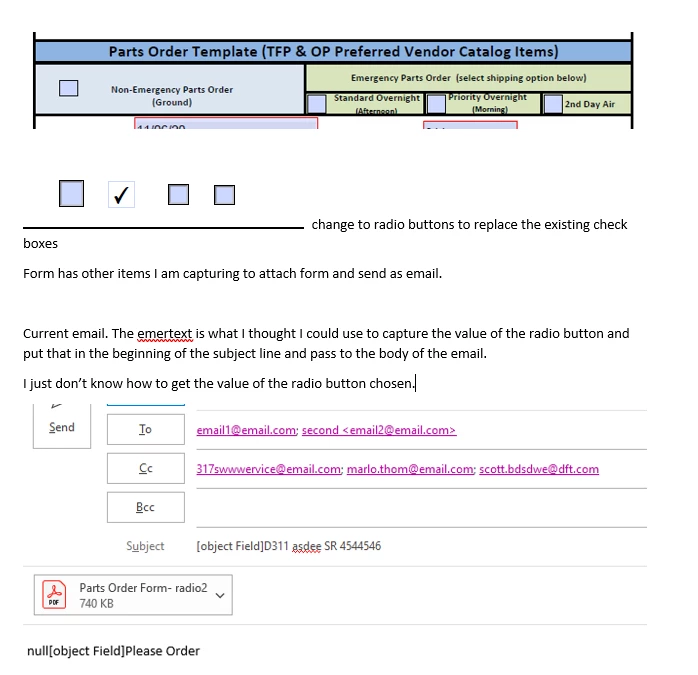
 

Summary:

Change check box to radio button option so people can only select one. I still want the form to show a checkbox.
Radio button names
Non-Emergency Parts Order
Standard Overnight
Priority Overnight
2nd Day Air
For the subject in the email:
If the radio button selected is: [Non-Emergency Parts Order]
Subject will read “D [district #] [customer name] SR [number]”
If the radio button selected is any of the other three:
Standard Overnight
Priority Overnight
2nd Day Air
Subject will read “ !!Rush - D [district #] [customer name] SR [number]”


Thank for taking the time to explain your project.


Now that you broke it down like that it was a lot easier to figure this all out.


What I did in the form was to implement a Button with a JavaScript Mouse-up action event.


I also spotted some errors on you spelled one of the variables for the customer name field.


The variable had a sapce "customer name" and this is probably why the original script wasn't loading the emailing part, so I renamed it to "customerName".


This is the script that is working on my end,  and I am also attaching a copy of the PDF so you can test and see how all the field objects interact with each other:


// DECLARE THE VARIABLES

var EmerText = "Non-Emergency Parts Order";

var ship = this.getField("shipping");

var district = this.getField("district").valueAsString; 

var customerName = this.getField("customer name").valueAsString; 

var serialNum = this.getField("SR number").valueAsString; 

var toAddress = "email1@email.com; second email2@email.com";

var ccAddress = "317swwwervice@email.com; marlo.thom@email.com; scott.bdsdwe@dft.com";

var msgBody = this.getField("shipping").value + " Please Order";


// ESTABLISH AN IF / ELSE / IF CONDITION

    if (ship.value == EmerText) {

   this.mailDoc({cTo: toAddress, cCc: ccAddress, cSubject: "D "+"["+district+"] "+"["+ customerName+"] "+"["+serialNum+"]", cMsg:"D "+ msgBody})

   this.calculateNow();

} else {

   if (ship.value !== EmerText) {

  this.mailDoc({cTo: toAddress, cCc: ccAddress, cSubject: "!!Rush - D "+"["+district+"] "+"["+ customerName+"] "+"["+serialNum+"]",  cMsg: "!!Rush - D "+msgBody})

  this.calculateNow();

  }
}


Here's a copy of the file:  Parts Order Template Test PDF 


NOTE: You may want to add an additional button to reset the form or just the radio buttons.

1 reply

ls_rbls
Community Expert
Community Expert
November 7, 2020

Maybe like this?


var EmerText = this.getField("shipping");


if (event.value !=="") {

if (event.target.value === "Non-Emergency Parts Order1") { 

EmerText.value ="";

} else {

EmerText.value ="!!Rush ";

  }
}

Mario5FAAAuthor
Participant
November 8, 2020

Thank you however this does not allow the email to open

ls_rbls
Community Expert
Community Expert
November 8, 2020

Sorry, unless I misunderstood everything in your inquiry, I was not aware that when you said 


"I will then put the "Emertext" on the sujext line as follows var subjectLine = EmerText + "D"+this.getField("District Office #").valueAsString + " " +this.getField("Customer name").valueAsString + " SR " + this.getField("Original SR #").valueAsString;"


that you were actually asking for a script to handle the automation of an email.


But in any case,  I did a mistake in the previous code.


The code below is a custom calculation script to be run from the textfield where you want to populate with the values of the radio buttons.


What I did , I created a group of mutually exclusive radio button (all with the  same name of "shipping" but different export values on each one.


 I assigned an export value of "Non-Emergency Parts Order1" (without the quotes) only on the first radio button. Every other radio buttons' export value are just "Choice2", "Choice3", "Choice4", etc.


var EmerText = this.getField("shipping");

if (EmerText.value !=="Off") {

if (EmerText.value == "Non-Emergency Parts Order1") { 

event.value ="";

} else {

event.value ="!!Rush ";

  }
}


The script I corrected is meant to answer this part of your inquiry:


"Following is the code I have. Issue is that it is not null when I chose "Non-Emergency Parts Order1"

Please help

var EmerText = this.getField("shipping");

if(event.target.value=="Non-Emergency Parts Order1") {
EmerText="";
} else {
EmerText="!!Rush ";
} "