
Problem with creating a dialog for Dynamic stamp
Hi all,
I am trying to adapt a JavaScript code provided here and change it to suit my needs. Looking at screenshot below, I need to click on drop-down menu (shown as item number 1), select Other from the listed options, and upon selecting Other, a new textbox to appear at location shown with number 2.
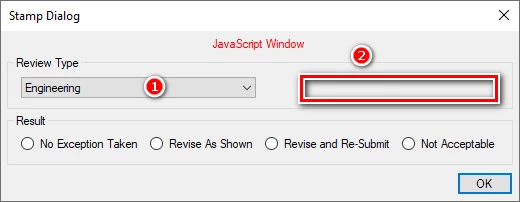
Here is my code at which the CreateDialog function does not seem to work:
// GLOBAL JAVASCRIPT SECTION FOR CUSTOMIZATION
var builder =
{
textBoxes :
[
{ field:"OtherText", description:"Type it here then:", default:function() { return ""; } }
],
// This maps to a Popup Group in the PDF named 'Review Type'
popupGroup: "Review Type",
listItems : [{
RevW :
{//list of items of Popup menu, positive number indicates default selection
"Engineering": +1,
"Sample": -2,
"Shop Drawing": -3,
"Other": -4
}
}
],
// This maps to a Radio Group in the PDF named 'Result'
radioGroup : "Result",
radioButtons :
[
// value maps to the 'Choice' of each radio button in the group, description will show on the dialog
{ value:"No Exception Taken", description:"No Exception Taken" },
{ value:"Revise As Shown", description:"Revise As Shown" },
{ value:"Revise and Re-Submit", description:"Revise and Re-Submit" },
{ value:"Not Acceptable", description:"Not Acceptable" }
],
radioErrorMsg : "Please select a Result"
}
//================================================
//End Var
//================================================
//And here's the javascript contained in a hidden calculations field on the stamp:
if ((event.source.forReal)&&(event.source.stampName == "#SCG Stamps"))
{
var stampDialog = CreateDialog(builder);
app.execDialog(stampDialog);
if (stampDialog.popupSelection != "Other")
this.getField("ReviewType").value = stampDialog.popupSelection;
else
this.getField("ReviewType").value = stampDialog.textBoxResults[0];
this.getField("Verdict").value = stampDialog.radioSelection;
this.getField("ReviewerName").value = identity.loginName.substring(0,1).toUpperCase() + ". " + identity.loginName.substring(2,1).toUpperCase() + identity.loginName.substring(2);
this.getField("ReviewDate").value = util.printd("dd mmmm yyyy", new Date());
}
//================================================
//================================================
//================================================
//================================================
function CreateDialog(dialogBuilder)
{
var StampDialog = new Object();
StampDialog.builder = dialogBuilder;
StampDialog.popupSelection = "";
StampDialog.textBoxResults = new Array();
StampDialog.radioSelection = "";
//================================================
var DropDownElemnt = new Array();
DropDownElemnt[0] =
{
type: "popup",
item_id: "RevW",
field: StampDialog.builder.popupGroup,
width: 250
};
//================================================
var OtherTextElements = new Array();
var view = new Object();
view.type = "view";
view.align_children = "align_row";
view.elements = new Array();
var e = new Object();
e.type = "edit_text";
e.item_id = "edt0" ;
e.width = 250;
view.elements[0] = e;
OtherTextElements[0] = view;
var ReviewTypeCluster =
{
type: "cluster",
name: "Review Type",
alignment: "align_center",
align_children: "align_distribute",
elements:
[
DropDownElemnt,
OtherTextElements
]
};
//================================================
var verdictElements = new Array();
for (var i = 0; i < dialogBuilder.radioButtons.length; ++i)
{
var c = dialogBuilder.radioButtons;
verdictElements =
{
type: "radio",
name: c.description,
item_id: "rad" + i,
group_id: "grp1"
};
}
var verdictCluster =
{
type: "cluster",
name: "Result",
alignment: "align_center",
align_children: "align_distribute",
elements: verdictElements
};
//================================================
//================================================
StampDialog.initialize = function(dialog)
{
var init = new Object();
for (var i = 0; i < this.builder.textBoxes.length; ++i)
{
var t = this.builder.textBoxes;
var id = "edt" + i;
init[id] = t.default();
}
dialog.load(init);
dialog.load(this.builder.listItems[0]);
};
//================================================
//================================================
StampDialog.commit = function(dialog)
{
var res = dialog.store();
for (var i in res["RevW"])
if (res["RevW"] >0)
{
this.popupSelection = i;
}
for (var i = 0; i < this.builder.textBoxes.length; ++i)
{
var t = this.builder.textBoxes;
var id = "edt" + i;
this.textBoxResults = res[id];
}
for (var i = 0; i < this.builder.radioButtons.length; ++i)
{
var c = this.builder.radioButtons;
var id = "rad" + i;
if (res[id] == true)
{
this.radioSelection = c.value;
break;
}
}
};
//================================================
//================================================
StampDialog.validate = function(dialog)
{
var res = dialog.store();
for (var i = 0; i < this.builder.radioButtons.length; ++i)
{
var c = this.builder.radioButtons;
var id = "rad" + i;
if (res[id] == true)
return true;
}
app.alert(this.builder.radioErrorMsg);
return false;
};
//================================================
//================================================
StampDialog.description =
{
name: "Stamp Dialog",
elements:
[
{
type: "view",
align_children: "align_fill",
elements:
[
ReviewTypeCluster,
verdictCluster
]
},
{
type: "ok"
}
]
};
return StampDialog;
}
And here are my stamp fields:
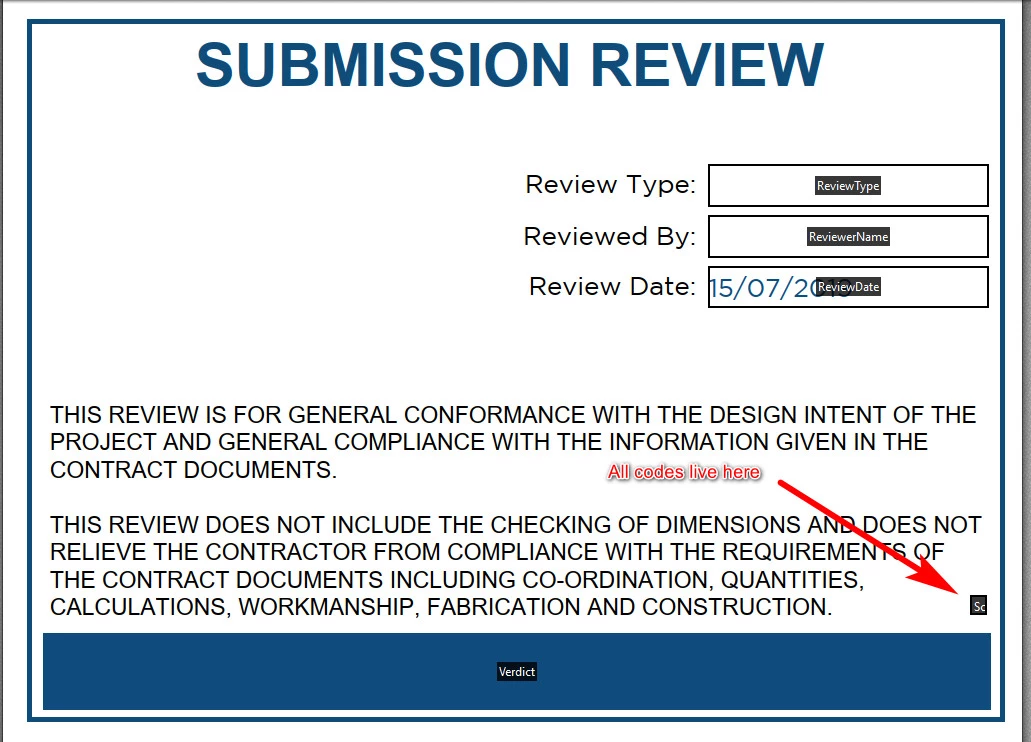
Can I ask for someone to have a look and tell me what is wrong with it ?!


 AdChoices