
joshuab76782683
Participating Frequently
March 21, 2019
Answered

summation based on criteria

  • March 21, 2019
  • 2 replies
  • 1032 views

Hi Guys,

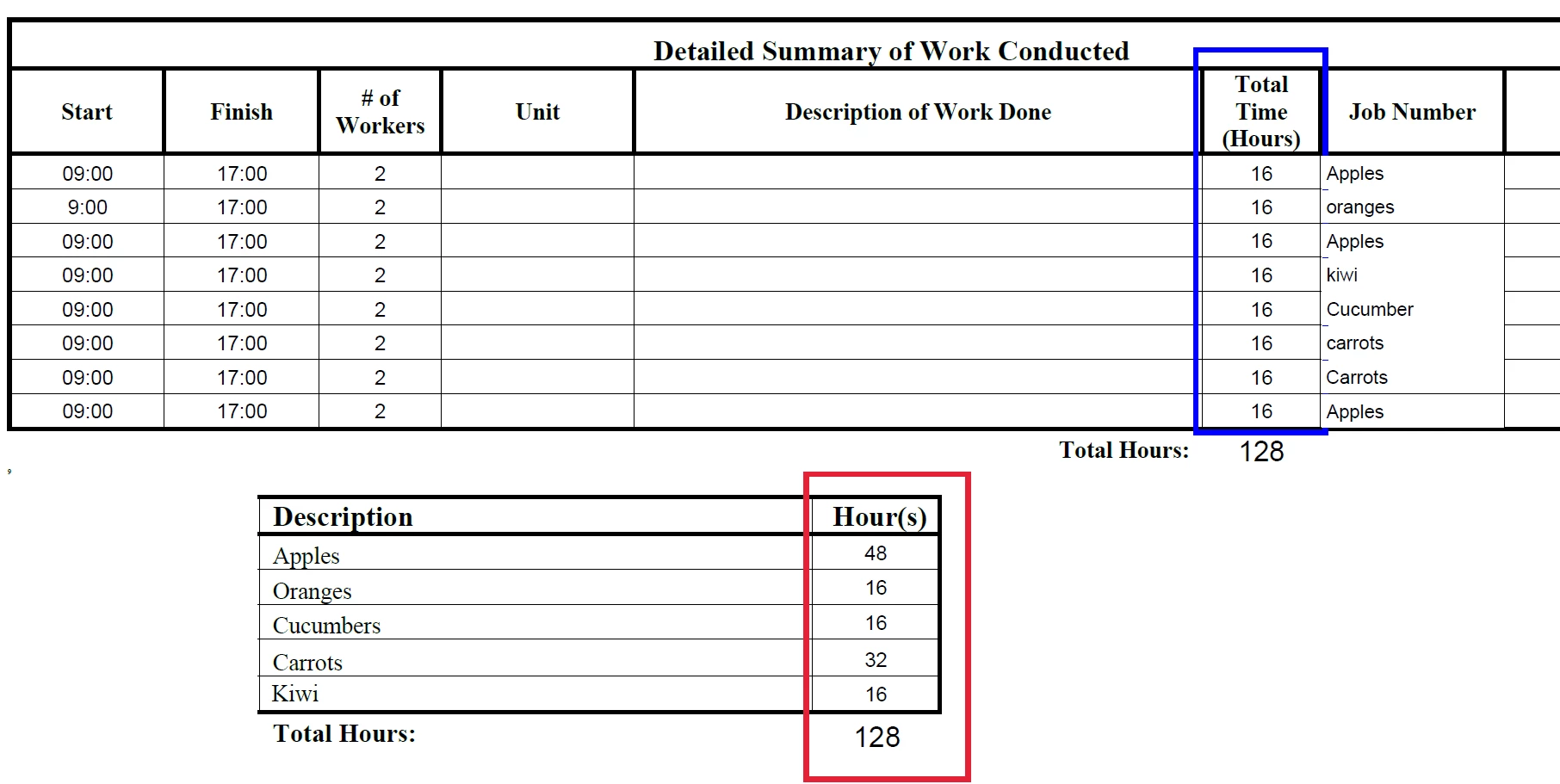
I have a question. I am trying to write a script with no success that sums up different cells based on their Job titles as shown in the picture below.

I Need the Hour(s) column highlighted in red to get its value from the sum in column highlighted in blue based on the job number.

example: all the "Apples" job number to be summed and displayed in the Hour(s) column highlights in red.

in excel it would be something like this. (JobNumber and Totaltime would be the cell range)

Apple Hours = SUMIF(JobNumber[0],"Apples",TotalTime(Hours)[0])

Sumif(Range, Criteria, [sum_range])
This topic has been closed for replies.
Correct answer try67

I recommend you give the fields consistent names. It will make writing the script much easier.

Let's say the job fields start from "Job Number 1.0" and go to "Job Number 1.7", just like the Total Hours fields.

In that case you would be able to use this code as a doc-level script:

function calcJobHours(jobNumber) {

    var total = 0;

    for (var i=0; i<=7; i++) {

        if (this.getField("Job Number 1."+i).valueAsString==jobNumber)

            total+=Number(this.getField("Total Time 1."+i).valueAsString);

    }

    event.value = total;

}

You can then call it from the custom calculation event of the total hours per job fields, like this:

calcJobHours("A101");

Or:

calcJobHours("A105");

etc.

2 replies

joshuab76782683
Participating Frequently
March 21, 2019

Job Fields:

"Job Number 1.1"

"Job Number 1.2"

"Job Number 1.3"

"Job Number 1.4"

"Job Number 1.5"

"Job Number 1.6"

"Job Number 1.7"

"Job Number 1.8"

Total Hours Fields:

"Total Time 1.0"

"Total Time 1.1"

"Total Time 1.2"

"Total Time 1.3"

"Total Time 1.4"

"Total Time 1.5"

"Total Time 1.6"

"Total Time 1.7"

Total hours done on the job Fields:

"A101"

"A105"

"A111"

This what your asking for? I'm not the greatest with Javascript, it's a learning process for me.

(Worse case you can make up names of the fields for the script and I can break it down and insert the changes I need to make it work.)

try67
Community Expert
try67Community ExpertCorrect answer
Community Expert
March 21, 2019

I recommend you give the fields consistent names. It will make writing the script much easier.

Let's say the job fields start from "Job Number 1.0" and go to "Job Number 1.7", just like the Total Hours fields.

In that case you would be able to use this code as a doc-level script:

function calcJobHours(jobNumber) {

    var total = 0;

    for (var i=0; i<=7; i++) {

        if (this.getField("Job Number 1."+i).valueAsString==jobNumber)

            total+=Number(this.getField("Total Time 1."+i).valueAsString);

    }

    event.value = total;

}

You can then call it from the custom calculation event of the total hours per job fields, like this:

calcJobHours("A101");

Or:

calcJobHours("A105");

etc.

joshuab76782683
Participating Frequently
March 22, 2019

Hi,

Thanks, but when I insert this coding into acrobat it says there's an error.

SyntaxError: Missing formal parameter 1: at line 2

try67
Community Expert
Community Expert
March 21, 2019

What are the names of the Total Time and Job Number fields?

joshuab76782683
Participating Frequently
March 21, 2019

I have created a table to give a better representation. I hope this clarifies a bit more.

TABLE 1

DateHoursJob Number
Monday10A101
Tuesday5A105
Wednesday30A111
Thursday3A101
Friday25A111
Saturday23

A105

TABLE 2

Job NumberTotal Hours Done on the Job
A101= SUM hours from "Hours" column if Job Number in Column "Job Number" contains A101 (Monday Hours + Thursday Hours gives a total of 13 hours)
A105= SUM hours from "Hours" column if Job Number in Column "Job Number" contains A105 (Tuesday Hours + Saturday Hours gives a total of 28 hours)
A111= SUM hours from "Hours" column if Job Number in Column "Job Number" contains A111 (Weds Hours + Friday Hours gives a total of 55 hours)
try67
Community Expert
Community Expert
March 21, 2019

I understood the request, but in order to help you with the code for it I need to know the names of the fields...
