

lauriek21601
Participant
July 19, 2016
Answered

Unable to edit PDF with Adobe Acrobat Standard DC

  • July 19, 2016
  • 5 replies
  • 3244 views

Good Morning,

One of my users is trying to edit a PDF that does not currently have recognizable text. I understand that if none of the text is recognized you are unable to edit it until you run OCR.

Although from my understanding with Adobe Acrobat DC after choosing "Edit PDF" Acrobat should automatically recognize the text on the first page to make it editable, although for my user after choosing "Edit PDF" they receive this error message:
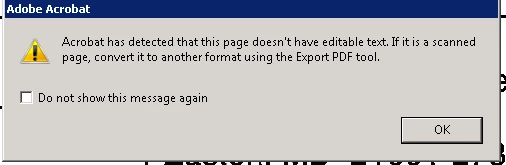
If I try the same process with the same document on Adobe Acrobat PRO DC the program will automatically recognize the first page and make it editable.

So my question is: Is this problem occurring because we are using Adobe Acrobat Standard? I tried looking on your website to see what features do not come with Adobe Acrobat DC Standard but was unable to find any information regarding OCRing files automatically.

Any help regarding this would be greatly appreciated.

This topic has been closed for replies.
Correct answer Priyanja

Editing of Scanned documents feature is not available for Adobe Acrobat Standard DC or Acrobat 11.x versions.

You need to upgrade to "Adobe Acrobat Pro DC" for using this functionality.

Regards,

Priyanka

5 replies

Participant
January 4, 2023

Thank you

PriyanjaCorrect answer
Adobe Employee
July 21, 2016

Editing of Scanned documents feature is not available for Adobe Acrobat Standard DC or Acrobat 11.x versions.

You need to upgrade to "Adobe Acrobat Pro DC" for using this functionality.

Regards,

Priyanka

Karl Heinz  Kremer
Community Expert
Community Expert
July 19, 2016

You said "I tried looking on your website" - most users here in the Adobe forums are not working for Adobe, so this is not "our web site". I assume that most experts here are using Adobe Acrobat Pro and not the Standard version - I have Acrobat XI Standard, but that does not help here because the automatic OCR is a new feature in DC. But this may not even be a problem with Standard vs Pro, it could also be related to the perpetual license vs. a subscription. There are differences in functionality between Standard and Pro, but there are also differences between the perpetual license and the subscription version of the software, so we are looking at four different configurations.

Are you using a subscription version for Standard or Pro? Are both Standard and Pro using the same type of license?

[ Update: our replies crossed paths, I do now see that you are using the perpetual license for both ]

lauriek21601
Participant
July 19, 2016

Just to give additional information, here are the software versions for Adobe Acrobat DC Standard/Pro

Jeca123
Participant
July 19, 2016

The same thing is happening with the XI Pro version which is incredibly annoying. This is supposed to be the DC desktop version and it should not have this problem. Why upgrade to this version if Adobe offers no chat support?

Karl Heinz  Kremer
Community Expert
Community Expert
July 19, 2016

Acrobat XI Pro did not OCR the page automatically when you selected to edit - this is a new feature in Acrobat DC (and based on the original question, it may be limited to just the Pro version). You can chat with Adobe's support: Use this link and click on the "Still need help" button (in case you are not getting the different types to contact support right away):

Contact Customer Care

Jeca123
Participant
July 20, 2016

XI Pro is not supported via the customer service chat. I upgraded to XI Pro and when I scan a document as a pdf file acrobat doesn't perform an OCR automatically or manually. It leaves it as a picture and gives the same message posted by user above: " Acrobat has detected...PDF Tool."

Thanks for your help.