Rstreet
Inspiring
April 16, 2019
Answered

Validation Code Assistance

  • April 16, 2019
  • 1 reply
  • 852 views

I have some validation code (below) that validates fields before a user can submit the form. The code works great, with one exception; Each time it catches one of the below, the code returns to the form and designated field, as should; but also clears all fields on the the entire form?

Anyone have any ideas as to why, upon returning to the form and designated field, the form clears all data from all fields; almost as if it is resetting the form?

Here is what I am working with?

if (this.getField("Date of Loss").valueAsString=="")

{app.alert("You must enter the Accident Date in the Date of Loss field.");

getField("Date of Loss").setFocus();}

else if (this.getField("Time of Loss").valueAsString=="")

{app.alert("You must enter the Time the accident occurred in the Time of Loss field.");

getField("Time of Loss").setFocus();}

else if (this.getField("Employee Drivers Name").valueAsString=="")

{app.alert("You must enter the Employee Drivers Name in the Employee Drivers Name field.");

getField("Employee Drivers Name").setFocus();}

else

{// Submit form - sends a copy of the form...bla bla bla bla bla}

This topic has been closed for replies.
Correct answer Thom Parker

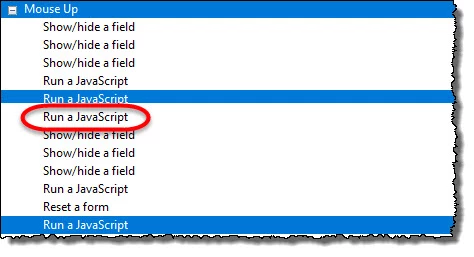
I actually have quite a bit of code running after this particular code (in red) executes...


That would be nice if you could abort the action sequence, maybe if you forced an exception. But I've never run into this situation. I always put all my code into a single action. If there is a JavaScript, then that is usually all that is needed. Everything can be scripted.

If you really want to keep your current structure, then you'll need to set a blocking variable and then guard all the code with "if" statements.  Be sure to reset the blocking variable when appropriate. But this is a really complicated strategy that's easy to mess up. I think you are better off putting everything into a single script, where you can control it all centrally.

1 reply

Thom Parker
Community Expert
Community Expert
April 16, 2019

There is obviously some other code running that is performing the reset. Find the other code.

What's at the bottom of the if block?

Thom Parker - Software Developer at PDFScriptingUse the Acrobat JavaScript Reference early and often
Rstreet
RstreetAuthor
Inspiring
April 16, 2019

Hi Thom -

Thanks again for your response! Omg...duh...yes...you are correct...sorry bout that. Didn't even think about the rest of the stuff. Guess I figured this would/should stop the form from processing any further code when it hits one of these validations.

So, lol..new question...is there a way to stop processing the remaining code unless all of the above is met?

Rstreet
RstreetAuthor
Inspiring
April 16, 2019

I actually have quite a bit of code running after this particular code (in red) executes...