
Mohsen Alyafei
Participant
July 16, 2019
Question

What JavaScript Version for my Acrobat?

  • July 16, 2019
  • 2 replies
  • 2009 views

Hi,

I am using Acrobat Pro DC on Windows 10.

The JavaScript for Acrobat API Reference Manual (2015) page 1 (36) states: "The most recent version of Acrobat now uses JavaScript 1.7."

With a paragraph and table showing the following information that Acrobat 10 support JavaScript version 1.8.
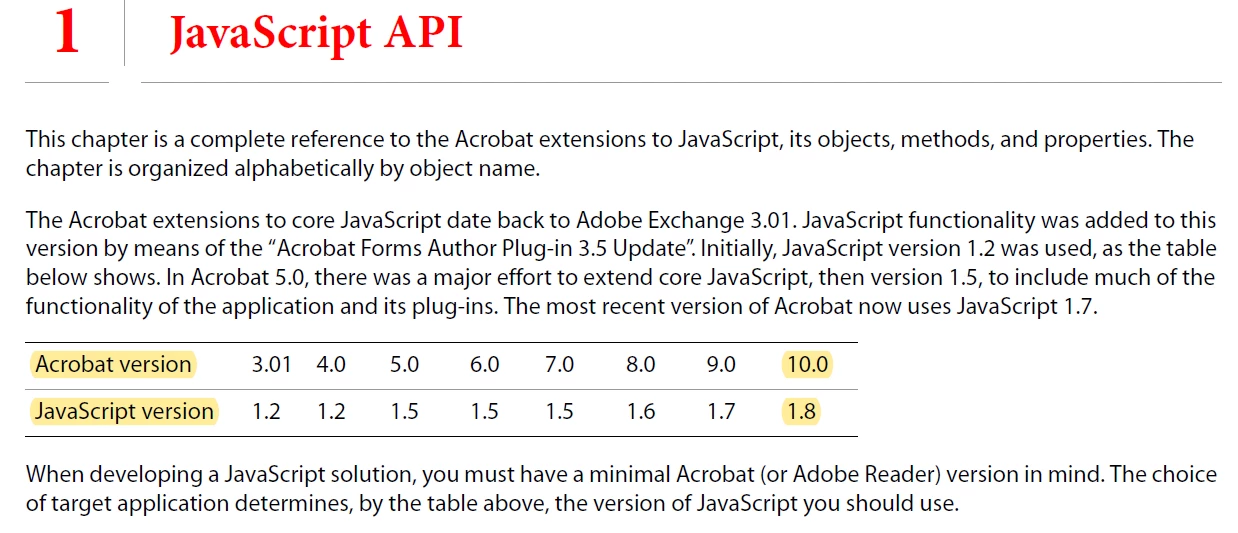
However, when using JavaScript, the functions and features above JavaScript 1.5 are not available and will throw errors.

For example:

Math.trunc(42.7)  will give "TypeError: Math.trunc is not a function"

Same applies to default parameter values, binary number annotation, etc.

Thanks

Mohsen

This topic has been closed for replies.

2 replies

Participating Frequently
November 18, 2023

Aaaah!. That explains why the keyword let to comply with scope-chaining threw an error back when I used it my code in ActionScripts .

It also explains why temperal literal aren't working either.

I understand that scoping,particularly global, is important to the Acrobat enviroment for security reasons.  However, so far I can't create effective batch script code with the Javascript paradigm I have learned under web development which has its own security concerns.


try67
Community Expert
Community Expert
July 17, 2019

The terms are confusing, but according to the Acrobat DC SDK documentation (Acrobat DC SDK Documentation ), Acrobat DC supports ECMAScript 5, which is one version prior to ECMAScript 2015 (AKA ECMAScript 6, ECMAScript - Wikipedia ), where the trunc method was first introduced (Math.trunc() - JavaScript | MDN ). So this method is not supported after all.

Karl Heinz  Kremer
Community Expert
Community Expert
July 17, 2019

Yup, the different version numbers are confusing.

You can easily add the missing functionality in e.g. a document level script by adding this:

if (!Math.trunc) {

  Math.trunc = function (v) {

  return v < 0 ? Math.ceil(v) : Math.floor(v);

  };

}

This is a "polyfill" and you can usually add missing functionality this way to make modern JavaScript run in older JS engines.

Mohsen Alyafei
Participant
July 18, 2019

Thank you all for the feedback and suggestions.

Is there any hope of the next Acrobat versions using a later version of JavaScript? ECMAScript 5 is already a 10 years' old version.

Thanks again.