


Participant
October 26, 2022
Answered

Adobe Stock Refund

  • October 26, 2022
  • 2 replies
  • 453 views

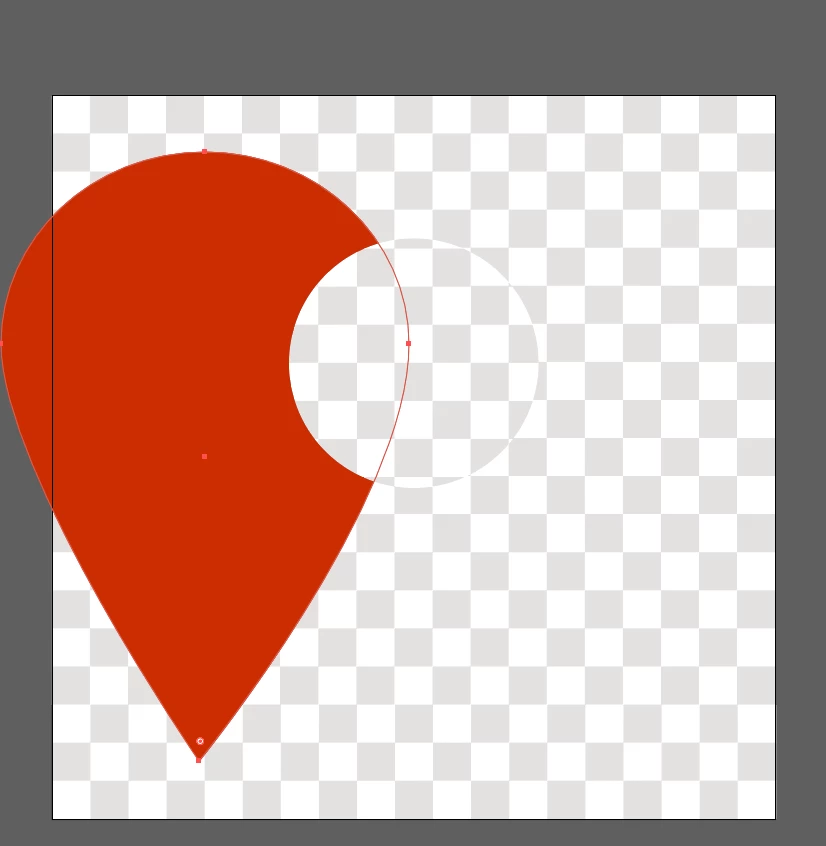
I just licensed image 206165896. It is supposed to have a transparent background, but, when I download the EPS/AI version, the "grid" background is part of the image, not indicating a transparency. I do not have time to correct that on the image to use it. Please refund this image and remove the license.
This topic has been closed for replies.
Correct answer Contributor1

That's a really creative use of layers to create an illusion of a hole. I'll send the asset to the content team for review. Thank you for the report and sorry for the problem with the asset.

2 replies

Abambo
Community Expert
Community Expert
October 26, 2022

It's easy to correct (10 seconds), but in principle you're right: the asset is not worth the storage it takes...


I suppose @Contributor1 should have a look on this.


(production note: I checked this on my iPad)

ABAMBO | Hard- and Software Engineer | Photographer
Contributor1Community ManagerCorrect answer
Community Manager
October 26, 2022

That's a really creative use of layers to create an illusion of a hole. I'll send the asset to the content team for review. Thank you for the report and sorry for the problem with the asset.

Abambo
Community Expert
Community Expert
October 26, 2022

That's what I thought too... 🙂

ABAMBO | Hard- and Software Engineer | Photographer
Jill_C
Community Expert
Community Expert
October 26, 2022

The members of this forum are primarily other users, not Adobe employees so we cannot help you with this problem. Use the Contact Us link at the bottom of this page to get help from Adobe:


https://helpx.adobe.com/support/stock.html

Jill C., Forum Volunteer
Participating Frequently
October 26, 2022

Hello Joseph23621051bqs2, 

I have verified that you have licensed asset # 206165896 and have granted you a replacement credit. Please delete asset from any downloads or library at your end.

Hope this helps !!!