Rebecca Slough
Participant
November 22, 2023
Answered

AI Gen Filter

  • November 22, 2023
  • 2 replies
  • 969 views

I want to search for REAL people not AI Gen - how can I filter out AI?

This topic has been closed for replies.
Correct answer daniellei4510

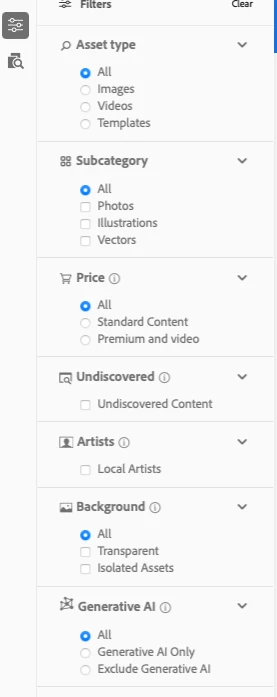
The drop down you've shown is the file type selection, not the filters. Type something in the search box, then click on the filters icon to the left. The filter panel will be displayed.


2 replies

Jill_C
Community Expert
Community Expert
November 22, 2023

On the Buyer portal, scroll down in the filter list until you reach the Generative AI section where you can choose All, Generative AI only, or Exclude Generative AI. Unfortunately, the filter defaults to All, so you will have to update your selection each time you visit the page.

Jill C., Forum Volunteer
Rebecca Slough
Participant
November 22, 2023

The drop down doesn't give those options - am I looking in the wrong place? - see screenshot attached

Jill_C
Community Expert
Community Expert
November 22, 2023

The drop down you've shown is the file type selection, not the filters. Type something in the search box, then click on the filters icon to the left. The filter panel will be displayed.

Jill C., Forum Volunteer
Participating Frequently
November 22, 2023