
Question
All Sales Final: How to Fix Hundreds and Hundreds of Icons
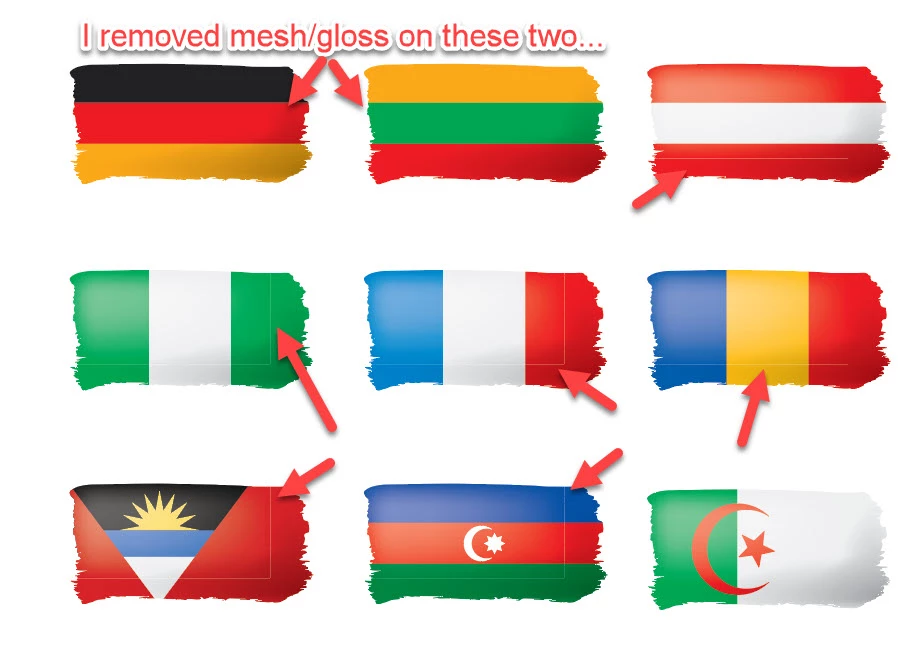
...multiple icon packs from the same "designer." The glass/mesh overlay is leaving lines on nearly every single icon. With lackluster Illustrator skills, I am able to remove the box causing my angst, though I lose the gloss (fine, I guess), but I am not prepared to click the heck out of it until the offender is isolated, cut the box, wash, rinse, repeat for 180+ icons per pack across multiple packs.
I cancelled my Stock account...so many issues with so many files and no recourse...but my question is:
- Is there anyway to select all problematic layers and remove these boxes wholesale without developing carpal tunnel synrome?


 AdChoices