
Participant
March 29, 2018
Answered

Can't remove pagination from free Adobe Stock template (FILE #:140148394)

  • March 29, 2018
  • 2 replies
  • 437 views

Hi all,

I recently downloaded the free "Food Magazine Layout" template by Themzy on Adobe Stock, and am encountering issues with removing the pagination from view. I've been able to tweak most of the layout to suit my needs, but I can't seem to remove the pagination so they aren't visible.

Anyone know how to solve this issue and make page numbers disappear from view in this template or others?

Thanks!
This topic has been closed for replies.
Correct answer twaritar3263062

Hi Adelia,

Sorry for a delay in response.

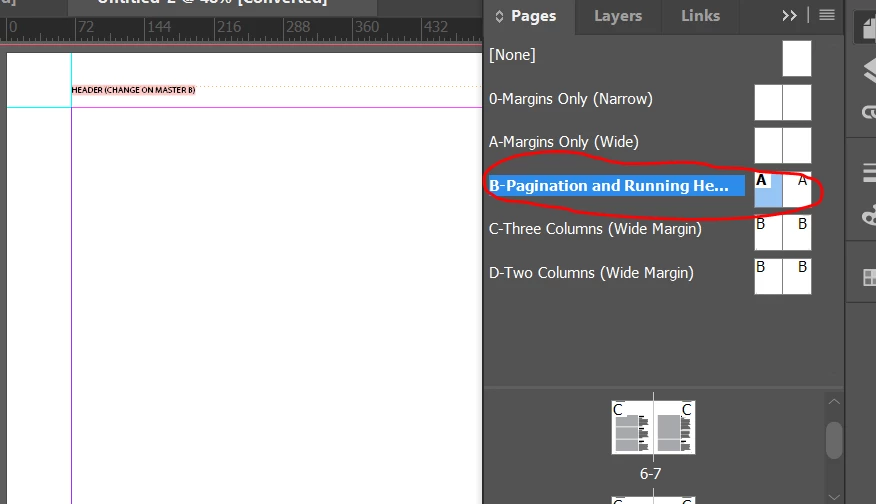
You have mentioned in your above post that you are unable to remove the "Pagination" from the template you have downloaded from Adobe Stock. It seems that the pagination is on the master page so you need to go to pages and select the "B-Pagination and running Headers" from the drop-down and then remove the pagination from there. Please see the screenshot for a better understanding.

Hope this information helps!

Feel free to update this thread in case of any additional questions.

Regards

Twarita

2 replies

twaritar3263062
twaritar3263062Correct answer
Participating Frequently
March 30, 2018

Hi Adelia,

Sorry for a delay in response.

You have mentioned in your above post that you are unable to remove the "Pagination" from the template you have downloaded from Adobe Stock. It seems that the pagination is on the master page so you need to go to pages and select the "B-Pagination and running Headers" from the drop-down and then remove the pagination from there. Please see the screenshot for a better understanding.

Hope this information helps!

Feel free to update this thread in case of any additional questions.

Regards

Twarita

Kanikas
Legend
March 29, 2018

Moving to Adobe Stock