Participant
June 27, 2023
Answered

Can we filter by license?

  • June 27, 2023
  • 2 replies
  • 758 views

Unless I missed it - there doesn't seem to be a way to filter search results by usage rights.  It's frustrating to find a clip I like and then find out it's internal use only.  Does that exist?

This topic has been closed for replies.
Correct answer Abambo

There is no “Internal use only” on Adobe stock. But if you mean “editorial use only”, for that, you have a filter:
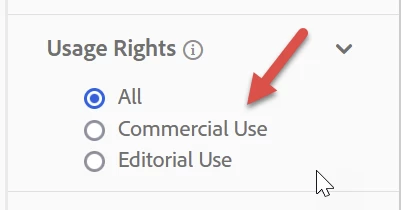
To get to the filters:
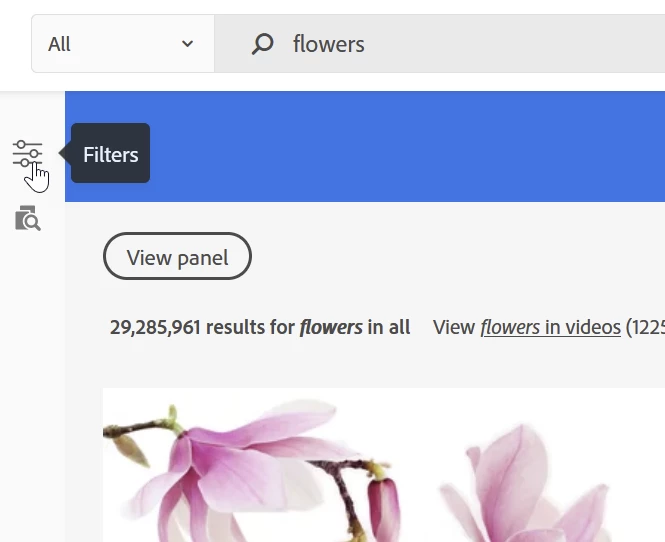
  • Search for your item (like “flowers”)
  • Click the filter icon:
  • Scroll down to the correct section, and make your choice. You can select multiple filters depending on the topic as radio button (round: only one item) or check box (square: multiple items).

2 replies

Abambo
Community Expert
AbamboCommunity ExpertCorrect answer
Community Expert
June 28, 2023

There is no “Internal use only” on Adobe stock. But if you mean “editorial use only”, for that, you have a filter:

To get to the filters:

  • Search for your item (like “flowers”)
  • Click the filter icon:
  • Scroll down to the correct section, and make your choice. You can select multiple filters depending on the topic as radio button (round: only one item) or check box (square: multiple items).
ABAMBO | Hard- and Software Engineer | Photographer
Legend
June 27, 2023

What do you mean "internal use only"?  Can you give an example or screen shot, I never saw anything like that in Stock.