Known Participant
October 12, 2018
Answered

cancel adobe stock... how?

  • October 12, 2018
  • 1 reply
  • 503 views

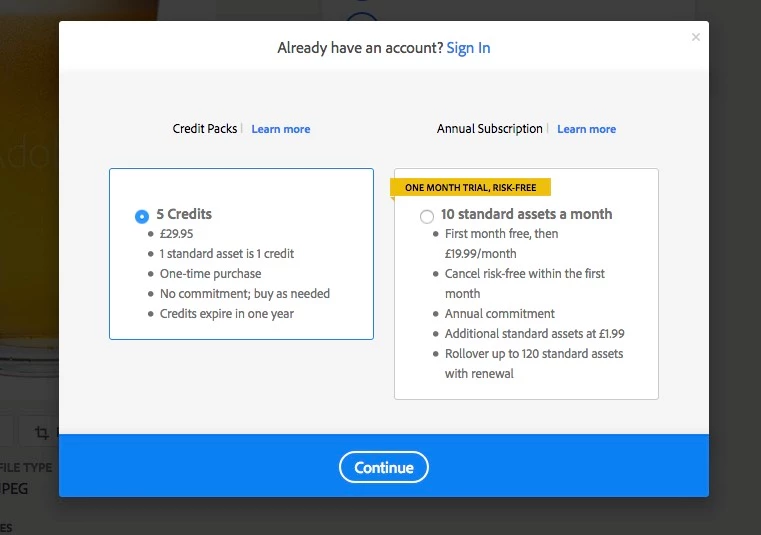
I have just purchased what I THOUGHT was a one-off, one-time purchase of a pack of 5 credits. I do NOT want a monthly roll-over.

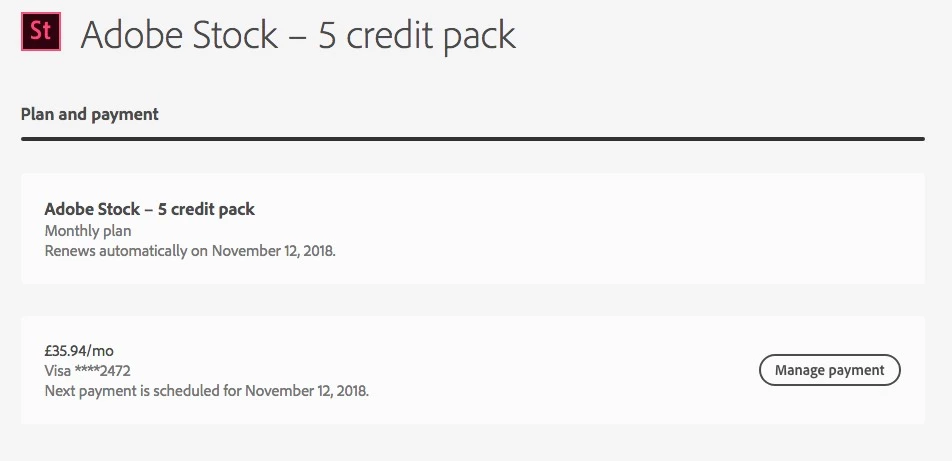
After making my purchase, I went to my account to print off the invoice. I find that according to the account information for Adobe Stock, I now have a monthly roll-over with the next payment due in mid November. THIS IS NOT WHAT I THOUGHT I WAS PURCHASING.

Of course that could be my mistake (but I don't see how - please explain), but nowhere on my account page can I find this invisible link Adobe talks about to cancel this subscription. I can't find it anywhere at all. So how do I cancel?

Everything on the Adobe site appears to go in a loop. It is the most frustrating morning I have had for quite a long time.

Please would someone explain in clear and simple language: HOW DO I CANCEL THIS ADOBE STOCK SUBSCRIPTION?

Thank you.

Andrew Jones
    This topic has been closed for replies.
    Correct answer Beverley Gray

    Hi Andrew

    You don't have a subscription plan, so there is nothing to cancel.

    The wording on the plans page should not state that the credit pack will renew automatically, as it won't - it's a one time purchase.

    No further action is required on your part.  You have your credit pack and have 1 year to use the credits. 

    Kind regards

    Bev

    1 reply

    Beverley Gray
    Inspiring
    October 12, 2018

    Sorry for the confusion caused.

    You are correct.  Credit packs are one-off purchases and will not renew automatically.  We will look into correcting the information on the plan and payment page.

    Kind regards

    Bev

    jonesuAuthor
    Known Participant
    October 12, 2018

    Thank you for the rapid reply, Beverley

    But I don't think I am confused.

    You don't mention anything in your reply about permanently cancelling the plan that I seem to have been saddled with. Is that what you mean? That you are now going to cancel this subscription plan and delete it from my account?

    So that I still have x number of unspent credits to use, but no monthly subscription payment roll-over?

    And where is this "cancel" button that the help pages talk about, but which I cannot find anywhere? I tried 3 different browsers to make sure it wasn't a browser glitch.

    Many thanks

    Andrew Jones

    Beverley Gray
    Beverley GrayCorrect answer
    Inspiring
    October 12, 2018

    Hi Andrew

    You don't have a subscription plan, so there is nothing to cancel.

    The wording on the plans page should not state that the credit pack will renew automatically, as it won't - it's a one time purchase.

    No further action is required on your part.  You have your credit pack and have 1 year to use the credits. 

    Kind regards

    Bev