
bryant17199938
Participant
October 11, 2018
Answered

Cannot find downloaded stock video

  • October 11, 2018
  • 1 reply
  • 1051 views

I purchased and downloaded a stock video a couple months ago, but did something dumb and can no longer find it. Is there a way to re-download videos you've already paid for without having to purchase again? Am I looking over some "My downloads" portion of my profile?

Thanks!
This topic has been closed for replies.
Correct answer twaritar3263062

Hi Bryan,

Thanks for reaching out to the Adobe Stock community.

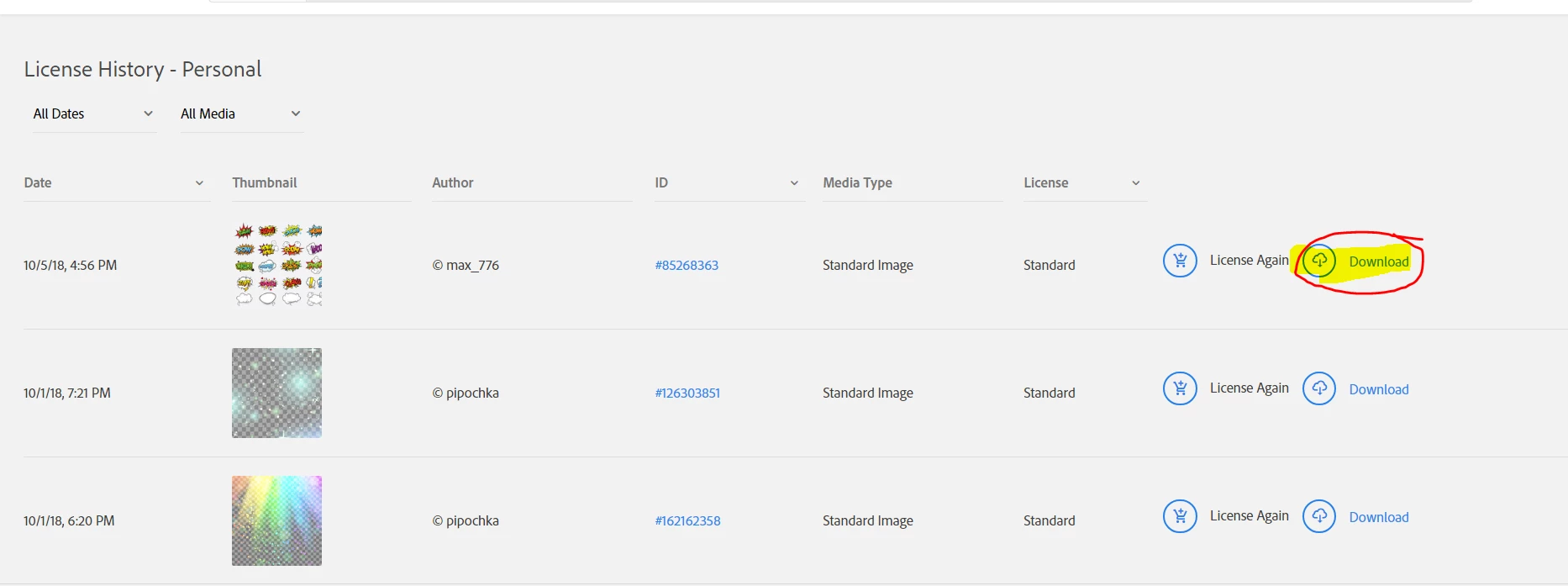
Yes, you can redownload the asset from your "License history". Please follow the steps as mentioned below:

  • Go to stock.adobe.com
  • Go to the "License history" and click on the "Download" option.

Hope this helps!

Feel free to update this thread in case of any additional questions.

Regards,

Twarita

1 reply

twaritar3263062
twaritar3263062Correct answer
Participating Frequently
October 11, 2018

Hi Bryan,

Thanks for reaching out to the Adobe Stock community.

Yes, you can redownload the asset from your "License history". Please follow the steps as mentioned below:

  • Go to stock.adobe.com
  • Go to the "License history" and click on the "Download" option.

Hope this helps!

Feel free to update this thread in case of any additional questions.

Regards,

Twarita

Participant
May 14, 2019

Hello Twarita,

is it possible to download all previously licensed files at the same time?

greetings

WendellaBee
Adobe Employee
Adobe Employee
May 14, 2019

Hi J. K.,

Unfortunately there isn't at this time. Our product managers are aware of this request and are considering a way to do this. You can navigate to your License History and download the files individually. If you put the files in a Creative Cloud library you can access your files from within a Creative Cloud application.

EBQ