


Participant
May 22, 2022
Answered

Cannot license anything even though I have a subscription

  • May 22, 2022
  • 3 replies
  • 1395 views

Hello, 


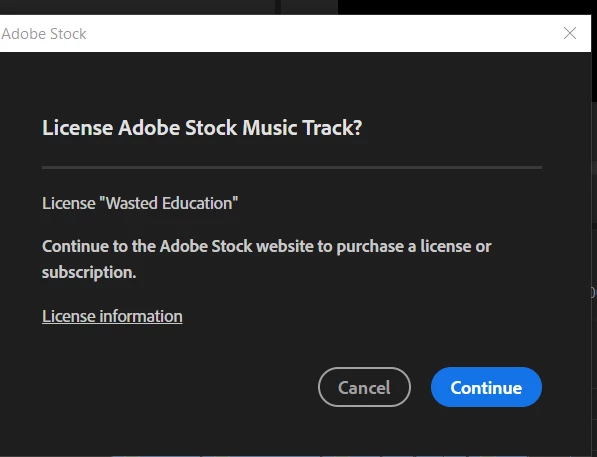
I have a trial version of adobe stock (10 assets a month). When I visit the adobe stock website and I'm signed in to my account, it says I do not have a subscription but when I go to my account the plan shows up. I was using an audio in premiere pro and clicked the cart button but it says I have to buy a subscription or credit. Any help trying to figure this out? 


Here's what shows up. 
This topic is closed to new replies. Start a new post to keep the conversation going.
Correct answer Abambo

Contact Adobe customer care on this issue. Adobe customer care can be contacted by beginning a secure chat session at https://helpx.adobe.com/contact.html?rghtup=autoOpen. Pop-up blockers need to be disabled! If the chat window fails to open, or is non-responsive, use a different device to start the interaction.
Support phone numbers may be found here: https://helpx.adobe.com/contact/phone.html. Please note that phone charges may apply.

(see also here: https://community.adobe.com/t5/creative-cloud-services/how-to-contact-adobe-support/td-p/11875703 or here
https://community.adobe.com/t5/account-payment-plan/how-to-contact-adobe-support/td-p/11843852)

3 replies

Abambo
Community Expert
Community Expert
May 22, 2022

Try to go to https://stock.adobe.com check, if you are signed in (upper-right corner: look for your avatar, left of your avatar you see the still available assets). If you are not signed-in, sign-in.


Search for your audio file:

and licence the asset from there:

I hope that works.

ABAMBO | Hard- and Software Engineer | Photographer
Participant
May 22, 2022

No luck. I have the same issue pop up whether it's on the website or on a program and I'm signed in. It just offers me to look at different subscriptions and when I click on one, it says I already have a plan. So I'm confused? 

Abambo
Community Expert
AbamboCommunity ExpertCorrect answer
Community Expert
May 23, 2022

Contact Adobe customer care on this issue. Adobe customer care can be contacted by beginning a secure chat session at https://helpx.adobe.com/contact.html?rghtup=autoOpen. Pop-up blockers need to be disabled! If the chat window fails to open, or is non-responsive, use a different device to start the interaction.
Support phone numbers may be found here: https://helpx.adobe.com/contact/phone.html. Please note that phone charges may apply.

(see also here: https://community.adobe.com/t5/creative-cloud-services/how-to-contact-adobe-support/td-p/11875703 or here
https://community.adobe.com/t5/account-payment-plan/how-to-contact-adobe-support/td-p/11843852)

ABAMBO | Hard- and Software Engineer | Photographer
