Participant
March 13, 2019
Answered

Downloaded my image into wrong format

  • March 13, 2019
  • 2 replies
  • 580 views

I downloaded an image I purchased but had it saved to Word (wrong choice). The image shows up with "Adobe" still in background.  How can I change the format to JPEG without having to purchase a new image of the same thing?

    This topic has been closed for replies.
    Correct answer Abambo

    caitlinw27276122  wrote

    I downloaded an image I purchased but had it saved to Word (wrong choice). The image shows up with "Adobe" still in background.  How can I change the format to JPEG without having to purchase a new image of the same thing?

    You have saved it to Word: So you did import it and placed the image in a Word file. That may or may not be what you intended, but it has nothing to do with your second claim: the image shows up with “Adobe” still in background.

    You probably mean that you still have the Adobe watermark on the image? If that is the case, you’re working with the preview image that you can download without buying the image to test your design.

    If you have purchased the image, you can download the unmarked image as often as you want from the Adobe site. You only need to repurchase a license if you are doing a different design for a different customer or if you have a print run of more than 500k.

    Click on your account on the header bar at “stock.adobe.com”, click on “License history” and you will find the licensed pictures. You can than choose to download the picture (as often as you want):
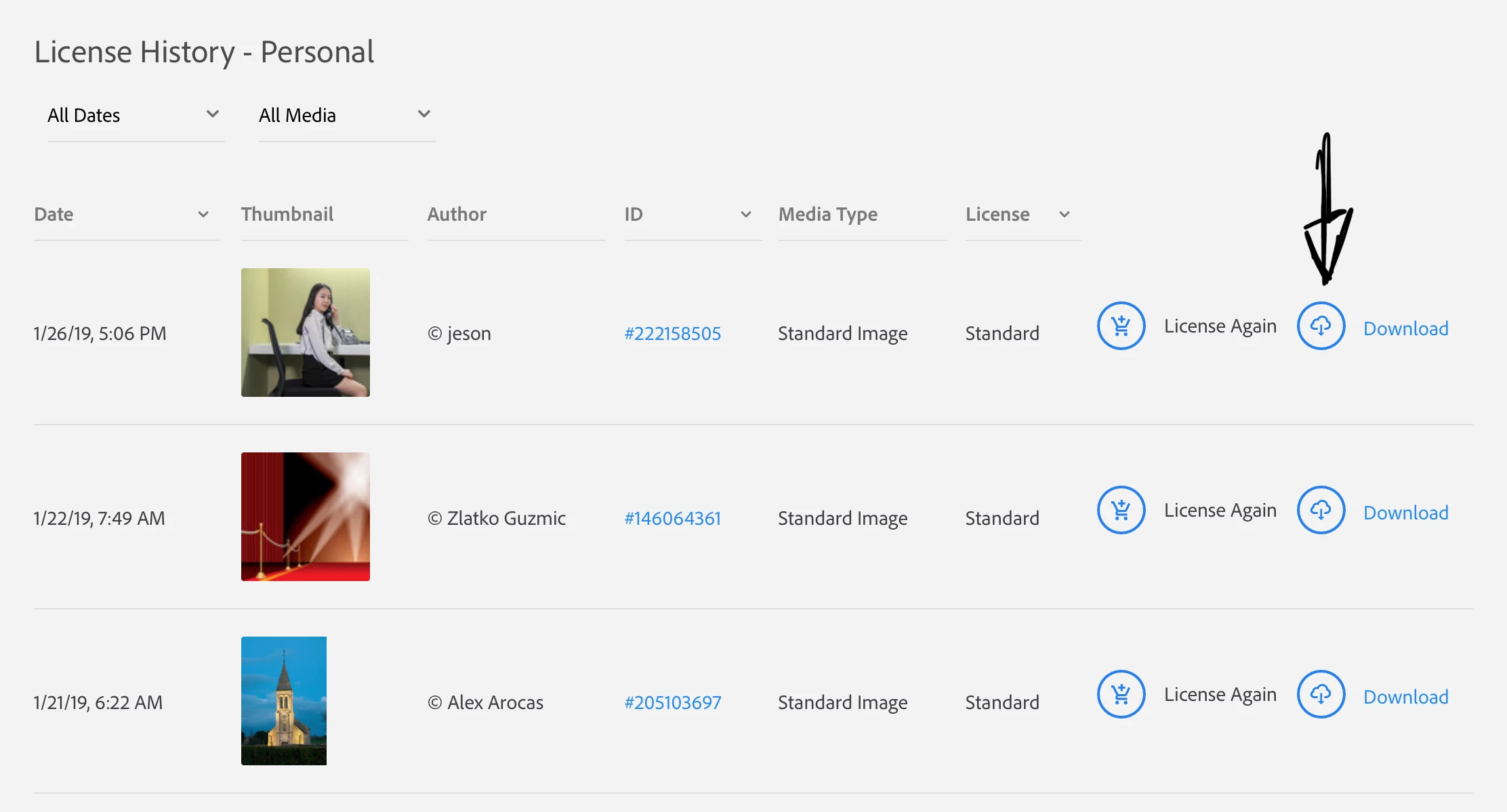
    License again is for the case that you would need the same picture again.

    2 replies

    Abambo
    Community Expert
    AbamboCommunity ExpertCorrect answer
    Community Expert
    March 13, 2019

    caitlinw27276122  wrote

    I downloaded an image I purchased but had it saved to Word (wrong choice). The image shows up with "Adobe" still in background.  How can I change the format to JPEG without having to purchase a new image of the same thing?

    You have saved it to Word: So you did import it and placed the image in a Word file. That may or may not be what you intended, but it has nothing to do with your second claim: the image shows up with “Adobe” still in background.

    You probably mean that you still have the Adobe watermark on the image? If that is the case, you’re working with the preview image that you can download without buying the image to test your design.

    If you have purchased the image, you can download the unmarked image as often as you want from the Adobe site. You only need to repurchase a license if you are doing a different design for a different customer or if you have a print run of more than 500k.

    Click on your account on the header bar at “stock.adobe.com”, click on “License history” and you will find the licensed pictures. You can than choose to download the picture (as often as you want):

    License again is for the case that you would need the same picture again.

    ABAMBO | Hard- and Software Engineer | Photographer
    Brad Lawryk
    Legend
    March 13, 2019

    You may download the image as many times as you want without re-purchasing it.