

camillah46202884
Participant
February 7, 2020
Answered

filter out premium content (viewing only Standard License)

  • February 7, 2020
  • 1 reply
  • 1898 views

How do I filter out the premium content when I search for things in Adobe Stock?
For example, I'm looking for InDesign templates. And I can only download 10 Standard License files a month.
So I do _not_ want to see other than Standard License templates/pictures.

Is there a filter for this?

I have been stuck in the (not so helpful) help support chat for 1,5 hour now and have been chatting to 8 different people. They just keep transfers/connects me to another colleague or team over and over again, so please help me with this mkay?

I found two old posts about this but they only mention solutions for how this would work with the old interface. So it doesn't work.

Sorry if my English isn't perfect, I'm from Sweden. Everything I see and use from Adobe is in Swedish and there's no translation. Sorry if I use the wrong terms or so.

Thanks in advance
This topic has been closed for replies.
Correct answer ProDesignTools

Yes, there is a filter for this.


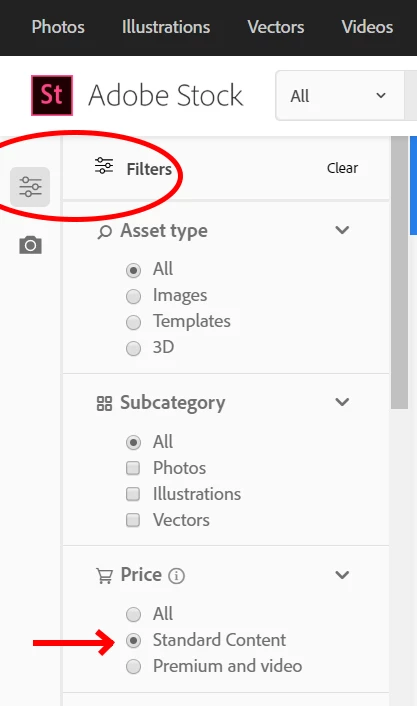
Look over on the left side of the Adobe Stock page for the filters, and you should see "Price"...


Set that to "Standard Content" and you should only see non-premium assets in your searches.


Here's a screenshot:


1 reply

ProDesignTools
Community Expert
ProDesignToolsCommunity ExpertCorrect answer
Community Expert
February 10, 2020

Yes, there is a filter for this.


Look over on the left side of the Adobe Stock page for the filters, and you should see "Price"...


Set that to "Standard Content" and you should only see non-premium assets in your searches.


Here's a screenshot:


camillah46202884
Participant
February 10, 2020

I'm sorry but that's not what it looks like when i search for InDesign-templates.
Here's a screenshot:

ProDesignTools
Community Expert
Community Expert
February 10, 2020

Hmm, odd. Not sure why it isn't showing in your browser interface (it does in mine every time), but try this link instead:


https://stock.adobe.com/search/templates?price%5B%24%5D=1


With that specific "price" encoded attribute, it should give you only Standard (non-Premium) assets.