Inspiring
July 10, 2024
Answered

How do I filter results in Adobe Stock so that I only see licensed audio tracks?

  • July 10, 2024
  • 1 reply
  • 516 views

I would like to filter so that I see all of my licensed audio tracks only.

I would like to be able to play a few bars of each track without having to go to a new page to play every single track and then try to find my way back to the filtered licensed audio tracks.

thank you
This topic has been closed for replies.
Correct answer joon.Stock

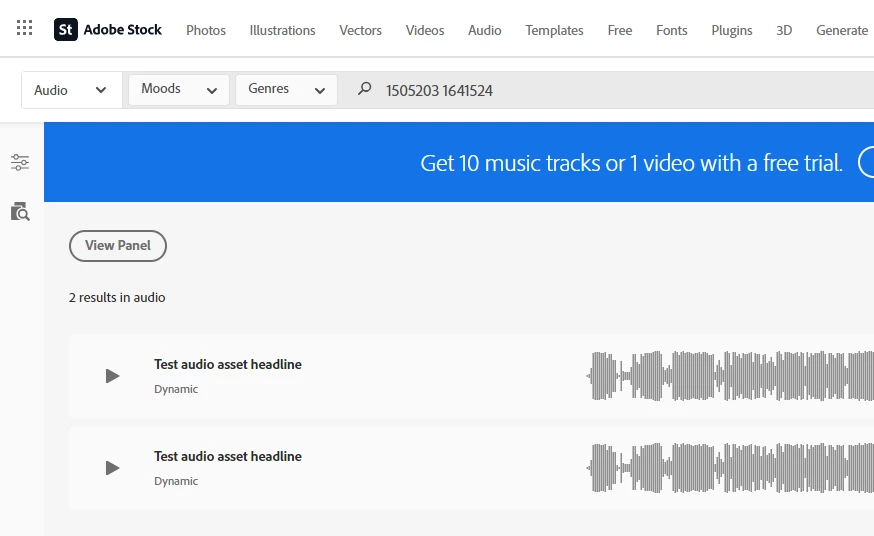
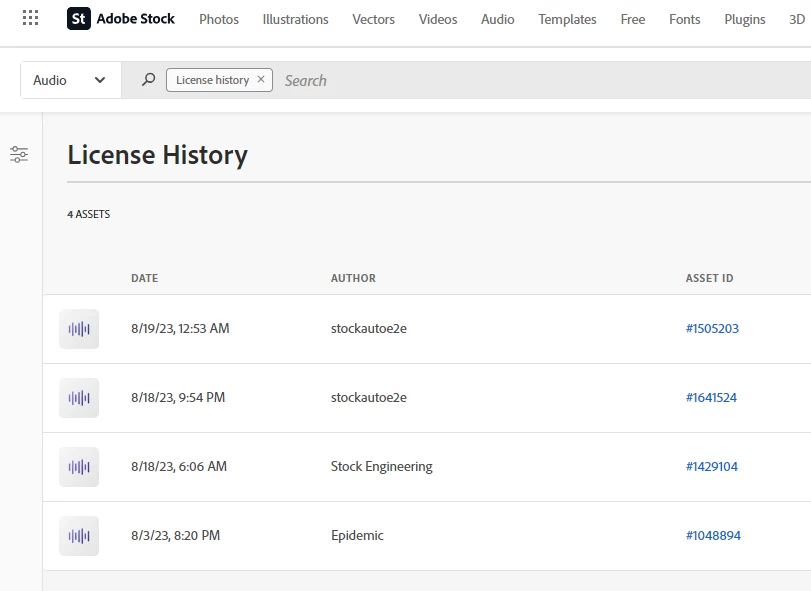
If you would like to go to licensehistory page https://primary.stock.stage.adobe.com/Dashboard/LicenseHistory  (you can also access by clicking profile menu), and in there select Audio from asset dropdown - you will be able to see licensed audio files only but this wouldn't serve your needs as you would like to play on it (we don't support that in license history page).  So I would suggest getting audio file IDs from license history page and enter in Audio search page https://primary.stock.stage.adobe.com/search/audio with space between ids.

Please refer to screenshot below:


1 reply

joon.StockCorrect answer
Participating Frequently
July 10, 2024

If you would like to go to licensehistory page https://primary.stock.stage.adobe.com/Dashboard/LicenseHistory  (you can also access by clicking profile menu), and in there select Audio from asset dropdown - you will be able to see licensed audio files only but this wouldn't serve your needs as you would like to play on it (we don't support that in license history page).  So I would suggest getting audio file IDs from license history page and enter in Audio search page https://primary.stock.stage.adobe.com/search/audio with space between ids.

Please refer to screenshot below:


JohnnyAirAuthor
Inspiring
July 12, 2024

Thank you.