Participant
Feb. 3, 2018 7:35 AM UTC
Beantwortet

How do I see what images I've bought and prove I bought them with a standard license?

Hello,

How do I see what images I've bought and prove I bought them with a standard license? I know I did, but I want to have the evidence to prove it should I need it.


With thanks

Sonia
Dieses Thema wurde für Antworten geschlossen.
Abambo
AbamboAntwort
Community Expert
Juni 7, 2023 10:47 PM UTC

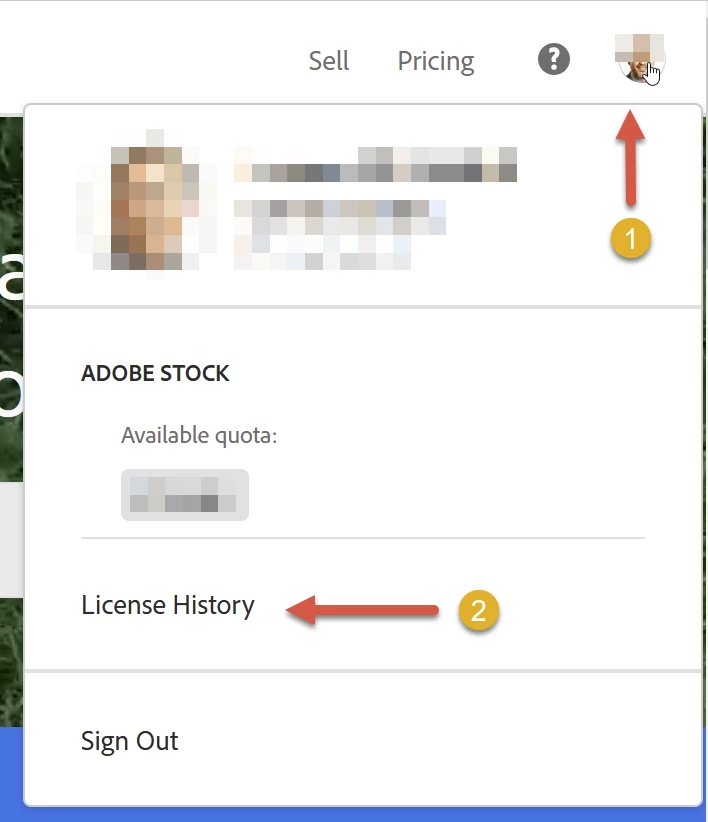
On https://stock.adobe.com click your avatar (1) and then “Licence History” (2). So basically, it's still the same:

A shortcut would be this link: https://stock.adobe.com/Dashboard/LicenseHistory


ABAMBO | Hard- and Software Engineer | Photographer

6 Antworten

twaritar3263062
Participating Frequently
Feb. 5, 2018 4:21 AM UTC

Hi Sonia,


Thanks for reaching out to our Stock team. The images you have purchased can be viewed in your license history. Please follow the steps below as shown in the screenshot.


  • You must sign into your Stock account and login with your Adobe ID and password.

Click on the license history.

  • Once you are on the license history page, you can view the File ID as well as the license type you have purchased.


Also, you will be able to find the proof of your purchase from the invoices, kindly follow the steps shared in the link below:

Print a copy of the invoice for your Adobe Creative Cloud subscription.


Hope this information helps!


Feel free to update this thread in case of any additional questions.


Regards

Twarita


[Moderator deleted private information. Please do not post private information like e-mails and phone numbers]

Übersetzen
loisr888
Participating Frequently
Nov. 27, 2018 1:32 AM UTC

It would be lovely if we could see them in bridge from creative cloud folder!

Übersetzen