alwaysfabian
Participant
October 4, 2022
Answered

How do you save stock items to a specific library

  • October 4, 2022
  • 5 replies
  • 521 views

Every time I click the littler heart icon when you hover over a stock item, it only saves to my default library which is the latest one created. Is there a way to save to a specific library?

This topic is closed to new replies. Start a new post to keep the conversation going.
Correct answer Abambo

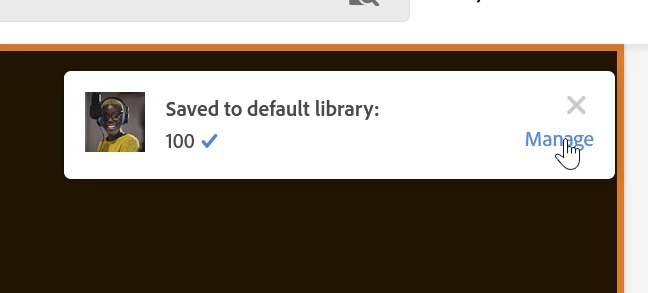
Easy, step by step:

Click manage:

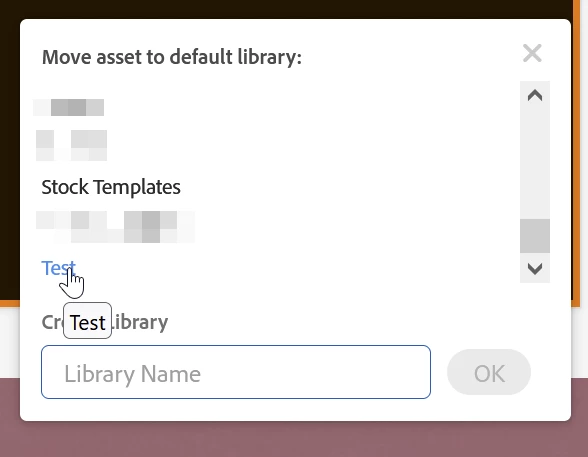
Choose a new default library:

The asset gets moved to that library and that library becomes the new default.

5 replies

Abambo
Community Expert
AbamboCommunity ExpertCorrect answer
Community Expert
October 4, 2022

Easy, step by step:

Click manage:

Choose a new default library:

The asset gets moved to that library and that library becomes the new default.

ABAMBO | Hard- and Software Engineer | Photographer
alwaysfabian
Participant
October 8, 2022

Thank you so much, @Abambo! Confirming that it worked. I wish the 'Manage' link was easier to catch, but this has helped me clean up my libraries.

Abambo
Community Expert
Community Expert
October 8, 2022

You're welcome and thanks for the update.

ABAMBO | Hard- and Software Engineer | Photographer