


Participant
January 18, 2022
Question

How to remove safety margin & trim line

  • January 18, 2022
  • 1 reply
  • 277 views

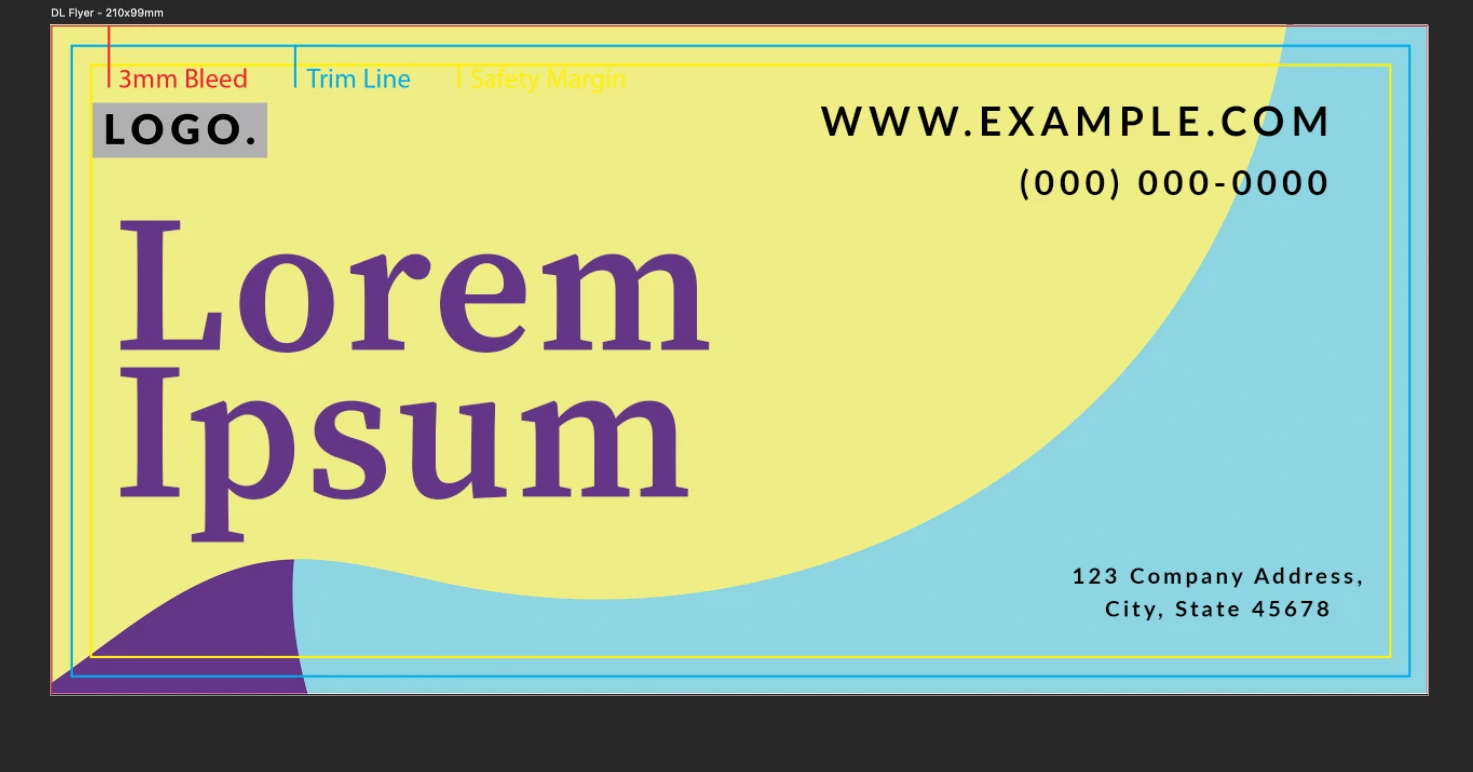
Hey guys, I designed a flyer with photoshop using a template. I am very new to this and wanted to ask if it is possible to remove the trim line & safety margin or what use this has because when we'll send it out to print it, it would be seen on the flyer, wouldn't it? I hope you can help me.


Thanks in advance


This topic has been closed for replies.

1 reply

Abambo
Community Expert
Community Expert
January 18, 2022

Please tell me what asset you licensed, so that I can check on that for more info.

Bleed and trim are needed for professional printing. The printer prints the bleed and then cuts the paper to get a borderless apearance. Without bleed, you would get probably a slightly white border Even a fraction of a millimeter will be seen.


When exporting to PDF (printer's standard file format), the marks are part of the meta data in the file, not real printing lines. Historically the marks were visually added outside of the artwork area. I guess, they are currently only needed for manual checks and can be added also in preprint (after you did send your file to the printing service provider). 


ABAMBO | Hard- and Software Engineer | Photographer