
kelly_knowles
Inspiring
April 17, 2017
Answered

I can only add images to my 4 most recent libraries?

  • April 17, 2017
  • 2 replies
  • 422 views

I have more than 4 libraries I use to save images, but I can only see the most recent ones.
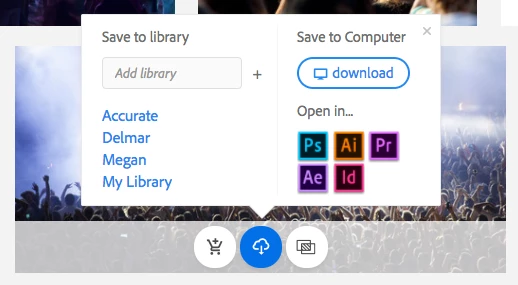
How can I add an image to a different library? Obviously if I type it into the field above the list, it just creates a new library with the same name.

I can do it within one of the CC apps, but that's a huge pain because the thumbnails are way too small and I need all the search filtering options available in browser.

This topic has been closed for replies.
Correct answer kelly_knowles

(Sorry can't edit my previous post)

The real answer is it's a Mac problem - I had to go into system preferences > general to tell it to always show scrollbars. I wonder how many other things I've been missing! C'mon Apple *shakes fist*

2 replies

kelly_knowles
kelly_knowlesAuthorCorrect answer
Inspiring
April 17, 2017

(Sorry can't edit my previous post)

The real answer is it's a Mac problem - I had to go into system preferences > general to tell it to always show scrollbars. I wonder how many other things I've been missing! C'mon Apple *shakes fist*

WendellaBee
Adobe Employee
Adobe Employee
April 17, 2017

Hi Kelly,

I too have a Mac. I can reproduce this issue. Go to Mac Preferences > General and switch from Automatically... to Always. This should give you your scrollbar. I notice that the issue does not occur if you use Firefox and have automatic scrolling set.

I'll let our engineering team know about the issue.

EBQ

WendellaBee
Adobe Employee
Adobe Employee
April 17, 2017

Hi Kelly,

What browser are you using where you see this issue, please?

EBQ

kelly_knowles
Inspiring
April 17, 2017

This was in Chrome, I just tried it in Firefox and I can see now that you can actually scroll through that list, its just that very few browsers nowadays show scrollbars anymore. Maybe it needs some kind of visual indication that there's more to the list? Fades to white a bit on the last link, or only shows half of the last link? Idk. Only discovered it by accident which isn't ideal UI design