


Participant
January 15, 2024
Answered

I can't download stock images to my PC

  • January 15, 2024
  • 1 reply
  • 4598 views

Hello,
I have a problem.
I can't download stock images.
I have tried everything in troubleshooting for problems downloading stock images:
1. Ensure that a pop-up blocker is not blocking the download page.
2. Ensure that your browser accepts cookies and your firewall doesn’t block outgoing information.
3. Sign out from Adobe Stock, sign back in, and try downloading the asset again.
4. Try to download the image using a different browser.
5. Clear your browser cache and delete your Internet history.

It still won't download to my PC.
Please help me. Thank you.
Correct answer nadácias62245227

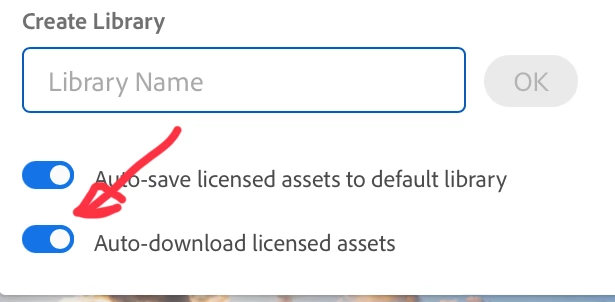
OK. This is independant from your Creative Cloud subscription. You did set your preferences to put the asset in the library, but not to download it:


When you licence your next item, you need to select "Manage" on the screen, where you can select the library.


Hello, I had it selected. The problem was elsewhere. I already solved it.

I found that when I log in on a computer that is connected to another computer network, the images can be downloaded. So I called the provider of the internet connection - the network on which I could not do it. And he confirmed to me that the problem was on their side because they were trying new software that was blocking Adobe Stock.

So the provider of the internet connection has reverted back to the old settings and the images can now be downloaded. Anyway, thank you for your willingness to help me.

1 reply

Abambo
Community Expert
Community Expert
January 15, 2024

Is there an error message? What plan do you have? What assets are you trying to download?

ABAMBO | Hard- and Software Engineer | Photographer
Participant
January 15, 2024

No error message. I have paid for all Creative Cloud Applications for the whole year. I never had a problem with downloading. This problem started recently. Maybe two weeks ago. When I want to download a free license image on Adobe Stock, it downloads only to My Library, but not to my PC. I have the same problem on the other PC when I log in.

Abambo
Community Expert
Community Expert
January 15, 2024

OK. This is independant from your Creative Cloud subscription. You did set your preferences to put the asset in the library, but not to download it:


When you licence your next item, you need to select "Manage" on the screen, where you can select the library.

ABAMBO | Hard- and Software Engineer | Photographer