November 9, 2022
Answered

Licensed or not

  • November 9, 2022
  • 1 reply
  • 366 views

With the cloud app open and veiwing my Libraries, how can I tell which is licensed and which is not ?

Thx

This topic has been closed for replies.
Correct answer Abambo

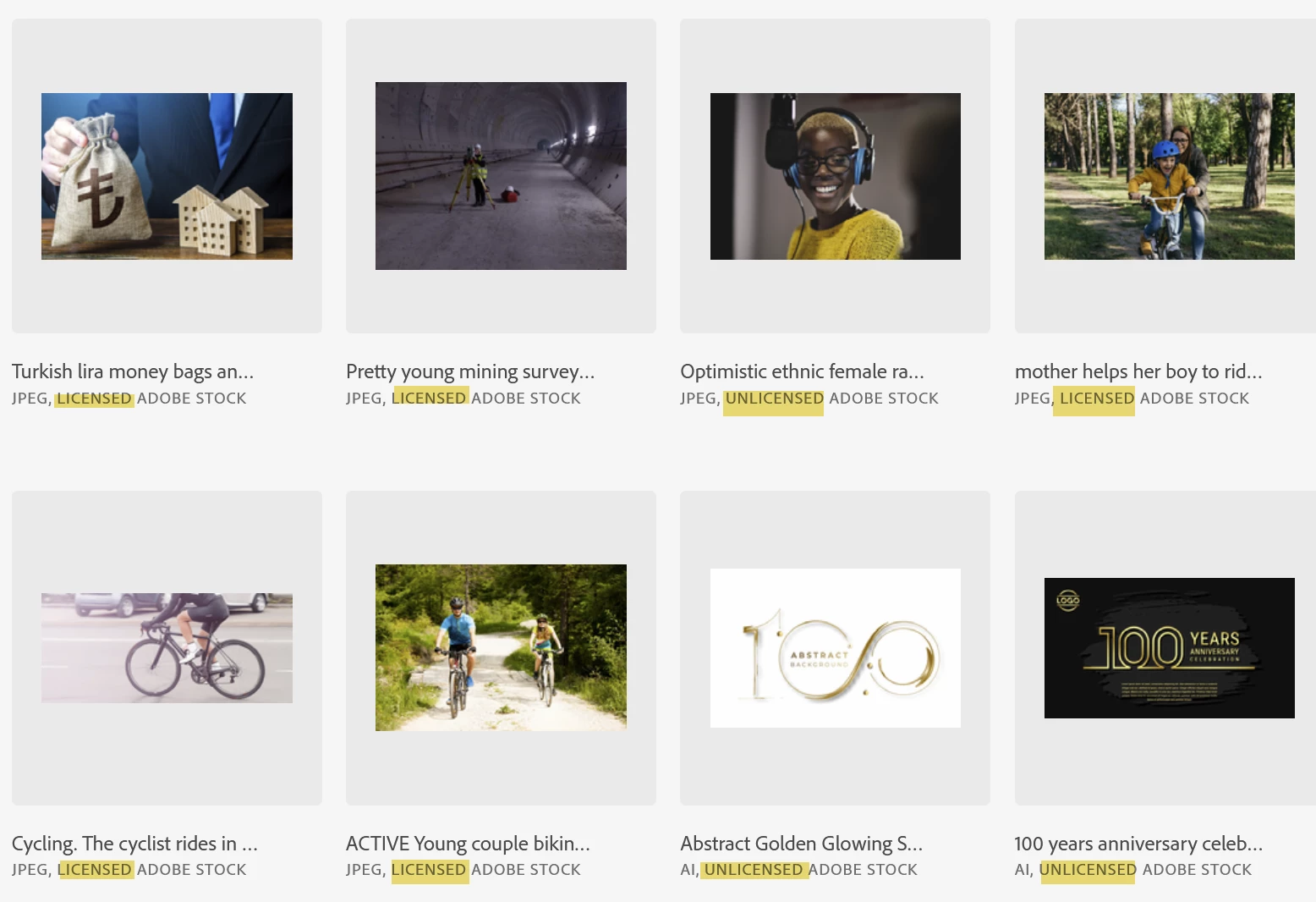
In the cloud app and on the web (https://assets.adobe.com/libraries) I see a text.

To see this text on the app, you need to enlarge the thumbnails.

1 reply

Jill_C
Community Expert
Community Expert
November 9, 2022

Licensed images have a blue box with the label "Licensed" and a check mark,

Jill C., Forum Volunteer
November 10, 2022

Thx for the reply

In the cloud app. There is a blue box round the image if I click on it but no tick


In an app like PS or PP, the box info appears with the mouse over indicating it's licence stsus


I have a back log of assets to claim and I'm just looking for a quick way to check

Thx

Abambo
Community Expert
AbamboCommunity ExpertCorrect answer
Community Expert
November 10, 2022

In the cloud app and on the web (https://assets.adobe.com/libraries) I see a text.

To see this text on the app, you need to enlarge the thumbnails.

ABAMBO | Hard- and Software Engineer | Photographer